<?xml version="1.0" encoding="UTF-8"?>

<?xml-stylesheet type="text/xsl" media="screen" href="https://xoops.hypweb.net/modules/UsersWiki/skin/loader.php?src=rss.ja.xml" ?>
<rdf:RDF
  xmlns:dc="http://purl.org/dc/elements/1.1/"

  xmlns="http://purl.org/rss/1.0/"
  xmlns:rdf="http://www.w3.org/1999/02/22-rdf-syntax-ns#"
  xmlns:content="http://purl.org/rss/1.0/modules/content/"
  xml:lang="ja">
 <channel rdf:about="https://xoops.hypweb.net/modules/UsersWiki/person/nao-pon/blog">
  <title>XOOPS マニア::UsersWiki/nao-pon/blog</title>
  <link>https://xoops.hypweb.net/modules/UsersWiki/person/nao-pon/blog</link>
  <description>xpWiki RecentChanges</description>
  <dc:date>2026-04-22T14:41:48+09:00</dc:date>
  <image rdf:resource="https://xoops.hypweb.net/modules/UsersWiki/index.phpmodule_icon.php" />
  <items>
   <rdf:Seq>
    <rdf:li rdf:resource="https://xoops.hypweb.net/modules/UsersWiki/person/nao-pon/blog/2023-01-20" />
    <rdf:li rdf:resource="https://xoops.hypweb.net/modules/UsersWiki/person/nao-pon/blog/2022-09-22" />
    <rdf:li rdf:resource="https://xoops.hypweb.net/modules/UsersWiki/person/nao-pon/blog/2022-08-26" />
    <rdf:li rdf:resource="https://xoops.hypweb.net/modules/UsersWiki/person/nao-pon/blog/2022-08-19" />
    <rdf:li rdf:resource="https://xoops.hypweb.net/modules/UsersWiki/person/nao-pon/blog/2022-01-17" />
    <rdf:li rdf:resource="https://xoops.hypweb.net/modules/UsersWiki/person/nao-pon/blog/2021-07-01" />
    <rdf:li rdf:resource="https://xoops.hypweb.net/modules/UsersWiki/person/nao-pon/blog/2021-06-20" />
    <rdf:li rdf:resource="https://xoops.hypweb.net/modules/UsersWiki/person/nao-pon/blog/2021-06-15" />
    <rdf:li rdf:resource="https://xoops.hypweb.net/modules/UsersWiki/person/nao-pon/blog/2021-03-17" />
    <rdf:li rdf:resource="https://xoops.hypweb.net/modules/UsersWiki/person/nao-pon/blog/2021-03-13" />
    <rdf:li rdf:resource="https://xoops.hypweb.net/modules/UsersWiki/person/nao-pon/blog/2021-02-17" />
    <rdf:li rdf:resource="https://xoops.hypweb.net/modules/UsersWiki/person/nao-pon/blog/2021-02-11" />
    <rdf:li rdf:resource="https://xoops.hypweb.net/modules/UsersWiki/person/nao-pon/blog/2021-02-07" />
    <rdf:li rdf:resource="https://xoops.hypweb.net/modules/UsersWiki/person/nao-pon/blog/2021-01-27" />
    <rdf:li rdf:resource="https://xoops.hypweb.net/modules/UsersWiki/person/nao-pon/blog/2020-12-28" />

   </rdf:Seq>
  </items>
 </channel>
 <image rdf:about="https://xoops.hypweb.net/modules/UsersWiki/index.phpmodule_icon.php">
   <title>XOOPS マニア::UsersWiki/nao-pon/blog</title>
   <link>https://xoops.hypweb.net/modules/UsersWiki/person/nao-pon/blog</link>
   <url>https://xoops.hypweb.net/modules/UsersWiki/index.phpmodule_icon.php</url>
 </image>

<item rdf:about="https://xoops.hypweb.net/modules/UsersWiki/index.php?nao-pon%2Fblog%2F2023-01-20">
 <title>ESP8266 を壊してしまいました しかも続けて2回も</title>
 <link>https://xoops.hypweb.net/modules/UsersWiki/person/nao-pon/blog/2023-01-20</link>
 <dc:date>2023-01-20T23:14:57+09:00</dc:date>
 <dc:creator>nao-pon</dc:creator>
 
 <description>DSN-MINI-360 というものらしい。&amp;#182; Tag: ESP8266 トラブル AMS1117 Aliexpress MINI360 MINI360 というものらしい。&amp;#182; アリエクで良さげなのを発見！ 以前に、アマゾンで購入した DC-DCステップダウンコンバータ を使用していくつか工作した時に、調子がよかったステップダウンコンバータのより小さなものを発見！ 1/ 5/10個3AミニDC-DCステップダウンコンバータ5v-23vに3.3v 6v 9v 12v 340 12&#182;Fri 20 Jan 2023 12VのLEDテープライトをESPでコントロールしようと計画していて、以前に購入していた AMS1117 5.0 というう降圧型モジュール LDO を使って 12V から 5V を取り出す回路をフレッドボードに組んで実験していたのですが、電源投入直後に ESP8266 の組み込み LDO がパチっという音ともに焼けてしまいまいました。しかも、素人なもので2回も続けて同じ失敗をしました。2回目の前には正常に動いていたんですけどね・・・調べてみると、ESP8266 は</description>
 <content:encoded><![CDATA[
 <dl><dt>Changes</dt><dd><p>DSN-MINI-360 というものらしい。</p>&#182;<!--ADD_TEXT_SEP-->
<div style="text-align:right"><!--description ignore-->
<span>Tag: ESP8266 トラブル AMS1117 Aliexpress MINI360 </span>
<!--/description ignore--><br />
MINI360 というものらしい。</div>&#182;<!--ADD_TEXT_SEP-->
<div>
<h3>アリエクで良さげなのを発見！  <img src="https://xoops.hypweb.net/modules/UsersWiki/skin/loader.php?src=anchor.png" alt="anchor.png" height="12" width="12" /> 
<!--description ignore-->

<!--/description ignore--></h3>
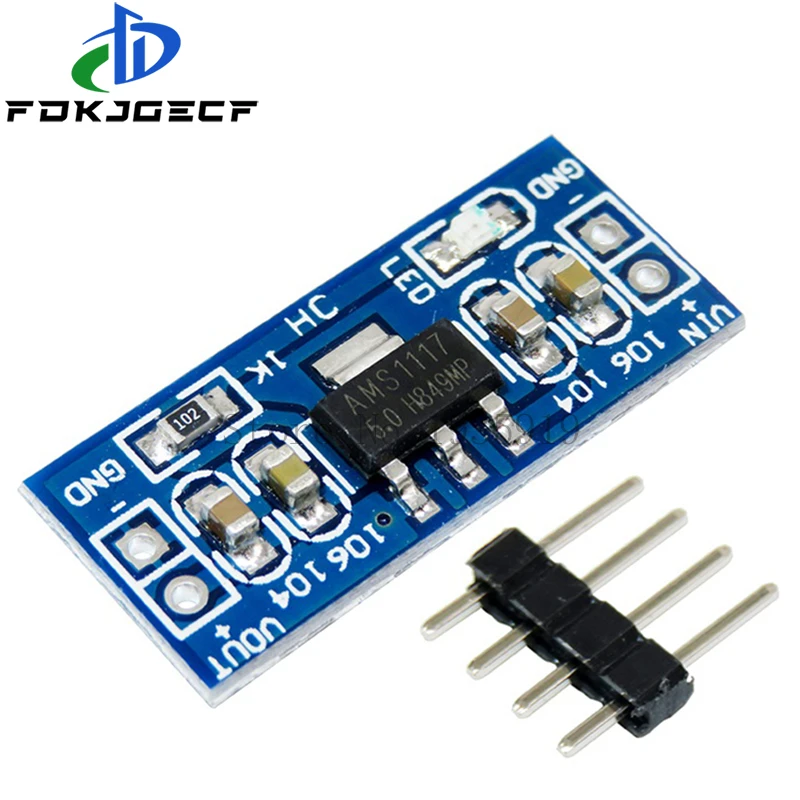
<p>以前に、アマゾンで購入した DC-DCステップダウンコンバータ を使用していくつか工作した時に、調子がよかったステップダウンコンバータのより小さなものを発見！</p>
<ul><li>1/ 5/10個3AミニDC-DCステップダウンコンバータ5v-23vに3.3v 6v 9v 12v 340 125khz</li></ul>
<p>10個入りで高速配送料込みで $5.91 と安かったので買ってみた。PayPalのクレカ払いドル建て支払い、本日のレートで 762円 でした。</p><!--bc26d2ad--></div>&#182;<!--ADD_TEXT_SEP-->
<div>
<h3>アリエクで良さげなのを発見！  <img src="https://xoops.hypweb.net/modules/UsersWiki/skin/loader.php?src=anchor.png" alt="anchor.png" height="12" width="12" /> 
<!--description ignore-->

<!--/description ignore--></h3>
<p>以前に、アマゾンで購入した DC-DCステップダウンコンバータ を使用していくつか工作した時に、調子がよかったステップダウンコンバータのより小さなものを発見！<br />
10個入りで高速配送料込みで $5.91 と安かったので買ってみた。PayPalのクレカ払いドル建て支払い、本日のレートで 762円 でした。</p><!--bc26d2ad--></div></dd></dl><hr />
<!--description ignore-->
<ul>
 <li><a href="https://xoops.hypweb.net/modules/UsersWiki/person/nao-pon/blog/2022-09-22" title="nao-pon/blog/2022-09-22 (1307d)">Prev</a></li>
 <li><a href="https://xoops.hypweb.net/modules/UsersWiki/person/nao-pon/blog/calendar" title="nao-pon/blog/calendar (6409d)">Next</a></li>
 <li><a href="https://xoops.hypweb.net/modules/UsersWiki/person/nao-pon" title="nao-pon (5174d)">nao-pon</a>/<a href="https://xoops.hypweb.net/modules/UsersWiki/person/nao-pon/blog" title="nao-pon/blog (6409d)">blog</a></li>
</ul>
<hr />
<!--/description ignore-->

<div style="text-align:right"><a href="https://xoops.hypweb.net/modules/UsersWiki/?cmd=rss&amp;p=nao-pon%2Fblog" title="RSS of nao-pon/blog"><img src="https://xoops.hypweb.net/modules/UsersWiki/image/feed-rss.png" alt="RSS of nao-pon/blog" /></a></div>
<div><span>
<span> 2023 </span>
<span> 1月 </span>
<span> 20 </span>
<span> (金) </span>
</span></div><div>&nbsp;</div>

<div>
<h2>ESP8266 を壊してしまいました <img alt=":cry:" src="https://xoops.hypweb.net/uploads/smil3dbd4e02c5440.gif" /> しかも続けて2回も <img alt=":oops:" src="https://xoops.hypweb.net/uploads/smil3dbd4df1944ee.gif" />  <a href="https://xoops.hypweb.net/modules/UsersWiki/person/nao-pon/blog/2023-01-20#q5f9d7f9" title="q5f9d7f9"><img src="https://xoops.hypweb.net/modules/UsersWiki/skin/loader.php?src=anchor.png" alt="anchor.png" height="12" width="12" /></a> 
<!--description ignore-->

<!--/description ignore--></h2>
<div style="text-align:right"><!--description ignore-->
<span>Tag: <a href="https://xoops.hypweb.net/modules/UsersWiki/index.php?cmd=lsx&amp;rtag=ESP8266">ESP8266</a> <a href="https://xoops.hypweb.net/modules/UsersWiki/index.php?cmd=lsx&amp;rtag=%A5%C8%A5%E9%A5%D6%A5%EB">トラブル</a> <a href="https://xoops.hypweb.net/modules/UsersWiki/index.php?cmd=lsx&amp;rtag=AMS1117">AMS1117</a> <a href="https://xoops.hypweb.net/modules/UsersWiki/index.php?cmd=lsx&amp;rtag=Aliexpress">Aliexpress</a> <a href="https://xoops.hypweb.net/modules/UsersWiki/index.php?cmd=lsx&amp;rtag=MINI360">MINI360</a> </span>
<!--/description ignore--></div>
<p><a href="https://xoops.hypweb.net/modules/xelfinder/index.php/view/49/230120-203103.png" title="230120-203103.png" type="img"><img src="https://xoops.hypweb.net/modules/xelfinder/index.php/view/49/230120-203103.png" alt="230120-203103.png" title="230120-203103.png" width="180" height="180" align="left" style="float:left;" /></a><br />
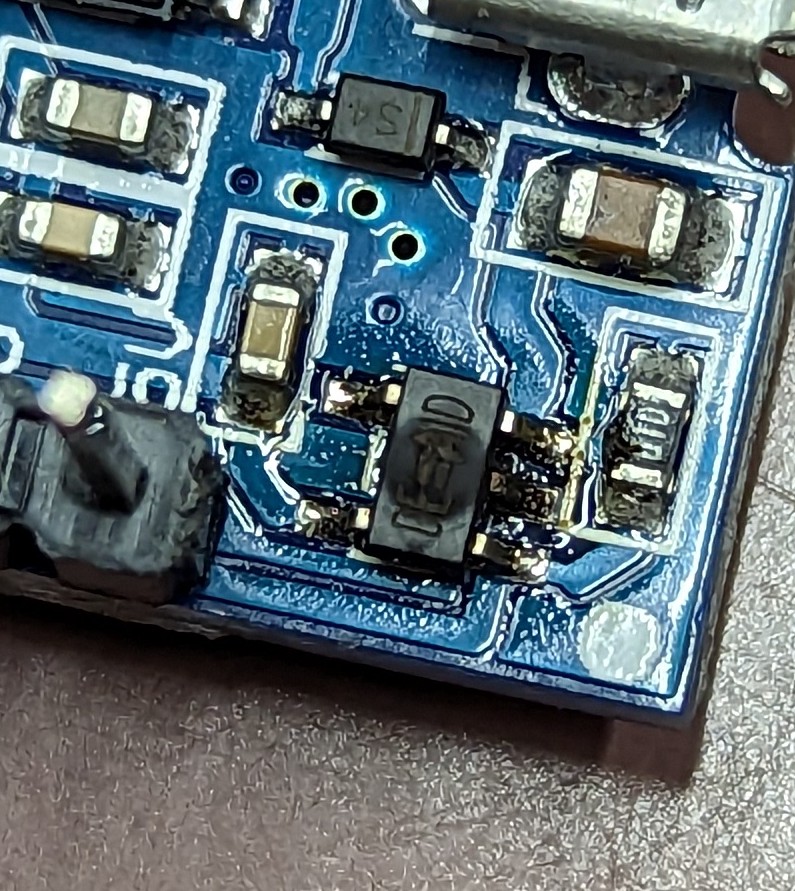
12VのLEDテープライトをESPでコントロールしようと計画していて、以前に購入していた <a href="https://s.click.aliexpress.com/e/_DkFOCVH" title="s.click.aliexpress.com/e/_DkFOCVH" target="_blank">AMS1117 5.0 というう降圧型モジュール LDO</a> を使って 12V から 5V を取り出す回路をフレッドボードに組んで実験していたのですが、電源投入直後に ESP8266 の組み込み LDO がパチっという音ともに焼けてしまいまいました。</p>
<div style="text-align:left;"><div><a href="https://xoops.hypweb.net/modules/xelfinder/index.php/view/50/PXL_20230120_045008725~2.jpg" title="PXL_20230120_045008725~2.jpg" type="img"><img src="https://xoops.hypweb.net/modules/xelfinder/index.php/view/50/PXL_20230120_045008725~2.jpg" alt="PXL_20230120_045008725~2.jpg" title="PXL_20230120_045008725~2.jpg" width="300" height="300" /></a></div></div>

<p>しかも、素人なもので2回も続けて同じ失敗をしました。2回目の前には正常に動いていたんですけどね・・・</p>
<p>調べてみると、ESP8266 は電源投入時の消費電力が大きいことがわかり、AMS1117 の 800ｍA では到底足らないことが分かりました。失敗のあと AMS1117 の出力電圧を測ったら、ほぼ 12V と入力の電圧がそのまま出ていました、<br />
素人の推測では、AMS1117 の出せる電流値以上を引き出してしまったので、AMS1117 が壊れてしまったのだと思います。しかし、壊れて電圧が出ないならいいけど、入力電圧そのままが出るのは怖いな・・・。</p>
<p>しょうがないので <a href="https://s.click.aliexpress.com/e/_DEAS9FN" title="s.click.aliexpress.com/e/_DEAS9FN" target="_blank">7805A という 3端子レギュレーター</a>を使って回路を組みました。</p>
<p>ということで、AMS1117 5.0 は、ESP8266 の電源に使わないほうがいいみたいです。</p>
<div>
<div><img src="https://xoops.hypweb.net/modules/UsersWiki/skin/loader.php?src=arrow_up.png" alt="Page Top" width="16" height="16" /></div><h3>アリエクで良さげなのを発見！  <a href="https://xoops.hypweb.net/modules/UsersWiki/person/nao-pon/blog/2023-01-20#bc26d2ad" title="bc26d2ad"><img src="https://xoops.hypweb.net/modules/UsersWiki/skin/loader.php?src=anchor.png" alt="anchor.png" height="12" width="12" /></a> 
<!--description ignore-->

<!--/description ignore--></h3>
<p>以前に、アマゾンで購入した DC-DCステップダウンコンバータ を使用していくつか工作した時に、調子がよかったステップダウンコンバータのより小さなものを発見！<br />
DSN-MINI-360 というものらしい。</p>
<ul><li><a href="https://ja.aliexpress.com/item/1005003709975604.html" title="ja.aliexpress.com/item/1005003709975604.html" target="_blank">1/ 5/10個3AミニDC-DCステップダウンコンバータ5v-23vに3.3v 6v 9v 12v 340 125khz</a></li></ul>
<p>10個入りで高速配送料込みで $5.91 と安かったので買ってみた。PayPalのクレカ払いドル建て支払い、本日のレートで 762円 でした。</p>
<div style="text-align:right"><span style="font-size:90%;line-height:130%;"></span></div>

<!--description ignore-->
<hr />
<ul>
 <li><a href="https://xoops.hypweb.net/modules/UsersWiki/person/nao-pon/blog/2022-09-22" title="nao-pon/blog/2022-09-22 (1307d)">Prev</a><br /><a href="https://xoops.hypweb.net/modules/UsersWiki/person/nao-pon/blog/2022-09-22" title="nao-pon/blog/2022-09-22 (1307d)">ESP32 + ESPHome の Bluetooth Proxy で SwitchBot Mater</a></li>
 <li><a href="https://xoops.hypweb.net/modules/UsersWiki/person/nao-pon/blog/calendar" title="nao-pon/blog/calendar (6409d)">Next</a><br /><a href="https://xoops.hypweb.net/modules/UsersWiki/person/nao-pon/blog/calendar" title="nao-pon/blog/calendar (6409d)">calendar</a></li>
 <li><a href="https://xoops.hypweb.net/modules/UsersWiki/person/nao-pon/blog" title="nao-pon/blog (6409d)">Up</a></li>
</ul>
<div style="clear:both;height:0px;"> </div>
<!--/description ignore-->
<!--bc26d2ad--></div>
<!--q5f9d7f9--></div>

<div style="display:none;"><img src="https://xoops.hypweb.net/modules/UsersWiki/gate.php?way=jobstack" alt="" width="1" height="1" /></div>

 ]]></content:encoded>
 <dc:identifier>https://xoops.hypweb.net/modules/UsersWiki/index.php?nao-pon%2Fblog%2F2023-01-20</dc:identifier>

</item>
<item rdf:about="https://xoops.hypweb.net/modules/UsersWiki/index.php?nao-pon%2Fblog%2F2022-09-22">
 <title>ESP32 + ESPHome の Bluetooth Proxy で SwitchBot Mater</title>
 <link>https://xoops.hypweb.net/modules/UsersWiki/person/nao-pon/blog/2022-09-22</link>
 <dc:date>2022-09-22T17:15:12+09:00</dc:date>
 <dc:creator>nao-pon</dc:creator>
 
 <description>Home Assistant 2022.9 から、ESPHome の Bluetooth Proxy が対応したので、今まで BLE Aadvertise を Listen して独自に処理していたものを、SwitchBot 統合を利用した方法に変更してみた。&amp;#182; Home Assistant 2022.9 から、ESPHome の Bluetooth Proxy が対応したので、今まで BLE Aadvertise を Listen して独自に処理していたものを、SwitchBot 統合&#182;Thu 22 Sep 2022 Home Assistant 2022.9 から、ESPHome の Bluetooth Proxy が対応したので、今まで BLE Aadvertise を Listen して独自に処理していたものを、SwitchBot 統合を利用した方法に変更してみた。手順はとても簡単。ESPHome の設定に &quot;bluetooth_proxy:&quot; を書き加えて、SwitchBot 統合を追加するだけで、自動的にデバイスを発見して追加してくれた。素晴らしい！Home Assi</description>
 <content:encoded><![CDATA[
 <dl><dt>Changes</dt><dd><p>Home Assistant 2022.9 から、ESPHome の Bluetooth Proxy が対応したので、今まで BLE Aadvertise を Listen して独自に処理していたものを、SwitchBot 統合を利用した方法に変更してみた。</p>&#182;<!--ADD_TEXT_SEP-->
<p>Home Assistant 2022.9 から、ESPHome の Bluetooth Proxy が対応したので、今まで BLE Aadvertise を Listen して独自に処理していたものを、SwitchBot 統合を利用した方法に変更してみた。</p></dd></dl><hr />
<!--description ignore-->
<ul>
 <li><a href="https://xoops.hypweb.net/modules/UsersWiki/person/nao-pon/blog/2022-08-26" title="nao-pon/blog/2022-08-26 (1333d)">Prev</a></li>
 <li><a href="https://xoops.hypweb.net/modules/UsersWiki/person/nao-pon/blog/2023-01-20" title="nao-pon/blog/2023-01-20 (1186d)">Next</a></li>
 <li><a href="https://xoops.hypweb.net/modules/UsersWiki/person/nao-pon" title="nao-pon (5173d)">nao-pon</a>/<a href="https://xoops.hypweb.net/modules/UsersWiki/person/nao-pon/blog" title="nao-pon/blog (6408d)">blog</a></li>
</ul>
<hr />
<!--/description ignore-->

<div style="text-align:right"><a href="https://xoops.hypweb.net/modules/UsersWiki/?cmd=rss&amp;p=nao-pon%2Fblog" title="RSS of nao-pon/blog"><img src="https://xoops.hypweb.net/modules/UsersWiki/image/feed-rss.png" alt="RSS of nao-pon/blog" /></a></div>
<div><span>
<span> 2022 </span>
<span> 9月 </span>
<span> 22 </span>
<span> (木) </span>
</span></div><div>&nbsp;</div>

<div>
<h2>ESP32 + ESPHome の Bluetooth Proxy で SwitchBot Mater  <a href="https://xoops.hypweb.net/modules/UsersWiki/person/nao-pon/blog/2022-09-22#o4ddaff8" title="o4ddaff8"><img src="https://xoops.hypweb.net/modules/UsersWiki/skin/loader.php?src=anchor.png" alt="anchor.png" height="12" width="12" /></a> 
<!--description ignore-->

<!--/description ignore--></h2>
<div style="text-align:right"><!--description ignore-->
<span>Tag: <a href="https://xoops.hypweb.net/modules/UsersWiki/index.php?cmd=lsx&amp;rtag=ESP32">ESP32</a> <a href="https://xoops.hypweb.net/modules/UsersWiki/index.php?cmd=lsx&amp;rtag=ESPHome">ESPHome</a> <a href="https://xoops.hypweb.net/modules/UsersWiki/index.php?cmd=lsx&amp;rtag=Bluetooth">Bluetooth</a> <a href="https://xoops.hypweb.net/modules/UsersWiki/index.php?cmd=lsx&amp;rtag=SwitchBot">SwitchBot</a> <a href="https://xoops.hypweb.net/modules/UsersWiki/index.php?cmd=lsx&amp;rtag=HomeAssistant">HomeAssistant</a> </span>
<!--/description ignore--></div>
<p><a href="https://www.home-assistant.io/blog/2022/09/07/release-20229/#bluetooth-everywhere" title="www.home-assistant.io/blog/2022/09/07/release-20229/#bluetooth-everywhere" target="_blank">Home Assistant 2022.9</a> から、ESPHome の <a href="https://esphome.io/components/bluetooth_proxy.html" title="esphome.io/components/bluetooth_proxy.html" target="_blank">Bluetooth Proxy</a> が対応したので、今まで BLE Aadvertise を Listen して独自に処理していたものを、SwitchBot 統合を利用した方法に変更してみた。</p>
<p>手順はとても簡単。ESPHome の設定に &quot;bluetooth_proxy:&quot; を書き加えて、SwitchBot 統合を追加するだけで、自動的にデバイスを発見して追加してくれた。</p>
<p>素晴らしい！</p>
<div style="text-align:left;"><div><a href="https://xoops.hypweb.net/modules/xelfinder/index.php/view/47/220922-170734.png" title="220922-170734.png" type="img"><img src="https://xoops.hypweb.net/modules/UsersWiki/attach/s/_i_5518ba9e51dcba31245a923bcb9fbd82_40.png" alt="220922-170734.png" title="220922-170734.png" width="400" height="212" /></a></div></div>

<p>Home Assistant で ESPHome の ESP32 が動いているなら、</p>
<div><pre>esp32_ble_tracker:
bluetooth_proxy:</pre></div>
<p>を追加するだけで、Bluetooth Proxy としても動作するので、対応した Bluetooth デバイスを気軽に追加できるようになった！本当に素晴らしい！</p>
<p>ちなみに以前、独自に BLE Aadvertise を Listen していた設定は次のような感じ。</p>

<!--description ignore-->
<div style="height:30.3em;overflow:auto;"><div><div><table border="0" cellpadding="0" cellspacing="0"><tr><td style="line-height:1.2em;"><pre style="width:auto;"> 1
 2
 3
 4
 5
 6
 7
 8
 9
10
11
12
13
14
15
16
17
18
19
20
21
22
23
24
25
26
27
28
29
30
31
32
33
34
35
36
37
38
39
40
41
42
43
44
45
46
</pre></td><td style="line-height:1.2em;"><pre><code>sensor:
  - platform: template
    name: &quot;$devicename Humidity&quot;
    id: humidity0
    unit_of_measurement: '%'
    accuracy_decimals: 0
    icon: &quot;mdi:water-percent&quot;
  - platform: template
    name: &quot;$devicename Temperature&quot;
    id: temperature0
    unit_of_measurement: '°C'
    accuracy_decimals: 1
    icon: &quot;mdi:thermometer&quot;
  - platform: template
    name: &quot;$devicename BT RSSI&quot;
    id: rssi0
    unit_of_measurement: 'dB'
    accuracy_decimals: 0
    icon: &quot;mdi:bluetooth&quot;
  - platform: template
    name: &quot;$devicename Battery&quot;
    id: battery0
    unit_of_measurement: '%'
    accuracy_decimals: 0
    icon: &quot;mdi:battery&quot;
 
esp32_ble_tracker:
  on_ble_advertise:
    - mac_address: f4:42:fa:xx:xx:xx
      then:
        - lambda: |-
            for (auto data : x.get_service_datas()) {
                if(data.data.size() == 6) {
                  float temperature = (float)(data.data[4] &amp; 0b01111111) + ((float)(data.data[3] &amp; 0b00001111) / 10);
                  if (!(data.data[4] &amp; 0b10000000)) {
                    temperature = -temperature;
                  }
                  int8_t humidity= data.data[5] &amp; 0b01111111;
                  int8_t battery = data.data[2] &amp; 0b01111111;
                  int8_t rssi=x.get_rssi();
                  id(humidity0).publish_state(humidity);
                  id(temperature0).publish_state(temperature);
                  id(rssi0).publish_state(rssi);
                  id(battery0).publish_state(battery);
                }
            }</code></pre></td></tr></table></div></div></div>
<!--/description ignore-->

<div style="text-align:right"><span style="font-size:90%;line-height:130%;"></span></div>

<!--description ignore-->
<hr />
<ul>
 <li><a href="https://xoops.hypweb.net/modules/UsersWiki/person/nao-pon/blog/2022-08-26" title="nao-pon/blog/2022-08-26 (1333d)">Prev</a><br /><a href="https://xoops.hypweb.net/modules/UsersWiki/person/nao-pon/blog/2022-08-26" title="nao-pon/blog/2022-08-26 (1333d)">独自ビルドの Tasmota を 12.1.1 へ</a></li>
 <li><a href="https://xoops.hypweb.net/modules/UsersWiki/person/nao-pon/blog/2023-01-20" title="nao-pon/blog/2023-01-20 (1186d)">Next</a><br /><a href="https://xoops.hypweb.net/modules/UsersWiki/person/nao-pon/blog/2023-01-20" title="nao-pon/blog/2023-01-20 (1186d)">ESP8266 を壊してしまいました しかも続けて2回も</a></li>
 <li><a href="https://xoops.hypweb.net/modules/UsersWiki/person/nao-pon/blog" title="nao-pon/blog (6408d)">Up</a></li>
</ul>
<div style="clear:both;height:0px;"> </div>
<!--/description ignore-->
<!--o4ddaff8--></div>

<div style="display:none;"><img src="https://xoops.hypweb.net/modules/UsersWiki/gate.php?way=jobstack" alt="" width="1" height="1" /></div>

 ]]></content:encoded>
 <dc:identifier>https://xoops.hypweb.net/modules/UsersWiki/index.php?nao-pon%2Fblog%2F2022-09-22</dc:identifier>

</item>
<item rdf:about="https://xoops.hypweb.net/modules/UsersWiki/index.php?nao-pon%2Fblog%2F2022-08-26">
 <title>独自ビルドの Tasmota を 12.1.1 へ</title>
 <link>https://xoops.hypweb.net/modules/UsersWiki/person/nao-pon/blog/2022-08-26</link>
 <dc:date>2022-08-26T20:40:15+09:00</dc:date>
 <dc:creator>nao-pon</dc:creator>
 
 <description>&amp;#182; Attached file: Screenshot_20220826-195833.png&#182;2022 8月 26 (金) エアコンのWiFi化に Tasmota をカスタマイズした独自ビルドを使っているけど、Tasmota 12.1.1 がリリースされたので、アップデートした。まずは、ブログに書いていなかったけど Tasmota 11.0.0.1 から 12.0.2.3 へアップデートについてちょっと前のことだけど...今回は少し躓きました。いつもの通りにはいかなかった。まずは、いつも通りgit checkout mastergit pullgit checkout mitsu_pan</description>
 <content:encoded><![CDATA[
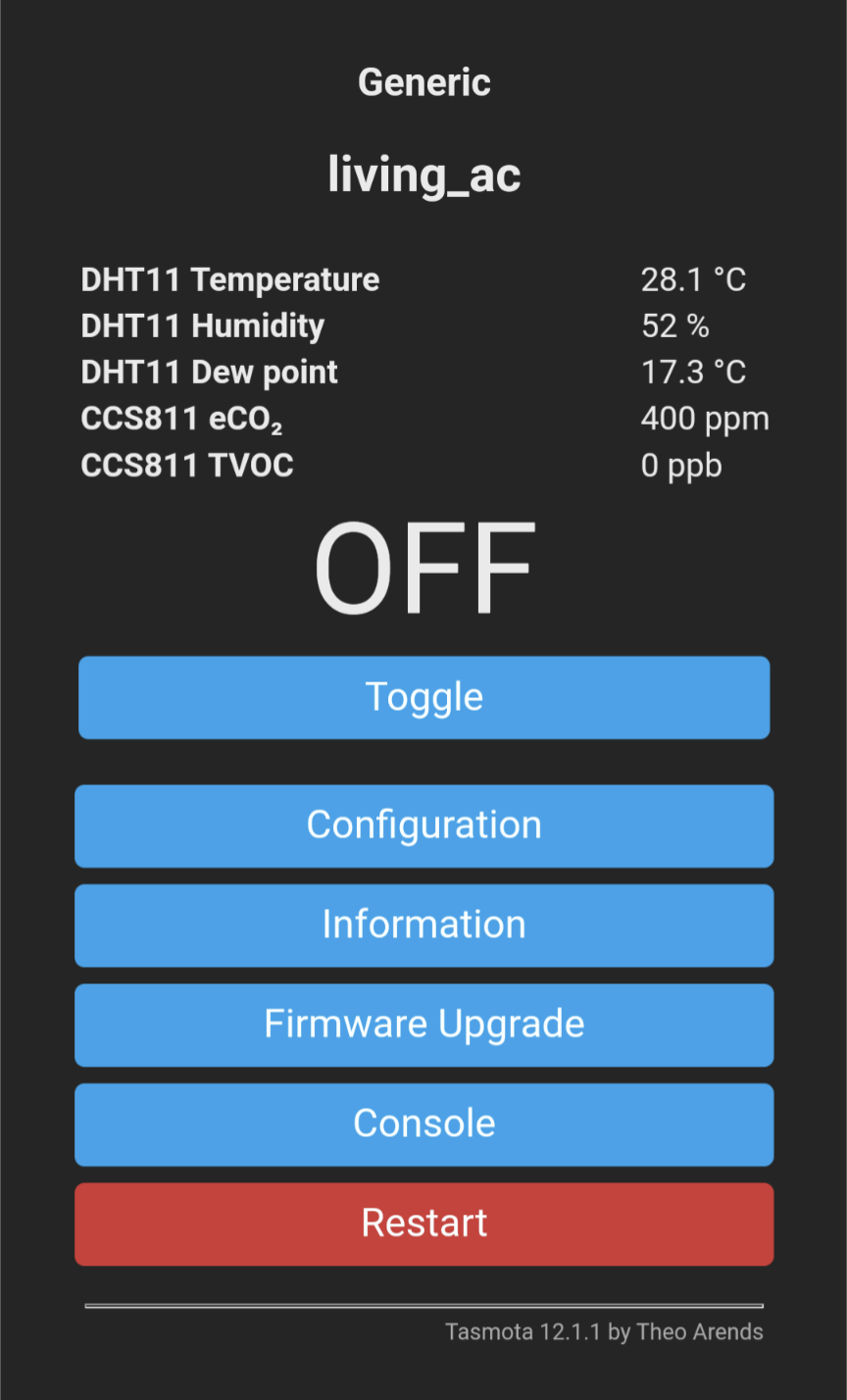
 <dl><dt>Changes</dt><dd><p><img src="https://xoops.hypweb.net/modules/UsersWiki/attach/s/6E616F2D706F6E2F626C6F672F323032322D30382D3236_25_53637265656E73686F745F32303232303832362D313935383333.png" alt="Screenshot_20220826-195833.png" title="Screenshot_20220826-195833.png, SIZE:864x1428(130.7KB)" width="217" height="360" align="right" style="float:right;" /></p>&#182;<!--ADD_TEXT_SEP-->
<p>Attached file: Screenshot_20220826-195833.png</p></dd></dl><hr />
<!--description ignore-->
<ul>
 <li><a href="https://xoops.hypweb.net/modules/UsersWiki/person/nao-pon/blog/2022-08-19" title="nao-pon/blog/2022-08-19 (1340d)">Prev</a></li>
 <li><a href="https://xoops.hypweb.net/modules/UsersWiki/person/nao-pon/blog/2022-09-22" title="nao-pon/blog/2022-09-22 (1306d)">Next</a></li>
 <li><a href="https://xoops.hypweb.net/modules/UsersWiki/person/nao-pon" title="nao-pon (5173d)">nao-pon</a>/<a href="https://xoops.hypweb.net/modules/UsersWiki/person/nao-pon/blog" title="nao-pon/blog (6408d)">blog</a></li>
</ul>
<hr />
<!--/description ignore-->

<div style="text-align:right"><a href="https://xoops.hypweb.net/modules/UsersWiki/?cmd=rss&amp;p=nao-pon%2Fblog" title="RSS of nao-pon/blog"><img src="https://xoops.hypweb.net/modules/UsersWiki/image/feed-rss.png" alt="RSS of nao-pon/blog" /></a></div>
<div><span>
<span> 2022 </span>
<span> 8月 </span>
<span> 26 </span>
<span> (金) </span>
</span></div><div>&nbsp;</div>

<div>
<h2>独自ビルドの Tasmota を 12.1.1 へ  <a href="https://xoops.hypweb.net/modules/UsersWiki/person/nao-pon/blog/2022-08-26#fb442d40" title="fb442d40"><img src="https://xoops.hypweb.net/modules/UsersWiki/skin/loader.php?src=anchor.png" alt="anchor.png" height="12" width="12" /></a> 
<!--description ignore-->

<!--/description ignore--></h2>
<div style="text-align:right"><!--description ignore-->
<span>Tag: <a href="https://xoops.hypweb.net/modules/UsersWiki/index.php?cmd=lsx&amp;rtag=ESP8266">ESP8266</a> <a href="https://xoops.hypweb.net/modules/UsersWiki/index.php?cmd=lsx&amp;rtag=%B2%C8IoT">家IoT</a> <a href="https://xoops.hypweb.net/modules/UsersWiki/index.php?cmd=lsx&amp;rtag=HomeAssistant">HomeAssistant</a> <a href="https://xoops.hypweb.net/modules/UsersWiki/index.php?cmd=lsx&amp;rtag=Tasmota">Tasmota</a> <a href="https://xoops.hypweb.net/modules/UsersWiki/index.php?cmd=lsx&amp;rtag=%A5%D3%A5%EB%A5%C9">ビルド</a> </span>
<!--/description ignore--></div>
<p><a href="https://xoops.hypweb.net/modules/UsersWiki/gate.php?way=ref&amp;_nodos&amp;_noumb&amp;page=nao-pon%2Fblog%2F2022-08-26&amp;src=Screenshot_20220826-195833.png" title="Screenshot_20220826-195833.png, SIZE:864x1428(130.7KB)" type="img"><img src="https://xoops.hypweb.net/modules/UsersWiki/attach/s/6E616F2D706F6E2F626C6F672F323032322D30382D3236_25_53637265656E73686F745F32303232303832362D313935383333.png" alt="Screenshot_20220826-195833.png" title="Screenshot_20220826-195833.png, SIZE:864x1428(130.7KB)" width="217" height="360" align="right" style="float:right;" /></a></p>
<p>エアコンのWiFi化に Tasmota をカスタマイズした独自ビルドを使っているけど、Tasmota 12.1.1 がリリースされたので、アップデートした。</p>
<p>まずは、ブログに書いていなかったけど Tasmota 11.0.0.1 から 12.0.2.3 へアップデートについて</p>
<div>
<div><img src="https://xoops.hypweb.net/modules/UsersWiki/skin/loader.php?src=arrow_up.png" alt="Page Top" width="16" height="16" /></div><h3>Tasmota 11.0.0.1 から 12.0.2.3 へアップデート  <a href="https://xoops.hypweb.net/modules/UsersWiki/person/nao-pon/blog/2022-08-26#nb1ab8fd" title="nb1ab8fd"><img src="https://xoops.hypweb.net/modules/UsersWiki/skin/loader.php?src=anchor.png" alt="anchor.png" height="12" width="12" /></a> 
<!--description ignore-->

<!--/description ignore--></h3>
<p>ちょっと前のことだけど...<br />
今回は少し躓きました。<a href="https://xoops.hypweb.net/modules/UsersWiki/person/nao-pon/blog/2021-06-20" title="nao-pon/blog/2021-06-20 (1765d)">いつもの通り</a>にはいかなかった。</p>
<p>まずは、いつも通り</p>
<div><pre >git checkout master
git pull
git checkout mitsu_pana_custom
git diff HEAD^1 &gt; _diff1.txt
git rebase master
git diff HEAD^1 &gt; _diff2.txt
</pre></div>
<p>で、_diff1.txt と _diff2.txt を比較して、問題なくカスタマイズ分が反映されているか確認する。</p>
<div><pre>diff _diff1.txt _diff2.txt &gt; _diff3.txt</pre></div>
<p>Tasmota は marge で</p>
<div><pre >git checkout development
git pull
git checkout irremote_full_custom
git marge master
</pre></div>
<p>Tasmota の pio run でエラー</p>
<p>とりあえず platformio upgrade -&gt; パーミッションエラー</p>
<div><pre >su
platformio upgrade
</pre></div>
<p>まだエラー、よく見たらディレクトリ構成が変わっていた！<br />
例えば tasmota/xdrv_05_irremote_full.ino -&gt; tasmota/tasmota_xdrv_driver/xdrv_05_irremote_full.ino</p>
<ul><li>xdrv_05_irremote_full_custom.ino を tasmota/tasmota_xdrv_driver へ</li>
<li>xsns_31_ccs811_v2_10sec.ino, xsns_31_ccs811_v2_60sec.ino を tasmota/tasmota_xsns_sensor へ</li></ul>
<p>これで OK だった。</p>
<!--nb1ab8fd--></div>
<div>
<div><img src="https://xoops.hypweb.net/modules/UsersWiki/skin/loader.php?src=arrow_up.png" alt="Page Top" width="16" height="16" /></div><h3>Tasmota 12.0.2.3 から 12.1.1 へアップデート  <a href="https://xoops.hypweb.net/modules/UsersWiki/person/nao-pon/blog/2022-08-26#ba788c42" title="ba788c42"><img src="https://xoops.hypweb.net/modules/UsersWiki/skin/loader.php?src=anchor.png" alt="anchor.png" height="12" width="12" /></a> 
<!--description ignore-->

<!--/description ignore--></h3>
<p>これまた、いつも通りに。</p>
<div><pre >git checkout master
git pull
git checkout mitsu_pana_custom
git diff HEAD^1 &gt; _diff1.txt
git rebase master
git diff HEAD^1 &gt; _diff2.txt
</pre></div>
<p>Tasmota は、今回から development ではなく、リリースバージョンをつかうことにした。まあ、深い意味はなく、なんとなく。</p>
<div><pre >git checkout development
git pull
git checkout irremote_full_custom
git merge v12.1.1
</pre></div>
<p>で</p>
<div><pre>pio run</pre></div>
<p>...あれ？なにか変... environment がデフォルトになってる模様。</p>
<div><pre>pio run -e ir_jema_bridge</pre></div>
<p>とかしてみると、ビルドがエラーで止まってしまう。</p>
<p>とりあえず platformio をアップデート</p>
<div><pre>su
platformio upgrade</pre></div>
<p>それでもエラー。なんか IRremoteESP8266 でバグってるみたいだったので、IRremoteESP8266 のほうは、元に戻してみた。</p>
<div><pre>git reset --hard 02b5833aaa3e92e386d2f9ec82db122c90f33e5a</pre></div>
<p>こちらは、これで問題なくなった模様だけど、また新たなエラー。</p>
<p>&quot;header:ihx.h&quot; が見つからないとかなんとか。</p>
<div><pre>platformio lib search &quot;header:ihx.h&quot;</pre></div>
<p>としてみたら、「ナニソレ？シラナイナ」とかの返事。</p>
<p>ググってみたところ、<a href="https://github.com/erocm123/Sonoff-Tasmota/blob/master/lib/C2Programmer-1.0.0/src/ihx.h" title="github.com/erocm123/Sonoff-Tasmota/blob/master/lib/C2Programmer-1.0.0/src/ihx.h" target="_blank">Sonoff-Tasmota</a> のものらしい。</p>
<p>あ！わかった！あれだ！</p>
<p>Zigbee の 有線 LAN ブリッジを導入した時に、Tasmota を <a href="https://github.com/vahempio/Tasmota-for-eWeLink" title="github.com/vahempio/Tasmota-for-eWeLink" target="_blank">vahempio/Tasmota-for-eWeLink</a> を利用して自分でビルドしたのだけど、その時に platformio_override.ini と tasmota/user_config_override.h が書き換わっていて、それが原因だった。</p>
<p>それぞれを以下の内容で保存し直して、今度は問題なくビルドが完了した。</p>
<ul><li><a href="https://github.com/nao-pon/Tasmota/blob/irremote_full_custom/platformio_override_sample_hyp.ini" title="github.com/nao-pon/Tasmota/blob/irremote_full_custom/platformio_override_sample_hyp.ini" target="_blank">platformio_override_sample_hyp.ini</a></li>
<li><a href="https://github.com/nao-pon/Tasmota/blob/irremote_full_custom/tasmota/user_config_override_sample_hyp.h" title="github.com/nao-pon/Tasmota/blob/irremote_full_custom/tasmota/user_config_override_sample_hyp.h" target="_blank">user_config_override_sample_hyp.h</a></li></ul>
<p>目的が違うものを同じディレクトリで使用するのはよくないなぁ。混ぜるな危険！</p>
<p>今度からは別のディレクトリで行おう。</p>
<div style="text-align:right"><span style="font-size:90%;line-height:130%;"></span></div>

<!--description ignore-->
<hr />
<ul>
 <li><a href="https://xoops.hypweb.net/modules/UsersWiki/person/nao-pon/blog/2022-08-19" title="nao-pon/blog/2022-08-19 (1340d)">Prev</a><br /><a href="https://xoops.hypweb.net/modules/UsersWiki/person/nao-pon/blog/2022-08-19" title="nao-pon/blog/2022-08-19 (1340d)">Zigbee + ZHA のメモ書き</a></li>
 <li><a href="https://xoops.hypweb.net/modules/UsersWiki/person/nao-pon/blog/2022-09-22" title="nao-pon/blog/2022-09-22 (1306d)">Next</a><br /><a href="https://xoops.hypweb.net/modules/UsersWiki/person/nao-pon/blog/2022-09-22" title="nao-pon/blog/2022-09-22 (1306d)">ESP32 + ESPHome の Bluetooth Proxy で SwitchBot Mater</a></li>
 <li><a href="https://xoops.hypweb.net/modules/UsersWiki/person/nao-pon/blog" title="nao-pon/blog (6408d)">Up</a></li>
</ul>
<div style="clear:both;height:0px;"> </div>
<!--/description ignore-->
<!--ba788c42--></div>
<!--fb442d40--></div>

<div style="display:none;"><img src="https://xoops.hypweb.net/modules/UsersWiki/gate.php?way=jobstack" alt="" width="1" height="1" /></div>

 ]]></content:encoded>
 <dc:identifier>https://xoops.hypweb.net/modules/UsersWiki/index.php?nao-pon%2Fblog%2F2022-08-26</dc:identifier>

</item>
<item rdf:about="https://xoops.hypweb.net/modules/UsersWiki/index.php?nao-pon%2Fblog%2F2022-08-19">
 <title>Zigbee + ZHA のメモ書き</title>
 <link>https://xoops.hypweb.net/modules/UsersWiki/person/nao-pon/blog/2022-08-19</link>
 <dc:date>2022-08-19T21:44:52+09:00</dc:date>
 <dc:creator>nao-pon</dc:creator>
 
 <description>Fri 19 Aug 2022 これまで、自作の ESPHome や Tasmota や Tuya, Meross などの WiFi 機器を利用して環境を拡張してきたが、 Amazon で Zigbee のLED電球が1個350円で売っていたので思わずポチったことから、Zigbee の環境も整えることになった。コーディネーターの選定に迷ったが、USB ドングルタイプは必然的に設置場所がラズパイの場所となり、場所的に不都合なことから WiFi ブリッジを検討していたところ、有線LANブリッジとして</description>
 <content:encoded><![CDATA[
 
<!--description ignore-->
<ul>
 <li><a href="https://xoops.hypweb.net/modules/UsersWiki/person/nao-pon/blog/2022-01-17" title="nao-pon/blog/2022-01-17 (1553d)">Prev</a></li>
 <li><a href="https://xoops.hypweb.net/modules/UsersWiki/person/nao-pon/blog/2022-08-26" title="nao-pon/blog/2022-08-26 (1331d)">Next</a></li>
 <li><a href="https://xoops.hypweb.net/modules/UsersWiki/person/nao-pon" title="nao-pon (5171d)">nao-pon</a>/<a href="https://xoops.hypweb.net/modules/UsersWiki/person/nao-pon/blog" title="nao-pon/blog (6406d)">blog</a></li>
</ul>
<hr />
<!--/description ignore-->

<div style="text-align:right"><a href="https://xoops.hypweb.net/modules/UsersWiki/?cmd=rss&amp;p=nao-pon%2Fblog" title="RSS of nao-pon/blog"><img src="https://xoops.hypweb.net/modules/UsersWiki/image/feed-rss.png" alt="RSS of nao-pon/blog" /></a></div>
<div><span>
<span> 2022 </span>
<span> 8月 </span>
<span> 19 </span>
<span> (金) </span>
</span></div><div>&nbsp;</div>

<div>

<!--description ignore-->
<div>
 <div>
  ページ内コンテンツ
 </div>
 <div>
  <ul><li>  Zigbee + ZHA のメモ書き 
<ul><li>  コーディネーターのセットアップ </li>
<li>  ペアリング時の注意事項 </li>
<li>  IKEA on/off ボタンのブループリント </li></ul></li></ul>
 </div>
</div>
<!--/description ignore-->

<h2>Zigbee + ZHA のメモ書き  <a href="https://xoops.hypweb.net/modules/UsersWiki/person/nao-pon/blog/2022-08-19#h9f5d063" title="h9f5d063"><img src="https://xoops.hypweb.net/modules/UsersWiki/skin/loader.php?src=anchor.png" alt="anchor.png" height="12" width="12" /></a> 
<!--description ignore-->

<!--/description ignore--></h2>
<div style="text-align:right"><!--description ignore-->
<span>Tag: <a href="https://xoops.hypweb.net/modules/UsersWiki/index.php?cmd=lsx&amp;rtag=HomeAssistant">HomeAssistant</a> <a href="https://xoops.hypweb.net/modules/UsersWiki/index.php?cmd=lsx&amp;rtag=Zigbee">Zigbee</a> <a href="https://xoops.hypweb.net/modules/UsersWiki/index.php?cmd=lsx&amp;rtag=ZHA">ZHA</a> </span>
<!--/description ignore--></div>
<p>これまで、自作の ESPHome や Tasmota や Tuya, Meross などの WiFi 機器を利用して環境を拡張してきたが、 Amazon で Zigbee のLED電球が1個350円で売っていたので思わずポチったことから、Zigbee の環境も整えることになった。</p>
<p>コーディネーターの選定に迷ったが、USB ドングルタイプは必然的に設置場所がラズパイの場所となり、場所的に不都合なことから WiFi ブリッジを検討していたところ、有線LANブリッジとして利用できる <a href="https://s.click.aliexpress.com/e/_DktYWXt" title="s.click.aliexpress.com/e/_DktYWXt" target="_blank">Ewelink zigbee 3 ゲートウェイ(ZB-GW03-V1.3)</a> を発見！それに決定した。</p>
<div>
<div><img src="https://xoops.hypweb.net/modules/UsersWiki/skin/loader.php?src=arrow_up.png" alt="Page Top" width="16" height="16" /></div><h3>コーディネーターのセットアップ  <a href="https://xoops.hypweb.net/modules/UsersWiki/person/nao-pon/blog/2022-08-19#y784b567" title="y784b567"><img src="https://xoops.hypweb.net/modules/UsersWiki/skin/loader.php?src=anchor.png" alt="anchor.png" height="12" width="12" /></a> 
<!--description ignore-->

<!--/description ignore--></h3>
<ul><li><a href="https://s.click.aliexpress.com/e/_DktYWXt" title="s.click.aliexpress.com/e/_DktYWXt" target="_blank">Ewelink zigbee 3 ゲートウェイ(ZB-GW03-V1.3)</a></li>
<li>Tasmota -&gt; ZHA 用に構成</li>
<li><a href="https://hpwb.net/3QCTCg6" title="github.com/vahempio/Tasmota-for-eWeLink" target="_blank">https://hpwb.net/3QCTCg6</a><span> (github.com)</span></li></ul>
<p>手順通りに作業すれば難しいことはなにもない。先達に感謝！有線LANでアクセス可能であることを確認してWiFiを無効にした。</p>
<ul><li>せっかくなので、自分は Tasmota v12.0.2 でビルドした。
<ul><li><a href="https://hpwb.net/3A7ZCXl" title="github.com/nao-pon/Tasmota/tree/ewelink-eth" target="_blank">https://hpwb.net/3A7ZCXl</a><span> (github.com)</span></li></ul></li></ul>
<!--y784b567--></div>
<div>
<div><img src="https://xoops.hypweb.net/modules/UsersWiki/skin/loader.php?src=arrow_up.png" alt="Page Top" width="16" height="16" /></div><h3>ペアリング時の注意事項  <a href="https://xoops.hypweb.net/modules/UsersWiki/person/nao-pon/blog/2022-08-19#kce403f0" title="kce403f0"><img src="https://xoops.hypweb.net/modules/UsersWiki/skin/loader.php?src=anchor.png" alt="anchor.png" height="12" width="12" /></a> 
<!--description ignore-->

<!--/description ignore--></h3>
<ul><li>LEDVANCE SMART+ LED電球
<ul><li>特に問題ない</li></ul></li>
<li>IKEA on/off ボタン
<ul><li>何故かコーディネーター(ZB-GW03)ではペアリング不可。 LEDVANCE SMART+ 経由では問題ないので、その直ぐ側でペアリングする。ペアリング後は ZB-GW03 経由の通信に問題はない。</li></ul></li>
<li><a href="https://s.click.aliexpress.com/e/_DCJIljV" title="s.click.aliexpress.com/e/_DCJIljV" target="_blank">Aqara 人感センサー</a>
<ul><li>LEDVANCE SMART+ 経由では、ペアリングと通信ともに不可。通信もできないので運用時に要注意。</li>
<li>コーディネーター(ZB-GW03)との通信が切れると、LEDVANCE の LED 電球経由でつながることがあり、そうなると再ペアリングが必要となる。IKEA のリピーターは問題なさそうなので、設置場所によっては IKEA のリピーターを近くに追加してそれとペアリングしたほうがようかも。</li>
<li><a href="https://community.hubitat.com/t/xiaomi-aqara-devices-pairing-keeping-them-connected/623" title="community.hubitat.com/t/xiaomi-aqara-devices-pairing-keeping-them-connected/623" target="_blank">https://community.hubitat.com/t/xiaomi-aqara-devices-pairing-keeping-them-connected/623</a></li></ul></li></ul>
<!--kce403f0--></div>
<div>
<div><img src="https://xoops.hypweb.net/modules/UsersWiki/skin/loader.php?src=arrow_up.png" alt="Page Top" width="16" height="16" /></div><h3>IKEA on/off ボタンのブループリント  <a href="https://xoops.hypweb.net/modules/UsersWiki/person/nao-pon/blog/2022-08-19#ube09a5f" title="ube09a5f"><img src="https://xoops.hypweb.net/modules/UsersWiki/skin/loader.php?src=anchor.png" alt="anchor.png" height="12" width="12" /></a> 
<!--description ignore-->

<!--/description ignore--></h3>
<ul><li><a href="https://community.home-assistant.io/t/zha-ikea-tradfri-on-off-switch/255538" title="community.home-assistant.io/t/zha-ikea-tradfri-on-off-switch/255538" target="_blank">汎用スイッチ用</a></li>
<li><a href="https://gist.github.com/jongdesteven/e267f19575cafbe5fc0d756612717a63" title="gist.github.com/jongdesteven/e267f19575cafbe5fc0d756612717a63" target="_blank">照明コントロール用</a>
<ul><li>On/Off 時に他のオートメーション用のトリガーとしたかったため、独自拡張して input_button ヘルパーを指定できるようにした。
<ul><li><a href="https://gist.github.com/nao-pon/5ed67440f45feb88db98e501e52ab691" title="gist.github.com/nao-pon/5ed67440f45feb88db98e501e52ab691" target="_blank">https://gist.github.com/nao-pon/5ed67440f45feb88db98e501e52ab691</a></li></ul></li></ul></li></ul>
<div style="text-align:right"><span style="font-size:90%;line-height:130%;"></span></div>

<!--description ignore-->
<hr />
<ul>
 <li><a href="https://xoops.hypweb.net/modules/UsersWiki/person/nao-pon/blog/2022-01-17" title="nao-pon/blog/2022-01-17 (1553d)">Prev</a><br /><a href="https://xoops.hypweb.net/modules/UsersWiki/person/nao-pon/blog/2022-01-17" title="nao-pon/blog/2022-01-17 (1553d)">HomeAssistant 統合の Tasmota-IRHVAC に貢献</a></li>
 <li><a href="https://xoops.hypweb.net/modules/UsersWiki/person/nao-pon/blog/2022-08-26" title="nao-pon/blog/2022-08-26 (1331d)">Next</a><br /><a href="https://xoops.hypweb.net/modules/UsersWiki/person/nao-pon/blog/2022-08-26" title="nao-pon/blog/2022-08-26 (1331d)">独自ビルドの Tasmota を 12.1.1 へ</a></li>
 <li><a href="https://xoops.hypweb.net/modules/UsersWiki/person/nao-pon/blog" title="nao-pon/blog (6406d)">Up</a></li>
</ul>
<div style="clear:both;height:0px;"> </div>
<!--/description ignore-->
<!--ube09a5f--></div>
<!--h9f5d063--></div>

<div style="display:none;"><img src="https://xoops.hypweb.net/modules/UsersWiki/gate.php?way=jobstack" alt="" width="1" height="1" /></div>

 ]]></content:encoded>
 <dc:identifier>https://xoops.hypweb.net/modules/UsersWiki/index.php?nao-pon%2Fblog%2F2022-08-19</dc:identifier>

</item>
<item rdf:about="https://xoops.hypweb.net/modules/UsersWiki/index.php?nao-pon%2Fblog%2F2022-01-17">
 <title>HomeAssistant 統合の Tasmota-IRHVAC に貢献</title>
 <link>https://xoops.hypweb.net/modules/UsersWiki/person/nao-pon/blog/2022-01-17</link>
 <dc:date>2022-01-17T00:16:46+09:00</dc:date>
 <dc:creator>nao-pon</dc:creator>
 
 <description>Mon 17 Jan 2022 hristo-atanasov/Tasmota-IRHVACのコラボレーターに招待されて、私の様々なカスタマイズがすべて統合されました。私がこのTasmota-IRHVAC統合を使用し続ける限り、メンテナンスに協力していきたいと思っています。ESP8266またはESP32に、赤外線受信機と送信機、そして温湿度計を備えた装置を自作してエアコンに組み込むことで、現時点において最高の体験を得ることができるものに仕上がると思います。関連ブログTasmota で三菱エアコン</description>
 <content:encoded><![CDATA[
 
<!--description ignore-->
<ul>
 <li><a href="https://xoops.hypweb.net/modules/UsersWiki/person/nao-pon/blog/2021-07-01" title="nao-pon/blog/2021-07-01 (1752d)">Prev</a></li>
 <li><a href="https://xoops.hypweb.net/modules/UsersWiki/person/nao-pon/blog/2022-08-19" title="nao-pon/blog/2022-08-19 (1338d)">Next</a></li>
 <li><a href="https://xoops.hypweb.net/modules/UsersWiki/person/nao-pon" title="nao-pon (5171d)">nao-pon</a>/<a href="https://xoops.hypweb.net/modules/UsersWiki/person/nao-pon/blog" title="nao-pon/blog (6406d)">blog</a></li>
</ul>
<hr />
<!--/description ignore-->

<div style="text-align:right"><a href="https://xoops.hypweb.net/modules/UsersWiki/?cmd=rss&amp;p=nao-pon%2Fblog" title="RSS of nao-pon/blog"><img src="https://xoops.hypweb.net/modules/UsersWiki/image/feed-rss.png" alt="RSS of nao-pon/blog" /></a></div>
<div><span>
<span> 2022 </span>
<span> 1月 </span>
<span> 17 </span>
<span> (月) </span>
</span></div><div>&nbsp;</div>

<div>
<h2>HomeAssistant 統合の Tasmota-IRHVAC に貢献  <a href="https://xoops.hypweb.net/modules/UsersWiki/person/nao-pon/blog/2022-01-17#y30b7f76" title="y30b7f76"><img src="https://xoops.hypweb.net/modules/UsersWiki/skin/loader.php?src=anchor.png" alt="anchor.png" height="12" width="12" /></a> 
<!--description ignore-->

<!--/description ignore--></h2>
<div style="text-align:right"><!--description ignore-->
<span>Tag: <a href="https://xoops.hypweb.net/modules/UsersWiki/index.php?cmd=lsx&amp;rtag=HomeAssistant">HomeAssistant</a> <a href="https://xoops.hypweb.net/modules/UsersWiki/index.php?cmd=lsx&amp;rtag=Tasmota">Tasmota</a> <a href="https://xoops.hypweb.net/modules/UsersWiki/index.php?cmd=lsx&amp;rtag=IRHVAC">IRHVAC</a> </span>
<!--/description ignore--></div>
<p><a href="https://github.com/hristo-atanasov/Tasmota-IRHVAC" title="github.com/hristo-atanasov/Tasmota-IRHVAC" target="_blank">hristo-atanasov/Tasmota-IRHVAC</a>のコラボレーターに招待されて、私の様々なカスタマイズがすべて統合されました。<br />
私がこのTasmota-IRHVAC統合を使用し続ける限り、メンテナンスに協力していきたいと思っています。</p>
<p>ESP8266またはESP32に、赤外線受信機と送信機、そして温湿度計を備えた装置を自作してエアコンに組み込むことで、現時点において最高の体験を得ることができるものに仕上がると思います。</p>
<p>関連ブログ</p>
<ul><li><a href="https://xoops.hypweb.net/modules/UsersWiki/person/nao-pon/blog/2021-02-07" title="nao-pon/blog/2021-02-07 (1896d)">Tasmota で三菱エアコンを完全コントロール</a></li>
<li><a href="https://xoops.hypweb.net/modules/UsersWiki/person/nao-pon/blog/2021-02-11" title="nao-pon/blog/2021-02-11 (1889d)">Tasmota で HA 端子(JEM-A) 連携</a></li>
<li><a href="https://xoops.hypweb.net/modules/UsersWiki/person/nao-pon/blog/2021-02-17" title="nao-pon/blog/2021-02-17 (1886d)">Panasonic (ナショナル) エアコンの 2008 年モデルも WiFi 化</a></li></ul>
<div style="text-align:right"><span style="font-size:90%;line-height:130%;"></span></div>

<!--description ignore-->
<hr />
<ul>
 <li><a href="https://xoops.hypweb.net/modules/UsersWiki/person/nao-pon/blog/2021-07-01" title="nao-pon/blog/2021-07-01 (1752d)">Prev</a><br /><a href="https://xoops.hypweb.net/modules/UsersWiki/person/nao-pon/blog/2021-07-01" title="nao-pon/blog/2021-07-01 (1752d)">HomeAssistant 統合の Tasmota-IRHVAC の不具合修正</a></li>
 <li><a href="https://xoops.hypweb.net/modules/UsersWiki/person/nao-pon/blog/2022-08-19" title="nao-pon/blog/2022-08-19 (1338d)">Next</a><br /><a href="https://xoops.hypweb.net/modules/UsersWiki/person/nao-pon/blog/2022-08-19" title="nao-pon/blog/2022-08-19 (1338d)">Zigbee + ZHA のメモ書き</a></li>
 <li><a href="https://xoops.hypweb.net/modules/UsersWiki/person/nao-pon/blog" title="nao-pon/blog (6406d)">Up</a></li>
</ul>
<div style="clear:both;height:0px;"> </div>
<!--/description ignore-->
<!--y30b7f76--></div>

<div style="display:none;"><img src="https://xoops.hypweb.net/modules/UsersWiki/gate.php?way=jobstack" alt="" width="1" height="1" /></div>

 ]]></content:encoded>
 <dc:identifier>https://xoops.hypweb.net/modules/UsersWiki/index.php?nao-pon%2Fblog%2F2022-01-17</dc:identifier>

</item>
<item rdf:about="https://xoops.hypweb.net/modules/UsersWiki/index.php?nao-pon%2Fblog%2F2021-07-01">
 <title>HomeAssistant 統合の Tasmota-IRHVAC の不具合修正</title>
 <link>https://xoops.hypweb.net/modules/UsersWiki/person/nao-pon/blog/2021-07-01</link>
 <dc:date>2021-07-01T20:26:54+09:00</dc:date>
 <dc:creator>nao-pon</dc:creator>
 
 <description>2021 7月 1 (木) HomeAssistant のサービス呼び出しで、エアコンの温度設定があるけど、ここのモード設定が効いていないことに気づいたのでその修正をした。nao-pon/Tasmota-IRHVAC</description>
 <content:encoded><![CDATA[
 
<!--description ignore-->
<ul>
 <li><a href="https://xoops.hypweb.net/modules/UsersWiki/person/nao-pon/blog/2021-06-20" title="nao-pon/blog/2021-06-20 (1764d)">Prev</a></li>
 <li><a href="https://xoops.hypweb.net/modules/UsersWiki/person/nao-pon/blog/2022-01-17" title="nao-pon/blog/2022-01-17 (1554d)">Next</a></li>
 <li><a href="https://xoops.hypweb.net/modules/UsersWiki/person/nao-pon" title="nao-pon (5172d)">nao-pon</a>/<a href="https://xoops.hypweb.net/modules/UsersWiki/person/nao-pon/blog" title="nao-pon/blog (6407d)">blog</a></li>
</ul>
<hr />
<!--/description ignore-->

<div style="text-align:right"><a href="https://xoops.hypweb.net/modules/UsersWiki/?cmd=rss&amp;p=nao-pon%2Fblog" title="RSS of nao-pon/blog"><img src="https://xoops.hypweb.net/modules/UsersWiki/image/feed-rss.png" alt="RSS of nao-pon/blog" /></a></div>
<div><span>
<span> 2021 </span>
<span> 7月 </span>
<span> 1 </span>
<span> (木) </span>
</span></div><div>&nbsp;</div>

<div>
<h2>HomeAssistant 統合の Tasmota-IRHVAC の不具合修正  <a href="https://xoops.hypweb.net/modules/UsersWiki/person/nao-pon/blog/2021-07-01#s19c87dd" title="s19c87dd"><img src="https://xoops.hypweb.net/modules/UsersWiki/skin/loader.php?src=anchor.png" alt="anchor.png" height="12" width="12" /></a> 
<!--description ignore-->

<!--/description ignore--></h2>
<div style="text-align:right"><!--description ignore-->
<span>Tag: <a href="https://xoops.hypweb.net/modules/UsersWiki/index.php?cmd=lsx&amp;rtag=Tasmota-IRHVAC">Tasmota-IRHVAC</a> <a href="https://xoops.hypweb.net/modules/UsersWiki/index.php?cmd=lsx&amp;rtag=HomeAssistant">HomeAssistant</a> <a href="https://xoops.hypweb.net/modules/UsersWiki/index.php?cmd=lsx&amp;rtag=Tasmota">Tasmota</a> </span>
<!--/description ignore--></div>
<p><a href="https://xoops.hypweb.net/modules/xelfinder/index.php/view/42/210701-195557.png" title="210701-195557.png" type="img"><img src="https://xoops.hypweb.net/modules/UsersWiki/attach/s/_i_fa184a228df71283c77a318912d0eb13_30.png" alt="210701-195557.png" title="210701-195557.png" width="300" height="180" align="right" style="float:right;" /></a></p>
<p>HomeAssistant のサービス呼び出しで、エアコンの温度設定があるけど、ここのモード設定が効いていないことに気づいたのでその修正をした。</p>
<ul><li><a href="https://github.com/nao-pon/Tasmota-IRHVAC/commit/3696a4e207f5ffa72945c4f2e04eb60c9a1c6e79" title="github.com/nao-pon/Tasmota-IRHVAC/commit/3696a4e207f5ffa72945c4f2e04eb60c9a1c6e79" target="_blank">nao-pon/Tasmota-IRHVAC</a></li></ul>
<div></div>
<div style="text-align:right"><span style="font-size:90%;line-height:130%;"></span></div>

<!--description ignore-->
<hr />
<ul>
 <li><a href="https://xoops.hypweb.net/modules/UsersWiki/person/nao-pon/blog/2021-06-20" title="nao-pon/blog/2021-06-20 (1764d)">Prev</a><br /><a href="https://xoops.hypweb.net/modules/UsersWiki/person/nao-pon/blog/2021-06-20" title="nao-pon/blog/2021-06-20 (1764d)">Tasmota を 9.4.0 から 9.5.0 へアップデート</a></li>
 <li><a href="https://xoops.hypweb.net/modules/UsersWiki/person/nao-pon/blog/2022-01-17" title="nao-pon/blog/2022-01-17 (1554d)">Next</a><br /><a href="https://xoops.hypweb.net/modules/UsersWiki/person/nao-pon/blog/2022-01-17" title="nao-pon/blog/2022-01-17 (1554d)">HomeAssistant 統合の Tasmota-IRHVAC に貢献</a></li>
 <li><a href="https://xoops.hypweb.net/modules/UsersWiki/person/nao-pon/blog" title="nao-pon/blog (6407d)">Up</a></li>
</ul>
<div style="clear:both;height:0px;"> </div>
<!--/description ignore-->
<!--s19c87dd--></div>

<div style="display:none;"><img src="https://xoops.hypweb.net/modules/UsersWiki/gate.php?way=jobstack" alt="" width="1" height="1" /></div>

 ]]></content:encoded>
 <dc:identifier>https://xoops.hypweb.net/modules/UsersWiki/index.php?nao-pon%2Fblog%2F2021-07-01</dc:identifier>

</item>
<item rdf:about="https://xoops.hypweb.net/modules/UsersWiki/index.php?nao-pon%2Fblog%2F2021-06-20">
 <title>Tasmota を 9.4.0 から 9.5.0 へアップデート</title>
 <link>https://xoops.hypweb.net/modules/UsersWiki/person/nao-pon/blog/2021-06-20</link>
 <dc:date>2021-06-20T21:49:44+09:00</dc:date>
 <dc:creator>nao-pon</dc:creator>
 
 <description>git merge development&amp;#182; git diff master &amp;gt; _diff1.txt git diff master &amp;gt; _diff2.txt&amp;#182; 今回は大丈夫だったけど、lib/lib_basic/IRremoteESP8266 でコンフリクトが生じるかも知れない。 そんなときは、次のようにとりあえず development 側を適用しておけばいいかな。知らんけど。 違った！そういえば、platformio_override.ini で lib_&#182;Sun 20 Jun 2021 エアコンのWiFi化は、Tasmota をカスタマイズした独自ビルドを使っているけど、Tasmota 9.5.0 がリリースされたので、アップデートした。次に実行するときは、多分忘れているだろうから、自分用の覚書を書いておく。IRremoteESP8266IRremoteESP8266 は、とにかく最新版を使うようにしている。master ブランチは upstream の master を参照している。で、_diff1.txt と _diff2.txt を比較して</description>
 <content:encoded><![CDATA[
 <dl><dt>Changes</dt><dd><p>git merge development</p>&#182;<!--ADD_TEXT_SEP-->
<p>git diff master &gt; _diff1.txt<br />
git diff master &gt; _diff2.txt</p>&#182;<!--ADD_TEXT_SEP-->
<p><del>今回は大丈夫だったけど、lib/lib_basic/IRremoteESP8266 でコンフリクトが生じるかも知れない。</del><br />
<del>そんなときは、次のようにとりあえず development 側を適用しておけばいいかな。知らんけど。</del><br />
違った！そういえば、platformio_override.ini で lib_extra_dirs を違うディレクトリを指定してあり、IRremoteESP8266 の Git ディレクトリにシンボリックを張ってあった。</p>
<p>&#35;code(ini){{<br />
[env:tasmota-ircustom]<br />
build_flags             = ${common.build_flags} ${irremoteesp_full.build_flags} -DFIRMWARE_IR_CUSTOM</p>
<p>[env:ir_jema_bridge]<br />
extends                     = env:tasmota-ircustom<br />
lib_extra_dirs              = lib/lib.bak</p>
<p>[env:ir_jema_bridge_ccs811]<br />
extends                     = env:tasmota-ircustom<br />
lib_extra_dirs              = lib/lib.bak, lib/lib_i2c<br />
;build_flags                 = ${env:tasmota-ircustom.build_flags} -DUSE_CCS811_V2<br />
;build_flags                 = ${env:tasmota-ircustom.build_flags} -DUSE_CCS811_V2_10SEC<br />
build_flags                 = ${env:tasmota-ircustom.build_flags} -DUSE_CCS811_V2_60SEC<br />
}}</p>&#182;<!--ADD_TEXT_SEP-->
<p>&#35;ref(https://hpwb.net/2Um2zSY<span> (modules)</span></p>&#182;<!--ADD_TEXT_SEP-->
<p>&#35;ref(https://hpwb.net/3cRnDqM<span> (modules)</span></p></dd></dl><hr />
<!--description ignore-->
<ul>
 <li><a href="https://xoops.hypweb.net/modules/UsersWiki/person/nao-pon/blog/2021-06-15" title="nao-pon/blog/2021-06-15 (1769d)">Prev</a></li>
 <li><a href="https://xoops.hypweb.net/modules/UsersWiki/person/nao-pon/blog/2021-07-01" title="nao-pon/blog/2021-07-01 (1752d)">Next</a></li>
 <li><a href="https://xoops.hypweb.net/modules/UsersWiki/person/nao-pon" title="nao-pon (5171d)">nao-pon</a>/<a href="https://xoops.hypweb.net/modules/UsersWiki/person/nao-pon/blog" title="nao-pon/blog (6406d)">blog</a></li>
</ul>
<hr />
<!--/description ignore-->

<div style="text-align:right"><a href="https://xoops.hypweb.net/modules/UsersWiki/?cmd=rss&amp;p=nao-pon%2Fblog" title="RSS of nao-pon/blog"><img src="https://xoops.hypweb.net/modules/UsersWiki/image/feed-rss.png" alt="RSS of nao-pon/blog" /></a></div>
<div><span>
<span> 2021 </span>
<span> 6月 </span>
<span> 20 </span>
<span> (日) </span>
</span></div><div>&nbsp;</div>

<div>
<h2>Tasmota を 9.4.0 から 9.5.0 へアップデート  <a href="https://xoops.hypweb.net/modules/UsersWiki/person/nao-pon/blog/2021-06-20#y5d45058" title="y5d45058"><img src="https://xoops.hypweb.net/modules/UsersWiki/skin/loader.php?src=anchor.png" alt="anchor.png" height="12" width="12" /></a> 
<!--description ignore-->

<!--/description ignore--></h2>
<div style="text-align:right"><!--description ignore-->
<span>Tag: <a href="https://xoops.hypweb.net/modules/UsersWiki/index.php?cmd=lsx&amp;rtag=%B2%C8IoT">家IoT</a> <a href="https://xoops.hypweb.net/modules/UsersWiki/index.php?cmd=lsx&amp;rtag=Tasmota">Tasmota</a> </span>
<!--/description ignore--></div>
<div style="width:auto;float:right;"><div><a href="https://xoops.hypweb.net/modules/xelfinder/index.php/view/34/210620-214752.png" title="210620-214752.png" type="img"><img src="https://xoops.hypweb.net/modules/UsersWiki/attach/s/_i_0c0d668eb0e79eea5f9beb847ecacc04_77.png" alt="210620-214752.png" title="210620-214752.png" width="230" height="400" /></a></div></div>

<p>エアコンのWiFi化は、Tasmota をカスタマイズした独自ビルドを使っているけど、Tasmota 9.5.0 がリリースされたので、アップデートした。</p>
<p>次に実行するときは、多分忘れているだろうから、自分用の覚書を書いておく。</p>
<div>
<div><img src="https://xoops.hypweb.net/modules/UsersWiki/skin/loader.php?src=arrow_up.png" alt="Page Top" width="16" height="16" /></div><h3>自前 GitHub リポジトリ  <a href="https://xoops.hypweb.net/modules/UsersWiki/person/nao-pon/blog/2021-06-20#i8b619bf" title="i8b619bf"><img src="https://xoops.hypweb.net/modules/UsersWiki/skin/loader.php?src=anchor.png" alt="anchor.png" height="12" width="12" /></a> 
<!--description ignore-->

<!--/description ignore--></h3>
<ul><li><a href="https://github.com/nao-pon/IRremoteESP8266" title="github.com/nao-pon/IRremoteESP8266" target="_blank">IRremoteESP8266</a></li></ul>
<p>IRremoteESP8266 は、とにかく最新版を使うようにしている。</p>
<p>master ブランチは upstream の master を参照している。</p>

<!--description ignore-->
<div style="height:8.7em;overflow:auto;"><div><div><table border="0" cellpadding="0" cellspacing="0"><tr><td style="line-height:1.2em;"><pre style="width:auto;">1
2
3
4
5
6
</pre></td><td style="line-height:1.2em;"><pre><code>git diff master &gt; _diff1.txt
git checkout master
git pull
git checkout mitsu_pana_custom
git rebase master
git diff master &gt; _diff2.txt</code></pre></td></tr></table></div></div></div>
<!--/description ignore-->

<p>で、_diff1.txt と _diff2.txt を比較して、問題なくカスタマイズ分が反映されているか確認する。</p>
<div><pre> diff _diff1.txt _diff2.txt &gt; _diff3.txt</pre></div>

<!--description ignore-->
<div style="height:30.3em;overflow:auto;"><div><div><table border="0" cellpadding="0" cellspacing="0"><tr><td style="line-height:1.2em;"><pre style="width:auto;"> 1
 2
 3
 4
 5
 6
 7
 8
 9
10
11
12
13
14
15
16
17
18
19
20
21
22
23
24
25
26
27
28
29
30
31
32
33
34
35
36
37
38
39
40
41
42
43
44
45
46
47
48
</pre></td><td style="line-height:1.2em;"></td><td style="line-height:1.2em;"><pre><code>2c2
<span>&lt; index f194430..9284250 100644
</span><span>---
</span><span>&gt; index 316d756..4a05193 100644
</span>75c75
<span>&lt; @@ -1375,12 +1429,13 @@ void IRac::midea(IRMideaAC *ac,
</span><span>---
</span><span>&gt; @@ -1367,12 +1421,13 @@ void IRac::midea(IRMideaAC *ac,
</span>90c90
<span>&lt; @@ -1394,10 +1449,12 @@ void IRac::mitsubishi(IRMitsubishiAC *ac,
</span><span>---
</span><span>&gt; @@ -1386,10 +1441,12 @@ void IRac::mitsubishi(IRMitsubishiAC *ac,
</span>105c105
<span>&lt; @@ -1613,8 +1670,8 @@ void IRac::panasonic(IRPanasonicAc *ac, const panasonic_ac_remote_model_t model,
</span><span>---
</span><span>&gt; @@ -1605,8 +1662,8 @@ void IRac::panasonic(IRPanasonicAc *ac, const panasonic_ac_remote_model_t model,
</span>116c116
<span>&lt; @@ -1626,6 +1683,11 @@ void IRac::panasonic(IRPanasonicAc *ac, const panasonic_ac_remote_model_t model,
</span><span>---
</span><span>&gt; @@ -1618,6 +1675,11 @@ void IRac::panasonic(IRPanasonicAc *ac, const panasonic_ac_remote_model_t model,
</span>128c128
<span>&lt; @@ -2304,11 +2366,11 @@ bool IRac::sendAc(const decode_type_t vendor, const int16_t model,
</span><span>---
</span><span>&gt; @@ -2296,11 +2358,11 @@ bool IRac::sendAc(const decode_type_t vendor, const int16_t model,
</span>142c142
<span>&lt; @@ -2609,7 +2671,7 @@ bool IRac::sendAc(const stdAc::state_t desired, const stdAc::state_t *prev) {
</span><span>---
</span><span>&gt; @@ -2601,7 +2663,7 @@ bool IRac::sendAc(const stdAc::state_t desired, const stdAc::state_t *prev) {
</span>151c151
<span>&lt; @@ -2665,7 +2727,7 @@ bool IRac::sendAc(const stdAc::state_t desired, const stdAc::state_t *prev) {
</span><span>---
</span><span>&gt; @@ -2657,7 +2719,7 @@ bool IRac::sendAc(const stdAc::state_t desired, const stdAc::state_t *prev) {
</span>160c160
<span>&lt; @@ -2827,7 +2889,7 @@ bool IRac::cmpStates(const stdAc::state_t a, const stdAc::state_t b) {
</span><span>---
</span><span>&gt; @@ -2819,7 +2881,7 @@ bool IRac::cmpStates(const stdAc::state_t a, const stdAc::state_t b) {
</span>227c227
<span>&lt; index 99b103f..4cfb3d6 100644
</span><span>---
</span><span>&gt; index 20fd7d0..0cbc259 100644
</span>248c248
<span>&lt; index 3ec5303..523ebd0 100644
</span><span>---
</span><span>&gt; index 5d16c85..acf57a5 100644
</span>251c251
<span>&lt; @@ -551,6 +551,8 @@ namespace irutils {
</span><span>---
</span><span>&gt; @@ -552,6 +552,8 @@ namespace irutils {
</span</code></pre></td></tr></table></div></div></div>
<!--/description ignore-->

<p>問題ない。</p>
<ul><li><a href="https://github.com/nao-pon/Tasmota" title="github.com/nao-pon/Tasmota" target="_blank">Tasmota</a></li></ul>

<!--description ignore-->
<div style="height:6.3em;overflow:auto;"><div><div><table border="0" cellpadding="0" cellspacing="0"><tr><td style="line-height:1.2em;"><pre style="width:auto;">1
2
3
4
</pre></td><td style="line-height:1.2em;"><pre><code>git checkout development
git pull
git checkout irremote_full_custom
git merge development</code></pre></td></tr></table></div></div></div>
<!--/description ignore-->

<p><del>今回は大丈夫だったけど、lib/lib_basic/IRremoteESP8266 でコンフリクトが生じるかも知れない。</del><br />
<del>そんなときは、次のようにとりあえず development 側を適用しておけばいいかな。知らんけど。</del></p>

<!--description ignore-->
<div style="height:6.54em;overflow:auto;"><div><div><div><img src="https://xoops.hypweb.net/modules/UsersWiki/skin/loader.php?src=code_outline_open.png" style="cursor: pointer" alt="Everything is expanded." title="Everything is expanded." /><img src="https://xoops.hypweb.net/modules/UsersWiki/skin/loader.php?src=code_outline_close.png" style="cursor: pointer" alt="Everything is shortened." title="Everything is shortened." /></div><table border="0" cellpadding="0" cellspacing="0"><tr><td style="line-height:1.2em;"><pre style="width:auto;">1
2
3
</pre></td><td style="line-height:1.2em;"><pre> 
 
 
</pre></td><td style="line-height:1.2em;"><pre><code>git checkout --theirs lib/lib_basic/IRremoteESP8266
git add lib/lib_basic/IRremoteESP8266
git commit</code></pre></td></tr></table></div></div></div>
<!--/description ignore-->

<p>違った！そういえば、platformio_override.ini で lib_extra_dirs を違うディレクトリを指定してあり、IRremoteESP8266 の Git ディレクトリにシンボリックを張ってあった。</p>

<!--description ignore-->
<div style="height:17.1em;overflow:auto;"><div><div><table border="0" cellpadding="0" cellspacing="0"><tr><td style="line-height:1.2em;"><pre style="width:auto;"> 1
 2
 3
 4
 5
 6
 7
 8
 9
10
11
12
13
</pre></td><td style="line-height:1.2em;"><pre><code>[env:tasmota-ircustom]
build_flags             = ${common.build_flags} ${irremoteesp_full.build_flags} -DFIRMWARE_IR_CUSTOM
 
[env:ir_jema_bridge]
extends                     = env:tasmota-ircustom
lib_extra_dirs              = lib/lib.bak
 
[env:ir_jema_bridge_ccs811]
extends                     = env:tasmota-ircustom
lib_extra_dirs              = lib/lib.bak, lib/lib_i2c
;build_flags                 = ${env:tasmota-ircustom.build_flags} -DUSE_CCS811_V2
;build_flags                 = ${env:tasmota-ircustom.build_flags} -DUSE_CCS811_V2_10SEC
build_flags                 = ${env:tasmota-ircustom.build_flags} -DUSE_CCS811_V2_60SEC</code></pre></td></tr></table></div></div></div>
<!--/description ignore-->

<p>xdrv_05_irremote_full.ino をカスタマイズした、xdrv_05_irremote_full_custom.ino をビルドに使っているので、内容を確認してカスタマイズ分が反映されているか確認する。</p>
<p>今回は Settings.param が Settings-&gt;param に変更になっていたので、それを WinMerge でさくっと修正した。</p>
<p>同様に、カスタマイズで使用している xsns_31_ccs811_v2_10sec.ino と xsns_31_ccs811_v2_60sec.ino も確認。<br />
今回、こちらは大丈夫だった。</p>
<p>lib/lib_basic/IRremoteESP8266 を <a href="https://github.com/nao-pon/IRremoteESP8266" title="github.com/nao-pon/IRremoteESP8266" target="_blank">nao-pon/IRremoteESP8266 の mitsu_pana_custom</a> で上書きする。</p>
<div><pre>git commit</pre></div>
<p>これで OK かな。</p>
<p>とりあえず、</p>
<div><pre>pio run</pre></div>
<p>でビルドしてみる、大丈夫っぽい。</p>
<p>OTA で更新可能にしてるので、試しに一台アップデートしてみたところ、問題ないようだったので全台アップデートした。</p>
<ul><li>OTA URL は下記で公開しています。よろしければ使ってください。ただし、自己責任でお願いします。
<p>Panasonic, Mitsubishi, Toshiba のエアコンが有効になっています。</p>
<p>HomeAssistant との統合は、Tasmota-IRHVAC をこの拡張分に対応させた <a href="https://github.com/nao-pon/Tasmota-IRHVAC" title="github.com/nao-pon/Tasmota-IRHVAC" target="_blank">nao-pon/Tasmota-IRHVAC</a> を使用してください。</p>
<ul><li>&#104;ttp://hypweb.net/tasmota/firmware/ir_jema_bridge.bin.gz</li>
<li>&#104;ttp://hypweb.net/tasmota/firmware/ir_jema_bridge_ccs811.bin.gz (CCS811 1分間隔更新)</li></ul></li></ul>

<div style="text-align:right"><span style="font-size:90%;line-height:130%;"></span></div>

<!--description ignore-->
<hr />
<ul>
 <li><a href="https://xoops.hypweb.net/modules/UsersWiki/person/nao-pon/blog/2021-06-15" title="nao-pon/blog/2021-06-15 (1769d)">Prev</a><br /><a href="https://xoops.hypweb.net/modules/UsersWiki/person/nao-pon/blog/2021-06-15" title="nao-pon/blog/2021-06-15 (1769d)">ミンティア[MINTIA] で WiFi 6ボタンスイッチを作った</a></li>
 <li><a href="https://xoops.hypweb.net/modules/UsersWiki/person/nao-pon/blog/2021-07-01" title="nao-pon/blog/2021-07-01 (1752d)">Next</a><br /><a href="https://xoops.hypweb.net/modules/UsersWiki/person/nao-pon/blog/2021-07-01" title="nao-pon/blog/2021-07-01 (1752d)">HomeAssistant 統合の Tasmota-IRHVAC の不具合修正</a></li>
 <li><a href="https://xoops.hypweb.net/modules/UsersWiki/person/nao-pon/blog" title="nao-pon/blog (6406d)">Up</a></li>
</ul>
<div style="clear:both;height:0px;"> </div>
<!--/description ignore-->
<!--i8b619bf--></div>
<!--y5d45058--></div>

<div style="display:none;"><img src="https://xoops.hypweb.net/modules/UsersWiki/gate.php?way=jobstack" alt="" width="1" height="1" /></div>

 ]]></content:encoded>
 <dc:identifier>https://xoops.hypweb.net/modules/UsersWiki/index.php?nao-pon%2Fblog%2F2021-06-20</dc:identifier>

</item>
<item rdf:about="https://xoops.hypweb.net/modules/UsersWiki/index.php?nao-pon%2Fblog%2F2021-06-15">
 <title>ミンティア[MINTIA] で WiFi 6ボタンスイッチを作った</title>
 <link>https://xoops.hypweb.net/modules/UsersWiki/person/nao-pon/blog/2021-06-15</link>
 <dc:date>2021-06-15T11:06:01+09:00</dc:date>
 <dc:creator>nao-pon</dc:creator>
 
 <description>ESPHome の設定 &amp;#182; ちょうど手元にミンティアとESP-32が転がっていて・・・。ん？これ入るんじゃね？って思ったところ。&amp;#182; いるもの *1 ESP-32 モジュール 474円 *2 タクトスイッチ 10円 × 6 ミンティアの空き容器 適当なユニバーサル基板 2mmポリウレタン銅線 適宜&amp;#182; &amp;#182; &amp;#35;clear&#182;Tue 15 Jun 2021 Google Home や Alexa と HomeAssistant を統合しているので、声で大体のことはできる・・・けど。声を発声して、アシスタントに認識させるのが、面倒くさいと感じる。なんてわがままな！ だって、正しく認識してくれないと、もう一度言い直したり、見当違いのスイッチを ON/OFF されたり・・・そこで、やっぱり物理ボタンですよ！ちょうど手元にミンティアとESP-32が転がっていて・・・。ん？これ入るんじゃね？って思ったところ。おぉー！やっぱりピ</description>
 <content:encoded><![CDATA[
 <dl><dt>Changes</dt><dd><div>
<h3>ESPHome の設定  <img src="https://xoops.hypweb.net/modules/UsersWiki/skin/loader.php?src=anchor.png" alt="anchor.png" height="12" width="12" /> 
<!--description ignore-->

<!--/description ignore--></h3><!--j6fe7996--></div>&#182;<!--ADD_TEXT_SEP-->
<p>ちょうど手元にミンティアとESP-32が転がっていて・・・。ん？これ入るんじゃね？って思ったところ。</p>&#182;<!--ADD_TEXT_SEP-->
<div>
<h3>いるもの *1  <img src="https://xoops.hypweb.net/modules/UsersWiki/skin/loader.php?src=anchor.png" alt="anchor.png" height="12" width="12" /> 
<!--description ignore-->

<!--/description ignore--></h3>
<ul><li>ESP-32 モジュール 474円 *2</li>
<li>タクトスイッチ 10円 × 6</li>
<li>ミンティアの空き容器</li>
<li>適当なユニバーサル基板</li>
<li>2mmポリウレタン銅線 適宜</li></ul><!--ibd9ea71--></div>&#182;<!--ADD_TEXT_SEP-->
<p><img src="https://xoops.hypweb.net/modules/UsersWiki/attach/s/_i_f33dd945216e64d40df36b76fd2adbfe_36.JPG" alt="DSC_3857.JPG" title="DSC_3857.JPG" width="161" height="180" align="left" style="float:left;" /><img src="https://xoops.hypweb.net/modules/UsersWiki/attach/s/_i_ce47ad750f0e353d7bee47db360e0432_36.JPG" alt="DSC_3856.JPG" title="DSC_3856.JPG" width="161" height="180" align="left" style="float:left;" /></p>&#182;<!--ADD_TEXT_SEP-->
<p>&#35;clear</p></dd></dl><hr />
<!--description ignore-->
<ul>
 <li><a href="https://xoops.hypweb.net/modules/UsersWiki/person/nao-pon/blog/2021-03-17" title="nao-pon/blog/2021-03-17 (1848d)">Prev</a></li>
 <li><a href="https://xoops.hypweb.net/modules/UsersWiki/person/nao-pon/blog/2021-06-20" title="nao-pon/blog/2021-06-20 (1753d)">Next</a></li>
 <li><a href="https://xoops.hypweb.net/modules/UsersWiki/person/nao-pon" title="nao-pon (5161d)">nao-pon</a>/<a href="https://xoops.hypweb.net/modules/UsersWiki/person/nao-pon/blog" title="nao-pon/blog (6396d)">blog</a></li>
</ul>
<hr />
<!--/description ignore-->

<div style="text-align:right"><a href="https://xoops.hypweb.net/modules/UsersWiki/?cmd=rss&amp;p=nao-pon%2Fblog" title="RSS of nao-pon/blog"><img src="https://xoops.hypweb.net/modules/UsersWiki/image/feed-rss.png" alt="RSS of nao-pon/blog" /></a></div>
<div><span>
<span> 2021 </span>
<span> 6月 </span>
<span> 15 </span>
<span> (火) </span>
</span></div><div>&nbsp;</div>

<div>
<h2>ミンティア[MINTIA] で WiFi 6ボタンスイッチを作った <img alt=":-D" src="https://xoops.hypweb.net/uploads/smil3dbd4d4e4c4f2.gif" />  <a href="https://xoops.hypweb.net/modules/UsersWiki/person/nao-pon/blog/2021-06-15#i7d337be" title="i7d337be"><img src="https://xoops.hypweb.net/modules/UsersWiki/skin/loader.php?src=anchor.png" alt="anchor.png" height="12" width="12" /></a> 
<!--description ignore-->

<!--/description ignore--></h2>
<div style="text-align:right"><!--description ignore-->
<span>Tag: <a href="https://xoops.hypweb.net/modules/UsersWiki/index.php?cmd=lsx&amp;rtag=WiFi">WiFi</a> <a href="https://xoops.hypweb.net/modules/UsersWiki/index.php?cmd=lsx&amp;rtag=ESP-32">ESP-32</a> <a href="https://xoops.hypweb.net/modules/UsersWiki/index.php?cmd=lsx&amp;rtag=DIY">DIY</a> <a href="https://xoops.hypweb.net/modules/UsersWiki/index.php?cmd=lsx&amp;rtag=HomeAssistant">HomeAssistant</a> <a href="https://xoops.hypweb.net/modules/UsersWiki/index.php?cmd=lsx&amp;rtag=Hass.io">Hass.io</a> <a href="https://xoops.hypweb.net/modules/UsersWiki/index.php?cmd=lsx&amp;rtag=ESPHome">ESPHome</a> </span>
<!--/description ignore--></div>
<p>Google Home や Alexa と HomeAssistant を統合しているので、声で大体のことはできる・・・けど。<br />
声を発声して、アシスタントに認識させるのが、面倒くさいと感じる。なんてわがままな！ <img alt=":lol:" src="https://xoops.hypweb.net/uploads/smil3dbd4dbc14f3f.gif" /><br />
だって、正しく認識してくれないと、もう一度言い直したり、見当違いのスイッチを ON/OFF されたり・・・</p>
<p>そこで、やっぱり物理ボタンですよ！</p>
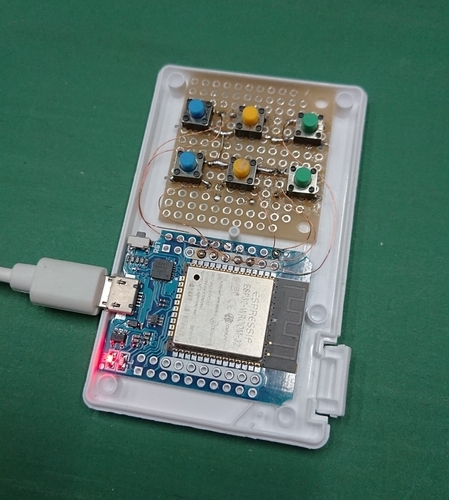
<p>ちょうど手元にミンティアとESP-32が転がっていて・・・。ん？これ入るんじゃね？って思ったところ。</p>
<p>おぉー！やっぱりピッタリじゃないですか！厚みが若干きついけど。</p>
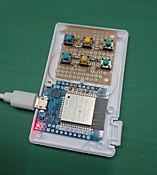
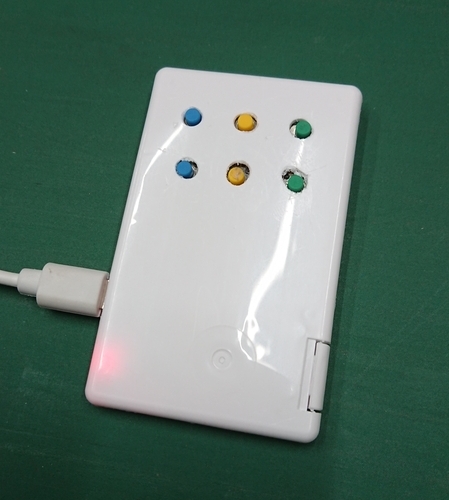
<p>で、結果こうなりました。やっぱりボタンで操作できるのは快適です。USB電源はいるけどね。</p>
<p><a href="https://xoops.hypweb.net/modules/xelfinder/index.php/view/10/DSC_3857.JPG" title="DSC_3857.JPG" type="img"><img src="https://xoops.hypweb.net/modules/UsersWiki/attach/s/_i_f33dd945216e64d40df36b76fd2adbfe_36.JPG" alt="DSC_3857.JPG" title="DSC_3857.JPG" width="161" height="180" align="left" style="float:left;" /></a><a href="https://xoops.hypweb.net/modules/xelfinder/index.php/view/8/DSC_3856.JPG" title="DSC_3856.JPG" type="img"><img src="https://xoops.hypweb.net/modules/UsersWiki/attach/s/_i_ce47ad750f0e353d7bee47db360e0432_36.JPG" alt="DSC_3856.JPG" title="DSC_3856.JPG" width="161" height="180" align="left" style="float:left;" /></a></p>
<div></div>
<p>ボタンの穴あけを少し失敗したけど、今度作るときはもう少しきちんと作ろう！</p>
<p>ボタンを押すと青いLEDが光ります。</p>
<div>
<div><img src="https://xoops.hypweb.net/modules/UsersWiki/skin/loader.php?src=arrow_up.png" alt="Page Top" width="16" height="16" /></div><h3>いるもの *1  <a href="https://xoops.hypweb.net/modules/UsersWiki/person/nao-pon/blog/2021-06-15#ibd9ea71" title="ibd9ea71"><img src="https://xoops.hypweb.net/modules/UsersWiki/skin/loader.php?src=anchor.png" alt="anchor.png" height="12" width="12" /></a> 
<!--description ignore-->

<!--/description ignore--></h3>
<ul><li><a href="https://ja.aliexpress.com/item/32823593448.html" title="ja.aliexpress.com/item/32823593448.html" target="_blank">ESP-32 モジュール</a> 474円 *2</li>
<li><a href="https://www.marutsu.co.jp/pc/i/599871/" title="www.marutsu.co.jp/pc/i/599871/" target="_blank">タクトスイッチ</a> 10円 × 6</li>
<li>ミンティアの空き容器</li>
<li>適当なユニバーサル基板</li>
<li>2mmポリウレタン銅線 適宜</li></ul>
<!--ibd9ea71--></div>
<div>
<div><img src="https://xoops.hypweb.net/modules/UsersWiki/skin/loader.php?src=arrow_up.png" alt="Page Top" width="16" height="16" /></div><h3>ESPHome の設定  <a href="https://xoops.hypweb.net/modules/UsersWiki/person/nao-pon/blog/2021-06-15#j6fe7996" title="j6fe7996"><img src="https://xoops.hypweb.net/modules/UsersWiki/skin/loader.php?src=anchor.png" alt="anchor.png" height="12" width="12" /></a> 
<!--description ignore-->

<!--/description ignore--></h3>
<p>esp32_ble_tracker は、手元に Qmote-S があったので、うまく使えないかな？と思って試してみたけど、検知範囲が狭くてほぼ使えなかった。残念。</p>

<!--description ignore-->
<div style="height:30.3em;overflow:auto;"><div><div><table border="0" cellpadding="0" cellspacing="0"><tr><td style="line-height:1.2em;"><pre style="width:auto;">  1
  2
  3
  4
  5
  6
  7
  8
  9
 10
 11
 12
 13
 14
 15
 16
 17
 18
 19
 20
 21
 22
 23
 24
 25
 26
 27
 28
 29
 30
 31
 32
 33
 34
 35
 36
 37
 38
 39
 40
 41
 42
 43
 44
 45
 46
 47
 48
 49
 50
 51
 52
 53
 54
 55
 56
 57
 58
 59
 60
 61
 62
 63
 64
 65
 66
 67
 68
 69
 70
 71
 72
 73
 74
 75
 76
 77
 78
 79
 80
 81
 82
 83
 84
 85
 86
 87
 88
 89
 90
 91
 92
 93
 94
 95
 96
 97
 98
 99
100
101
102
103
104
105
106
107
108
109
110
111
112
113
114
115
116
117
118
119
120
121
122
123
124
125
126
127
128
129
130
131
132
133
134
135
136
137
138
139
140
141
142
143
144
145
146
147
148
149
150
151
152
153
154
155
156
157
158
159
160
161
162
163
164
165
166
167
168
169
170
171
172
173
174
175
176
177
178
179
180
181
182
183
184
185
186
187
188
189
190
191
192
</pre></td><td style="line-height:1.2em;"><pre><code>substitutions:
  devicename: switch_box_11
 
esphome:
  name: $devicename
  platform: ESP32
  board: wemos_d1_mini32
  on_boot:
    - priority: 1000
      then:
        - while:
            condition:
              not:
                api.connected:
            then:
            - switch.turn_on: led
            - delay: 500ms 
            - switch.turn_off: led
            - delay: 500ms
 
wifi:
  networks: !include common/wifi.networks.yaml
  # Enable fallback hotspot (captive portal) in case wifi connection fails
  ap: !include common/wifi.ap.yaml
 
  manual_ip:
    static_ip: 192.168.1.xx
    gateway: 192.168.1.1
    subnet: 255.255.255.0
 
captive_portal:
 
# Enable logging
logger:
 
# Enable Home Assistant API
api:
 
ota:
 
esp32_ble_tracker:
  id: ble_tracker
 
  on_ble_manufacturer_data_advertise:
    - mac_address: 88:4A:XX:XX:DE:52
      manufacturer_id: 004C
      then:
        - lambda: |-
            if (id(qmote_de52_click).state == false) {
              id(qmote_de52_click).publish_state(true);
              id(qmote_de52_click).publish_state(false);
            }
    - mac_address: 88:4A:XX:XX:99:BB
      manufacturer_id: 004C
      then:
        - lambda: |-
            if (id(qmote_99bb_click).state == false) {
              id(qmote_99bb_click).publish_state(true);
              id(qmote_99bb_click).publish_state(false);
            }
    - mac_address: 88:4A:XX:XX:9F:03
      manufacturer_id: 004C
      then:
        - lambda: |-
            if (id(qmote_9f03_click).state == false) {
              id(qmote_9f03_click).publish_state(true);
              id(qmote_9f03_click).publish_state(false);
            }
  
binary_sensor:
  - platform: gpio
    pin:
      number: GPIO23
      inverted: True
      mode: INPUT_PULLUP
    name: &quot;$devicename btn1&quot;
    on_press:
      then:
        - switch.turn_on: led
    on_release:
      then:
        - switch.turn_off: led
  - platform: gpio
    pin:
      number: GPIO19
      inverted: True
      mode: INPUT_PULLUP
    name: &quot;$devicename btn2&quot;
    on_press:
      then:
        - switch.turn_on: led
    on_release:
      then:
        - switch.turn_off: led
  - platform: gpio
    pin:
      number: GPIO18
      inverted: True
      mode: INPUT_PULLUP
    name: &quot;$devicename btn3&quot;
    on_press:
      then:
        - switch.turn_on: led
    on_release:
      then:
        - switch.turn_off: led
  - platform: gpio
    pin:
      number: GPIO33
      inverted: True
      mode: INPUT_PULLUP
    name: &quot;$devicename btn4&quot;
    on_press:
      then:
        - switch.turn_on: led
    on_release:
      then:
        - switch.turn_off: led
  - platform: gpio
    pin:
      number: GPIO05
      inverted: True
      mode: INPUT_PULLUP
    name: &quot;$devicename btn5&quot;
    on_press:
      then:
        - switch.turn_on: led
    on_release:
      then:
        - switch.turn_off: led
  - platform: gpio
    pin:
      number: GPIO26
      inverted: True
      mode: INPUT_PULLUP
    name: &quot;$devicename btn6&quot;
    on_press:
      then:
        - switch.turn_on: led
    on_release:
      then:
        - switch.turn_off: led
  - platform: template
    id: qmote_de52_click
    name: &quot;$devicename Qmote de52 Click&quot;
    filters:
      delayed_off: 800ms
    on_press:
      then:
        - switch.turn_on: led
    on_release:
      then:
        - switch.turn_off: led
  - platform: template
    id: qmote_99bb_click
    name: &quot;$devicename Qmote 99bb Click&quot;
    filters:
      delayed_off: 800ms
    on_press:
      then:
        - switch.turn_on: led
    on_release:
      then:
        - switch.turn_off: led
  - platform: template
    id: qmote_9f03_click
    name: &quot;$devicename Qmote 9f03 Click&quot;
    filters:
      delayed_off: 800ms
    on_press:
      then:
        - switch.turn_on: led
    on_release:
      then:
        - switch.turn_off: led
 
sensor:
  - platform: wifi_signal
    name: &quot;$devicename WiFi&quot;
    update_interval: 60s
    unit_of_measurement: &quot;%&quot;
    filters:
      - lambda: x = 2 * (x + 100); if (x &lt; 0) {x = 0;} else if (x &gt; 100) {x = 100;} return x;
 
switch:
  - platform: restart
    name: &quot;$devicename Restart&quot;
  - platform: gpio
    pin:
      number: GPIO2
    name: &quot;$devicename LED&quot;
    id: led</code></pre></td></tr></table></div></div></div>
<!--/description ignore-->

<div style="text-align:right"><span style="font-size:90%;line-height:130%;"></span></div>

<!--description ignore-->
<hr />
<ul>
 <li><a href="https://xoops.hypweb.net/modules/UsersWiki/person/nao-pon/blog/2021-03-17" title="nao-pon/blog/2021-03-17 (1848d)">Prev</a><br /><a href="https://xoops.hypweb.net/modules/UsersWiki/person/nao-pon/blog/2021-03-17" title="nao-pon/blog/2021-03-17 (1848d)">SwitchBot 温湿度計を ESP32 でモニタリング</a></li>
 <li><a href="https://xoops.hypweb.net/modules/UsersWiki/person/nao-pon/blog/2021-06-20" title="nao-pon/blog/2021-06-20 (1753d)">Next</a><br /><a href="https://xoops.hypweb.net/modules/UsersWiki/person/nao-pon/blog/2021-06-20" title="nao-pon/blog/2021-06-20 (1753d)">Tasmota を 9.4.0 から 9.5.0 へアップデート</a></li>
 <li><a href="https://xoops.hypweb.net/modules/UsersWiki/person/nao-pon/blog" title="nao-pon/blog (6396d)">Up</a></li>
</ul>
<div style="clear:both;height:0px;"> </div>
<!--/description ignore-->
<!--j6fe7996--></div>
<!--i7d337be--></div>

<div style="display:none;"><img src="https://xoops.hypweb.net/modules/UsersWiki/gate.php?way=jobstack" alt="" width="1" height="1" /></div>

 ]]></content:encoded>
 <dc:identifier>https://xoops.hypweb.net/modules/UsersWiki/index.php?nao-pon%2Fblog%2F2021-06-15</dc:identifier>

</item>
<item rdf:about="https://xoops.hypweb.net/modules/UsersWiki/index.php?nao-pon%2Fblog%2F2021-03-17">
 <title>SwitchBot 温湿度計を ESP32 でモニタリング</title>
 <link>https://xoops.hypweb.net/modules/UsersWiki/person/nao-pon/blog/2021-03-17</link>
 <dc:date>2021-03-17T22:48:29+09:00</dc:date>
 <dc:creator>nao-pon</dc:creator>
 
 <description>&amp;#35;navi &amp;#35;boxdate SwitchBot 温湿度計を ESP32 でモニタリング Tag: SwitchBot Meter 温湿度計 HomeAssistant ESP32 ESPHome BLE SwitchBot の温湿度計は、リーズナブルで家庭で使うには問題のない精度があるので、なかなか便利です。 この温湿度計は、公式の API (Meter BLE open API) が公開されていて、BLE Advertisement パケットをリッスンすることで、温湿度データ&#182;2021 3月 17 (水) SwitchBot の温湿度計は、リーズナブルで家庭で使うには問題のない精度があるので、なかなか便利です。この温湿度計は、公式の API (Meter BLE open API) が公開されていて、BLE Advertisement パケットをリッスンすることで、温湿度データを取得できます。これを、ESP32 を使い HomeAssistant で利用できるようにしました。ESP32 のファームには ESPHome を使用しています。シンプルですね。カスタムコンポー</description>
 <content:encoded><![CDATA[
 <dl><dt>Changes</dt><dd><p>&#35;navi</p>
<div style="text-align:right"><img src="https://xoops.hypweb.net/modules/UsersWiki/image/feed-rss.png" alt="RSS of nao-pon/blog" /><br />
&#35;boxdate</div>
<div>
<h2>SwitchBot 温湿度計を ESP32 でモニタリング  <img src="https://xoops.hypweb.net/modules/UsersWiki/skin/loader.php?src=anchor.png" alt="anchor.png" height="12" width="12" /> 
<!--description ignore-->

<!--/description ignore--></h2>
<div style="text-align:right"><!--description ignore-->
<span>Tag: SwitchBot Meter 温湿度計 HomeAssistant ESP32 ESPHome BLE </span>
<!--/description ignore--></div>
<p>SwitchBot の温湿度計は、リーズナブルで家庭で使うには問題のない精度があるので、なかなか便利です。</p>
<p>この温湿度計は、公式の API (Meter BLE open API) が公開されていて、BLE Advertisement パケットをリッスンすることで、温湿度データを取得できます。</p>
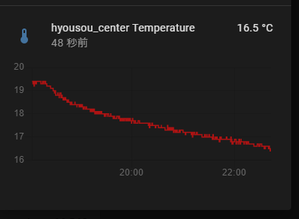
<p>これを、ESP32 を使い HomeAssistant で利用できるようにしました。ESP32 のファームには ESPHome を使用しています。</p>
<p><img src="https://xoops.hypweb.net/modules/UsersWiki/gate.php?way=ref&amp;_nodos&amp;_noumb&amp;page=nao-pon%2Fblog%2F2021-03-17&amp;src=210317-224349.png" alt="210317-224349.png" title="210317-224349.png, SIZE:299x219(16.0KB)" width="299" height="219" /><img src="https://xoops.hypweb.net/modules/UsersWiki/gate.php?way=ref&amp;_nodos&amp;_noumb&amp;page=nao-pon%2Fblog%2F2021-03-17&amp;src=210317-224648.png" alt="210317-224648.png" title="210317-224648.png, SIZE:299x212(16.0KB)" width="299" height="212" /></p>
<div>
<div><img src="https://xoops.hypweb.net/modules/UsersWiki/skin/loader.php?src=arrow_up.png" alt="Page Top" width="16" height="16" /></div><h3>ESPHome 用 yaml の該当部分の抜粋  <img src="https://xoops.hypweb.net/modules/UsersWiki/skin/loader.php?src=anchor.png" alt="anchor.png" height="12" width="12" /> 
<!--description ignore-->

<!--/description ignore--></h3>
<p>&#35;code(yaml){{<br />
substitutions:</p>
<div><pre> devicename: switchbot_meter</pre></div>
<p>sensor:</p>
<div><pre> - platform: template
   name: &quot;$devicename Humidity&quot;
   id: humidity0
   unit_of_measurement: '%'
   accuracy_decimals: 0
   icon: &quot;mdi:water-percent&quot;
 - platform: template
   name: &quot;$devicename Temperature&quot;
   id: temperature0
   unit_of_measurement: '°C'
   accuracy_decimals: 1
   icon: &quot;mdi:thermometer&quot;
 - platform: template
   name: &quot;$devicename BT RSSI&quot;
   id: rssi0
   unit_of_measurement: 'dB'
   accuracy_decimals: 0
   icon: &quot;mdi:bluetooth&quot;
 - platform: template
   name: &quot;$devicename Battery&quot;
   id: battery0
   unit_of_measurement: '%'
   accuracy_decimals: 0
   icon: &quot;mdi:battery&quot;
 - platform: wifi_signal
   name: &quot;$devicename WiFi&quot;
   update_interval: 60s
   unit_of_measurement: &quot;%&quot;
   filters:
     - lambda: x = 2 * (x + 100); if (x &lt; 0) {x = 0;} else if (x &gt; 100) {x = 100;} return x;</pre></div>
<p>esp32_ble_tracker:</p>
<div><pre> scan_parameters:
   duration: 60s
 on_ble_advertise:
   - mac_address: f4:42:fa:b4:72:2a
     then:
       - lambda: |-
           for (auto data : x.get_service_datas()) {
               if(data.data.size() == 6) {
                 float temperature = (float)(data.data[4] &amp; 0b01111111) + ((float)(data.data[3] &amp; 0b00001111) / 10);
                 if (!(data.data[4] &amp; 0b10000000)) {
                   temperature = -temperature;
                 }
                 int8_t humidity= data.data[5] &amp; 0b01111111;
                 int8_t battery = data.data[2] &amp; 0b01111111;
                 int8_t rssi=x.get_rssi();
                 id(humidity0).publish_state(humidity);
                 id(temperature0).publish_state(temperature);
                 id(rssi0).publish_state(rssi);
                 id(battery0).publish_state(battery);
               }
           }</pre></div>
<p>}}</p>
<p>シンプルですね。カスタムコンポーネントを作るまでもないので、lambda を使いました。</p>
<div style="text-align:right"><span style="font-size:90%;line-height:130%;"></span><br />
&#35;navi</div><!--xdf548e2--></div>
<!--hefa2313--></div></dd></dl><hr />
<!--description ignore-->
<ul>
 <li><a href="https://xoops.hypweb.net/modules/UsersWiki/person/nao-pon/blog/2021-03-13" title="nao-pon/blog/2021-03-13 (1863d)">Prev</a></li>
 <li><a href="https://xoops.hypweb.net/modules/UsersWiki/person/nao-pon/blog/2021-06-15" title="nao-pon/blog/2021-06-15 (1770d)">Next</a></li>
 <li><a href="https://xoops.hypweb.net/modules/UsersWiki/person/nao-pon" title="nao-pon (5172d)">nao-pon</a>/<a href="https://xoops.hypweb.net/modules/UsersWiki/person/nao-pon/blog" title="nao-pon/blog (6407d)">blog</a></li>
</ul>
<hr />
<!--/description ignore-->

<div style="text-align:right"><a href="https://xoops.hypweb.net/modules/UsersWiki/?cmd=rss&amp;p=nao-pon%2Fblog" title="RSS of nao-pon/blog"><img src="https://xoops.hypweb.net/modules/UsersWiki/image/feed-rss.png" alt="RSS of nao-pon/blog" /></a></div>
<div><span>
<span> 2021 </span>
<span> 3月 </span>
<span> 17 </span>
<span> (水) </span>
</span></div><div>&nbsp;</div>

<div>
<h2>SwitchBot 温湿度計を ESP32 でモニタリング  <a href="https://xoops.hypweb.net/modules/UsersWiki/person/nao-pon/blog/2021-03-17#hefa2313" title="hefa2313"><img src="https://xoops.hypweb.net/modules/UsersWiki/skin/loader.php?src=anchor.png" alt="anchor.png" height="12" width="12" /></a> 
<!--description ignore-->

<!--/description ignore--></h2>
<div style="text-align:right"><!--description ignore-->
<span>Tag: <a href="https://xoops.hypweb.net/modules/UsersWiki/index.php?cmd=lsx&amp;rtag=SwitchBot">SwitchBot</a> <a href="https://xoops.hypweb.net/modules/UsersWiki/index.php?cmd=lsx&amp;rtag=Meter">Meter</a> <a href="https://xoops.hypweb.net/modules/UsersWiki/index.php?cmd=lsx&amp;rtag=%B2%B9%BC%BE%C5%D9%B7%D7">温湿度計</a> <a href="https://xoops.hypweb.net/modules/UsersWiki/index.php?cmd=lsx&amp;rtag=HomeAssistant">HomeAssistant</a> <a href="https://xoops.hypweb.net/modules/UsersWiki/index.php?cmd=lsx&amp;rtag=ESP32">ESP32</a> <a href="https://xoops.hypweb.net/modules/UsersWiki/index.php?cmd=lsx&amp;rtag=ESPHome">ESPHome</a> <a href="https://xoops.hypweb.net/modules/UsersWiki/index.php?cmd=lsx&amp;rtag=BLE">BLE</a> </span>
<!--/description ignore--></div>
<p><a href="https://www.switchbot.jp/meter" title="www.switchbot.jp/meter" target="_blank">SwitchBot の温湿度計</a>は、リーズナブルで家庭で使うには問題のない精度があるので、なかなか便利です。</p>
<p>この温湿度計は、公式の <a href="https://github.com/OpenWonderLabs/python-host/wiki/Meter-BLE-open-API" title="github.com/OpenWonderLabs/python-host/wiki/Meter-BLE-open-API" target="_blank">API (Meter BLE open API)</a> が公開されていて、BLE Advertisement パケットをリッスンすることで、温湿度データを取得できます。</p>
<p>これを、ESP32 を使い HomeAssistant で利用できるようにしました。ESP32 のファームには ESPHome を使用しています。</p>
<p><img src="https://xoops.hypweb.net/modules/UsersWiki/gate.php?way=ref&amp;_nodos&amp;_noumb&amp;page=nao-pon%2Fblog%2F2021-03-17&amp;src=210317-224349.png" alt="210317-224349.png" title="210317-224349.png, SIZE:299x219(16.0KB)" width="299" height="219" /><img src="https://xoops.hypweb.net/modules/UsersWiki/gate.php?way=ref&amp;_nodos&amp;_noumb&amp;page=nao-pon%2Fblog%2F2021-03-17&amp;src=210317-224648.png" alt="210317-224648.png" title="210317-224648.png, SIZE:299x212(16.0KB)" width="299" height="212" /></p>
<div>
<div><img src="https://xoops.hypweb.net/modules/UsersWiki/skin/loader.php?src=arrow_up.png" alt="Page Top" width="16" height="16" /></div><h3>ESPHome 用 yaml の該当部分の抜粋  <a href="https://xoops.hypweb.net/modules/UsersWiki/person/nao-pon/blog/2021-03-17#xdf548e2" title="xdf548e2"><img src="https://xoops.hypweb.net/modules/UsersWiki/skin/loader.php?src=anchor.png" alt="anchor.png" height="12" width="12" /></a> 
<!--description ignore-->

<!--/description ignore--></h3>

<!--description ignore-->
<div style="height:30.3em;overflow:auto;"><div><div><table border="0" cellpadding="0" cellspacing="0"><tr><td style="line-height:1.2em;"><pre style="width:auto;"> 1
 2
 3
 4
 5
 6
 7
 8
 9
10
11
12
13
14
15
16
17
18
19
20
21
22
23
24
25
26
27
28
29
30
31
32
33
34
35
36
37
38
39
40
41
42
43
44
45
46
47
48
49
50
51
</pre></td><td style="line-height:1.2em;"><pre><code>substitutions:
  devicename: switchbot_meter
 
sensor:
  - platform: template
    name: &quot;$devicename Humidity&quot;
    id: humidity0
    unit_of_measurement: '%'
    accuracy_decimals: 0
    icon: &quot;mdi:water-percent&quot;
  - platform: template
    name: &quot;$devicename Temperature&quot;
    id: temperature0
    unit_of_measurement: '°C'
    accuracy_decimals: 1
    icon: &quot;mdi:thermometer&quot;
  - platform: template
    name: &quot;$devicename BT RSSI&quot;
    id: rssi0
    unit_of_measurement: 'dB'
    accuracy_decimals: 0
    icon: &quot;mdi:bluetooth&quot;
  - platform: template
    name: &quot;$devicename Battery&quot;
    id: battery0
    unit_of_measurement: '%'
    accuracy_decimals: 0
    icon: &quot;mdi:battery&quot;
 
esp32_ble_tracker:
  scan_parameters:
    duration: 60s
  on_ble_advertise:
    - mac_address: f4:42:fa:b4:72:2a
      then:
        - lambda: |-
            for (auto data : x.get_service_datas()) {
                if(data.data.size() == 6) {
                  float temperature = (float)(data.data[4] &amp; 0b01111111) + ((float)(data.data[3] &amp; 0b00001111) / 10);
                  if (!(data.data[4] &amp; 0b10000000)) {
                    temperature = -temperature;
                  }
                  int8_t humidity= data.data[5] &amp; 0b01111111;
                  int8_t battery = data.data[2] &amp; 0b01111111;
                  int8_t rssi=x.get_rssi();
                  id(humidity0).publish_state(humidity);
                  id(temperature0).publish_state(temperature);
                  id(rssi0).publish_state(rssi);
                  id(battery0).publish_state(battery);
                }
            }</code></pre></td></tr></table></div></div></div>
<!--/description ignore-->

<p>シンプルですね。カスタムコンポーネントを作るまでもないので、lambda を使いました。</p>
<div style="text-align:right"><span style="font-size:90%;line-height:130%;"></span></div>

<!--description ignore-->
<hr />
<ul>
 <li><a href="https://xoops.hypweb.net/modules/UsersWiki/person/nao-pon/blog/2021-03-13" title="nao-pon/blog/2021-03-13 (1863d)">Prev</a><br /><a href="https://xoops.hypweb.net/modules/UsersWiki/person/nao-pon/blog/2021-03-13" title="nao-pon/blog/2021-03-13 (1863d)">東芝エアコンのエントリーモデルもWiFi化</a></li>
 <li><a href="https://xoops.hypweb.net/modules/UsersWiki/person/nao-pon/blog/2021-06-15" title="nao-pon/blog/2021-06-15 (1770d)">Next</a><br /><a href="https://xoops.hypweb.net/modules/UsersWiki/person/nao-pon/blog/2021-06-15" title="nao-pon/blog/2021-06-15 (1770d)">ミンティア[MINTIA] で WiFi 6ボタンスイッチを作った</a></li>
 <li><a href="https://xoops.hypweb.net/modules/UsersWiki/person/nao-pon/blog" title="nao-pon/blog (6407d)">Up</a></li>
</ul>
<div style="clear:both;height:0px;"> </div>
<!--/description ignore-->
<!--xdf548e2--></div>
<!--hefa2313--></div>

<div style="display:none;"><img src="https://xoops.hypweb.net/modules/UsersWiki/gate.php?way=jobstack" alt="" width="1" height="1" /></div>

 ]]></content:encoded>
 <dc:identifier>https://xoops.hypweb.net/modules/UsersWiki/index.php?nao-pon%2Fblog%2F2021-03-17</dc:identifier>

</item>
<item rdf:about="https://xoops.hypweb.net/modules/UsersWiki/index.php?nao-pon%2Fblog%2F2021-03-13">
 <title>東芝エアコンのエントリーモデルもWiFi化</title>
 <link>https://xoops.hypweb.net/modules/UsersWiki/person/nao-pon/blog/2021-03-13</link>
 <dc:date>2021-03-13T18:36:04+09:00</dc:date>
 <dc:creator>nao-pon</dc:creator>
 
 <description>Tasmotaの設定は、いつもの通り -&amp;gt; 2021-02-11&#182;2021 3月 13 (土) 家中のエアコンのWiFi化を進めています。先日は東芝のエントリーモデルのエアコンRAS2558VをWiFi化しました。いつものように、IRremoteESP8266 ですぐできると思ったのですが、IRremoteESP8266 が東芝エアコンのリモコンのIR信号を認識しません。調べていくと、kToshibaAcMinGap で指定している値が大きすぎることに気付きました。この値を調整することで、正常に認識できるようになります、Issue を立てました。Smaller</description>
 <content:encoded><![CDATA[
 <dl><dt>Changes</dt><dd><p>Tasmotaの設定は、いつもの通り -&gt; 2021-02-11</p></dd></dl><hr />
<!--description ignore-->
<ul>
 <li><a href="https://xoops.hypweb.net/modules/UsersWiki/person/nao-pon/blog/2021-02-17" title="nao-pon/blog/2021-02-17 (1887d)">Prev</a></li>
 <li><a href="https://xoops.hypweb.net/modules/UsersWiki/person/nao-pon/blog/2021-03-17" title="nao-pon/blog/2021-03-17 (1859d)">Next</a></li>
 <li><a href="https://xoops.hypweb.net/modules/UsersWiki/person/nao-pon" title="nao-pon (5172d)">nao-pon</a>/<a href="https://xoops.hypweb.net/modules/UsersWiki/person/nao-pon/blog" title="nao-pon/blog (6407d)">blog</a></li>
</ul>
<hr />
<!--/description ignore-->

<div style="text-align:right"><a href="https://xoops.hypweb.net/modules/UsersWiki/?cmd=rss&amp;p=nao-pon%2Fblog" title="RSS of nao-pon/blog"><img src="https://xoops.hypweb.net/modules/UsersWiki/image/feed-rss.png" alt="RSS of nao-pon/blog" /></a></div>
<div><span>
<span> 2021 </span>
<span> 3月 </span>
<span> 13 </span>
<span> (土) </span>
</span></div><div>&nbsp;</div>

<div>
<h2>東芝エアコンのエントリーモデルもWiFi化  <a href="https://xoops.hypweb.net/modules/UsersWiki/person/nao-pon/blog/2021-03-13#k45397ca" title="k45397ca"><img src="https://xoops.hypweb.net/modules/UsersWiki/skin/loader.php?src=anchor.png" alt="anchor.png" height="12" width="12" /></a> 
<!--description ignore-->

<!--/description ignore--></h2>
<div style="text-align:right"><!--description ignore-->
<span>Tag: <a href="https://xoops.hypweb.net/modules/UsersWiki/index.php?cmd=lsx&amp;rtag=Toshiba">Toshiba</a> <a href="https://xoops.hypweb.net/modules/UsersWiki/index.php?cmd=lsx&amp;rtag=%C5%EC%BC%C7">東芝</a> <a href="https://xoops.hypweb.net/modules/UsersWiki/index.php?cmd=lsx&amp;rtag=%A5%A8%A5%A2%A5%B3%A5%F3">エアコン</a> <a href="https://xoops.hypweb.net/modules/UsersWiki/index.php?cmd=lsx&amp;rtag=Wifi">Wifi</a> <a href="https://xoops.hypweb.net/modules/UsersWiki/index.php?cmd=lsx&amp;rtag=HomeAssistant">HomeAssistant</a> <a href="https://xoops.hypweb.net/modules/UsersWiki/index.php?cmd=lsx&amp;rtag=Hass.io">Hass.io</a> <a href="https://xoops.hypweb.net/modules/UsersWiki/index.php?cmd=lsx&amp;rtag=Tasmota">Tasmota</a> <a href="https://xoops.hypweb.net/modules/UsersWiki/index.php?cmd=lsx&amp;rtag=HA%C3%BC%BB%D2">HA端子</a> </span>
<!--/description ignore--></div>
<p>家中のエアコンのWiFi化を進めています。先日は東芝のエントリーモデルのエアコンRAS2558VをWiFi化しました。</p>
<p>いつものように、IRremoteESP8266 ですぐできると思ったのですが、<a href="https://github.com/crankyoldgit/IRremoteESP8266" title="github.com/crankyoldgit/IRremoteESP8266" target="_blank">IRremoteESP8266</a> が東芝エアコンのリモコンのIR信号を認識しません。</p>
<p>調べていくと、kToshibaAcMinGap で指定している値が大きすぎることに気付きました。この値を調整することで、正常に認識できるようになります、</p>
<p>Issue を立てました。</p>
<ul><li><a href="https://github.com/crankyoldgit/IRremoteESP8266/issues/1420" title="github.com/crankyoldgit/IRremoteESP8266/issues/1420" target="_blank">Smaller kToshibaAcMinGap #1420</a></li></ul>
<p>開発者の crankyoldgit はすぐに対応してくれました。素晴らしい！</p>
<p>他にも気になるところがあったので、次の Issue も立てましたが、全て解決してくれました。素晴らしい！</p>
<ul><li><a href="https://github.com/crankyoldgit/IRremoteESP8266/issues/1423" title="github.com/crankyoldgit/IRremoteESP8266/issues/1423" target="_blank">[Toshiba AC] support swing toggle button</a></li>
<li><a href="https://github.com/crankyoldgit/IRremoteESP8266/issues/1424" title="github.com/crankyoldgit/IRremoteESP8266/issues/1424" target="_blank">[Toshiba AC] I want Tasmota to understand the reception of swing mode.</a></li></ul>
<p>おかげで、いつもの通りHA端子ブリッジを備えた、IRコントローラを作成して、無事に Tasmota 経由で HomeAssistant からコントロールできるようになりました。</p>
<p>Tasmotaの設定は、いつもの通り -&gt; <a href="https://xoops.hypweb.net/modules/UsersWiki/person/nao-pon/blog/2021-02-11" title="nao-pon/blog/2021-02-11 (1890d)">2021-02-11</a></p>
<div style="text-align:right"><span style="font-size:90%;line-height:130%;"></span></div>

<!--description ignore-->
<hr />
<ul>
 <li><a href="https://xoops.hypweb.net/modules/UsersWiki/person/nao-pon/blog/2021-02-17" title="nao-pon/blog/2021-02-17 (1887d)">Prev</a><br /><a href="https://xoops.hypweb.net/modules/UsersWiki/person/nao-pon/blog/2021-02-17" title="nao-pon/blog/2021-02-17 (1887d)">Panasonic (ナショナル) エアコンの 2008 年モデルも WiFi 化</a></li>
 <li><a href="https://xoops.hypweb.net/modules/UsersWiki/person/nao-pon/blog/2021-03-17" title="nao-pon/blog/2021-03-17 (1859d)">Next</a><br /><a href="https://xoops.hypweb.net/modules/UsersWiki/person/nao-pon/blog/2021-03-17" title="nao-pon/blog/2021-03-17 (1859d)">SwitchBot 温湿度計を ESP32 でモニタリング</a></li>
 <li><a href="https://xoops.hypweb.net/modules/UsersWiki/person/nao-pon/blog" title="nao-pon/blog (6407d)">Up</a></li>
</ul>
<div style="clear:both;height:0px;"> </div>
<!--/description ignore-->
<!--k45397ca--></div>

<div style="display:none;"><img src="https://xoops.hypweb.net/modules/UsersWiki/gate.php?way=jobstack" alt="" width="1" height="1" /></div>

 ]]></content:encoded>
 <dc:identifier>https://xoops.hypweb.net/modules/UsersWiki/index.php?nao-pon%2Fblog%2F2021-03-13</dc:identifier>

</item>
<item rdf:about="https://xoops.hypweb.net/modules/UsersWiki/index.php?nao-pon%2Fblog%2F2021-02-17">
 <title>Panasonic (ナショナル) エアコンの 2008 年モデルも WiFi 化</title>
 <link>https://xoops.hypweb.net/modules/UsersWiki/person/nao-pon/blog/2021-02-17</link>
 <dc:date>2021-02-18T00:44:06+09:00</dc:date>
 <dc:creator>nao-pon</dc:creator>
 
 <description>Tag: Panasonic ナショナル エアコン Wifi HomeAssistant Hass.io Tasmota HA端子 &amp;#182; そして、インストール。圧電ブザーの上が HA 端子。&amp;#182; Tasmota は独自ビルド・Tasmota-IRHVAC もカスタム https://github.com/nao-pon/Tasmota/tree/irremote-org https://github.com/nao-pon/Tasmota-IRHVAC&amp;#182; &amp;#35;na&#182;Wed 17 Feb 2021 先日の Mitsubishi エアコンに引き続き、古めの Panasonic (ナショナル) エアコン CS-X288A2 も WiFi 化して、HomeAssistant でコントロールできるようになった。あまりに古くて、Panasonic のサイトにも、据付工事説明書がなかったので、メイン基板までアクセスできるか不安だったが、なんとか到達。フロントパネルを外すと、右側のカバーが外すことができ、すぐにアクセスできた。こんな感じに制作。ソケットは ESP8266 </description>
 <content:encoded><![CDATA[
 <dl><dt>Changes</dt><dd><div style="text-align:right"><!--description ignore-->
<span>Tag: Panasonic ナショナル エアコン Wifi HomeAssistant Hass.io Tasmota HA端子 </span>
<!--/description ignore--></div>&#182;<!--ADD_TEXT_SEP-->
<p>そして、インストール。圧電ブザーの上が HA 端子。</p>&#182;<!--ADD_TEXT_SEP-->
<div>
<h3>Tasmota は独自ビルド・Tasmota-IRHVAC もカスタム  <img src="https://xoops.hypweb.net/modules/UsersWiki/skin/loader.php?src=anchor.png" alt="anchor.png" height="12" width="12" /> 
<!--description ignore-->

<!--/description ignore--></h3>
<ul><li>https://github.com/nao-pon/Tasmota/tree/irremote-org</li>
<li>https://github.com/nao-pon/Tasmota-IRHVAC</li></ul><!--t9dbb27e--></div>&#182;<!--ADD_TEXT_SEP-->
<p>&#35;navi</p>
<div style="text-align:right"><img src="https://xoops.hypweb.net/modules/UsersWiki/image/feed-rss.png" alt="RSS of nao-pon/blog" /><br />
&#35;boxdate</div>
<div>
<h2>Panasonic (ナショナル) エアコンの 2008 年モデルも WiFi 化  <img src="https://xoops.hypweb.net/modules/UsersWiki/skin/loader.php?src=anchor.png" alt="anchor.png" height="12" width="12" /> 
<!--description ignore-->

<!--/description ignore--></h2>
<div style="text-align:right"><!--description ignore-->
<span>Tag: Panasonic ナショナル エアコン Wifi HomeAssistant Hass.io Tasmota </span>
<!--/description ignore--></div>
<p>先日の Mitsubishi エアコンに引き続き、古めの Panasonic (ナショナル) エアコン CS-X288A2 も WiFi 化して、HomeAssistant でコントロールできるようになった。</p>
<p>あまりに古くて、Panasonic のサイトにも、据付工事説明書がなかったので、メイン基板までアクセスできるか不安だったが、なんとか到達。</p>
<p>フロントパネルを外すと、右側のカバーが外すことができ、すぐにアクセスできた。</p>
<p><img src="https://xoops.hypweb.net/modules/UsersWiki/attach/s/6E616F2D706F6E2F626C6F672F323032312D30322D3137_7_4453435F33363233.jpg" alt="DSC_3623.jpg" title="DSC_3623.jpg, SIZE:2992x5333(671.5KB)" width="201" height="360" /></p>
<p>こんな感じに制作。ソケットは ESP8266 のモジュール用</p>
<p><img src="https://xoops.hypweb.net/modules/UsersWiki/attach/s/6E616F2D706F6E2F626C6F672F323032312D30322D3137_7_4453435F33363336.jpg" alt="DSC_3636.jpg" title="DSC_3636.jpg, SIZE:2992x5333(872.5KB)" width="201" height="360" /></p>
<p>そして、インストール。</p>
<p><img src="https://xoops.hypweb.net/modules/UsersWiki/attach/s/6E616F2D706F6E2F626C6F672F323032312D30322D3137_7_4453435F33363431.jpg" alt="DSC_3641.jpg" title="DSC_3641.jpg, SIZE:2992x5333(641.5KB)" width="201" height="360" /></p>
<p>赤外線レシーバーとトランスミッターは、こんな感じに配置。</p>
<p><img src="https://xoops.hypweb.net/modules/UsersWiki/attach/s/6E616F2D706F6E2F626C6F672F323032312D30322D3137_7_4453435F333633395F30.jpg" alt="DSC_3639.jpg" title="DSC_3639.jpg, SIZE:2992x5333(573.7KB)" width="201" height="360" /></p>
<p>無事に稼働しました。</p>
<p><img src="https://xoops.hypweb.net/modules/UsersWiki/attach/s/6E616F2D706F6E2F626C6F672F323032312D30322D3137_9_4453435F33363433.jpg" alt="DSC_3643.jpg" title="DSC_3643.jpg, SIZE:5333x3000(393.3KB)" width="480" height="270" /></p>
<p>高校の時に取った電気工事士(現在の第二種電気工事士)の免許。ずっとペーパーだったが、取っててよかった。</p>
<div style="text-align:right"><span style="font-size:90%;line-height:130%;"></span><br />
&#35;navi</div><!--xbc8acba--></div></dd></dl><hr />
<!--description ignore-->
<ul>
 <li><a href="https://xoops.hypweb.net/modules/UsersWiki/person/nao-pon/blog/2021-02-11" title="nao-pon/blog/2021-02-11 (1891d)">Prev</a></li>
 <li><a href="https://xoops.hypweb.net/modules/UsersWiki/person/nao-pon/blog/2021-03-13" title="nao-pon/blog/2021-03-13 (1864d)">Next</a></li>
 <li><a href="https://xoops.hypweb.net/modules/UsersWiki/person/nao-pon" title="nao-pon (5173d)">nao-pon</a>/<a href="https://xoops.hypweb.net/modules/UsersWiki/person/nao-pon/blog" title="nao-pon/blog (6408d)">blog</a></li>
</ul>
<hr />
<!--/description ignore-->

<div style="text-align:right"><a href="https://xoops.hypweb.net/modules/UsersWiki/?cmd=rss&amp;p=nao-pon%2Fblog" title="RSS of nao-pon/blog"><img src="https://xoops.hypweb.net/modules/UsersWiki/image/feed-rss.png" alt="RSS of nao-pon/blog" /></a></div>
<div><span>
<span> 2021 </span>
<span> 2月 </span>
<span> 17 </span>
<span> (水) </span>
</span></div><div>&nbsp;</div>

<div>
<h2>Panasonic (ナショナル) エアコンの 2008 年モデルも WiFi 化  <a href="https://xoops.hypweb.net/modules/UsersWiki/person/nao-pon/blog/2021-02-17#xbc8acba" title="xbc8acba"><img src="https://xoops.hypweb.net/modules/UsersWiki/skin/loader.php?src=anchor.png" alt="anchor.png" height="12" width="12" /></a> 
<!--description ignore-->

<!--/description ignore--></h2>
<div style="text-align:right"><!--description ignore-->
<span>Tag: <a href="https://xoops.hypweb.net/modules/UsersWiki/index.php?cmd=lsx&amp;rtag=Panasonic">Panasonic</a> <a href="https://xoops.hypweb.net/modules/UsersWiki/index.php?cmd=lsx&amp;rtag=%A5%CA%A5%B7%A5%E7%A5%CA%A5%EB">ナショナル</a> <a href="https://xoops.hypweb.net/modules/UsersWiki/index.php?cmd=lsx&amp;rtag=%A5%A8%A5%A2%A5%B3%A5%F3">エアコン</a> <a href="https://xoops.hypweb.net/modules/UsersWiki/index.php?cmd=lsx&amp;rtag=Wifi">Wifi</a> <a href="https://xoops.hypweb.net/modules/UsersWiki/index.php?cmd=lsx&amp;rtag=HomeAssistant">HomeAssistant</a> <a href="https://xoops.hypweb.net/modules/UsersWiki/index.php?cmd=lsx&amp;rtag=Hass.io">Hass.io</a> <a href="https://xoops.hypweb.net/modules/UsersWiki/index.php?cmd=lsx&amp;rtag=Tasmota">Tasmota</a> <a href="https://xoops.hypweb.net/modules/UsersWiki/index.php?cmd=lsx&amp;rtag=HA%C3%BC%BB%D2">HA端子</a> </span>
<!--/description ignore--></div>
<p>先日の Mitsubishi エアコンに引き続き、古めの Panasonic (ナショナル) エアコン CS-X288A2 も WiFi 化して、HomeAssistant でコントロールできるようになった。</p>
<p>あまりに古くて、Panasonic のサイトにも、据付工事説明書がなかったので、メイン基板までアクセスできるか不安だったが、なんとか到達。</p>
<p>フロントパネルを外すと、右側のカバーが外すことができ、すぐにアクセスできた。</p>
<p><a href="https://xoops.hypweb.net/modules/UsersWiki/gate.php?way=ref&amp;_nodos&amp;_noumb&amp;page=nao-pon%2Fblog%2F2021-02-17&amp;src=DSC_3623.jpg" title="DSC_3623.jpg, SIZE:2992x5333(671.5KB)" type="img"><img src="https://xoops.hypweb.net/modules/UsersWiki/attach/s/6E616F2D706F6E2F626C6F672F323032312D30322D3137_7_4453435F33363233.jpg" alt="DSC_3623.jpg" title="DSC_3623.jpg, SIZE:2992x5333(671.5KB)" width="201" height="360" /></a></p>
<p>こんな感じに制作。ソケットは ESP8266 のモジュール用</p>
<p><a href="https://xoops.hypweb.net/modules/UsersWiki/gate.php?way=ref&amp;_nodos&amp;_noumb&amp;page=nao-pon%2Fblog%2F2021-02-17&amp;src=DSC_3636.jpg" title="DSC_3636.jpg, SIZE:2992x5333(872.5KB)" type="img"><img src="https://xoops.hypweb.net/modules/UsersWiki/attach/s/6E616F2D706F6E2F626C6F672F323032312D30322D3137_7_4453435F33363336.jpg" alt="DSC_3636.jpg" title="DSC_3636.jpg, SIZE:2992x5333(872.5KB)" width="201" height="360" /></a></p>
<p>そして、インストール。圧電ブザーの上が HA 端子。</p>
<p><a href="https://xoops.hypweb.net/modules/UsersWiki/gate.php?way=ref&amp;_nodos&amp;_noumb&amp;page=nao-pon%2Fblog%2F2021-02-17&amp;src=DSC_3641.jpg" title="DSC_3641.jpg, SIZE:2992x5333(641.5KB)" type="img"><img src="https://xoops.hypweb.net/modules/UsersWiki/attach/s/6E616F2D706F6E2F626C6F672F323032312D30322D3137_7_4453435F33363431.jpg" alt="DSC_3641.jpg" title="DSC_3641.jpg, SIZE:2992x5333(641.5KB)" width="201" height="360" /></a></p>
<p>赤外線レシーバーとトランスミッターは、こんな感じに配置。</p>
<p><a href="https://xoops.hypweb.net/modules/UsersWiki/gate.php?way=ref&amp;_nodos&amp;_noumb&amp;page=nao-pon%2Fblog%2F2021-02-17&amp;src=DSC_3639_0.jpg" title="DSC_3639.jpg, SIZE:2992x5333(573.7KB)" type="img"><img src="https://xoops.hypweb.net/modules/UsersWiki/attach/s/6E616F2D706F6E2F626C6F672F323032312D30322D3137_7_4453435F333633395F30.jpg" alt="DSC_3639.jpg" title="DSC_3639.jpg, SIZE:2992x5333(573.7KB)" width="201" height="360" /></a></p>
<p>無事に稼働しました。</p>
<p><a href="https://xoops.hypweb.net/modules/UsersWiki/gate.php?way=ref&amp;_nodos&amp;_noumb&amp;page=nao-pon%2Fblog%2F2021-02-17&amp;src=DSC_3643.jpg" title="DSC_3643.jpg, SIZE:5333x3000(393.3KB)" type="img"><img src="https://xoops.hypweb.net/modules/UsersWiki/attach/s/6E616F2D706F6E2F626C6F672F323032312D30322D3137_9_4453435F33363433.jpg" alt="DSC_3643.jpg" title="DSC_3643.jpg, SIZE:5333x3000(393.3KB)" width="480" height="270" /></a></p>
<p>高校の時に取った電気工事士(現在の第二種電気工事士)の免許。ずっとペーパーだったが、取っててよかった。</p>
<div>
<div><img src="https://xoops.hypweb.net/modules/UsersWiki/skin/loader.php?src=arrow_up.png" alt="Page Top" width="16" height="16" /></div><h3>Tasmota は独自ビルド・Tasmota-IRHVAC もカスタム  <a href="https://xoops.hypweb.net/modules/UsersWiki/person/nao-pon/blog/2021-02-17#t9dbb27e" title="t9dbb27e"><img src="https://xoops.hypweb.net/modules/UsersWiki/skin/loader.php?src=anchor.png" alt="anchor.png" height="12" width="12" /></a> 
<!--description ignore-->

<!--/description ignore--></h3>
<ul><li><a href="https://github.com/nao-pon/Tasmota/tree/irremote-org" title="github.com/nao-pon/Tasmota/tree/irremote-org" target="_blank">https://github.com/nao-pon/Tasmota/tree/irremote-org</a></li>
<li><a href="https://github.com/nao-pon/Tasmota-IRHVAC" title="github.com/nao-pon/Tasmota-IRHVAC" target="_blank">https://github.com/nao-pon/Tasmota-IRHVAC</a></li></ul>
<div style="text-align:right"><span style="font-size:90%;line-height:130%;"></span></div>

<!--description ignore-->
<hr />
<ul>
 <li><a href="https://xoops.hypweb.net/modules/UsersWiki/person/nao-pon/blog/2021-02-11" title="nao-pon/blog/2021-02-11 (1891d)">Prev</a><br /><a href="https://xoops.hypweb.net/modules/UsersWiki/person/nao-pon/blog/2021-02-11" title="nao-pon/blog/2021-02-11 (1891d)">Tasmota で HA 端子(JEM-A) 連携</a></li>
 <li><a href="https://xoops.hypweb.net/modules/UsersWiki/person/nao-pon/blog/2021-03-13" title="nao-pon/blog/2021-03-13 (1864d)">Next</a><br /><a href="https://xoops.hypweb.net/modules/UsersWiki/person/nao-pon/blog/2021-03-13" title="nao-pon/blog/2021-03-13 (1864d)">東芝エアコンのエントリーモデルもWiFi化</a></li>
 <li><a href="https://xoops.hypweb.net/modules/UsersWiki/person/nao-pon/blog" title="nao-pon/blog (6408d)">Up</a></li>
</ul>
<div style="clear:both;height:0px;"> </div>
<!--/description ignore-->
<!--t9dbb27e--></div>
<!--xbc8acba--></div>

<div style="display:none;"><img src="https://xoops.hypweb.net/modules/UsersWiki/gate.php?way=jobstack" alt="" width="1" height="1" /></div>

 ]]></content:encoded>
 <dc:identifier>https://xoops.hypweb.net/modules/UsersWiki/index.php?nao-pon%2Fblog%2F2021-02-17</dc:identifier>

</item>
<item rdf:about="https://xoops.hypweb.net/modules/UsersWiki/index.php?nao-pon%2Fblog%2F2021-02-11">
 <title>Tasmota で HA 端子(JEM-A) 連携</title>
 <link>https://xoops.hypweb.net/modules/UsersWiki/person/nao-pon/blog/2021-02-11</link>
 <dc:date>2021-02-15T09:25:01+09:00</dc:date>
 <dc:creator>nao-pon</dc:creator>
 
 <description>そして、オプション設定。Relay 1, Switch 2, Switch_n 3 (PIRセンサー用) の前提。&amp;#182; 抵抗 1kΩ 3個 (ブリッジ用) 抵抗 200Ω 1個 (ブリッジ用) 抵抗 680Ω 1個 (5V -&amp;gt; 680Ω -&amp;gt; 赤外線LED[+]) 抵抗 300Ω 1個 (IRsendピン -&amp;gt; 300Ω -&amp;gt; 2SK4017ゲート端子) 赤外線LED ([-] -&amp;gt; 2SK4017ドレイン端子)&amp;#182; Backlog SwitchM&#182;2021 2月 11 (木) Tasmota で HA 端子と連携するには、すこし設定が必要なので、未来の自分のための健忘録。ESPHome は、YAML で設定していくので、割と直感的に設定できるし設定ファイルを見れば後で再利用も簡単。しかし、Tasmota はコマンド発行で設定を変えていく。設定一覧が見たいけど現状で、その方法が分からない。今回は、HA 端子との連携なので、スイッチとバイナリーセンサーの組み合わせ。ブリッジは自作したもの。フォトカプラー2個と1kΩ抵抗3個、200Ω抵抗1個の</description>
 <content:encoded><![CDATA[
 <dl><dt>Changes</dt><dd><p>そして、オプション設定。Relay 1, Switch 2, Switch_n 3 (PIRセンサー用) の前提。</p>&#182;<!--ADD_TEXT_SEP-->
<p>抵抗 1kΩ 3個 (ブリッジ用)<br />
抵抗 200Ω 1個 (ブリッジ用)<br />
抵抗 680Ω 1個 (5V -&gt; 680Ω -&gt; 赤外線LED[+])<br />
抵抗 300Ω 1個 (IRsendピン -&gt; 300Ω -&gt; 2SK4017ゲート端子)<br />
赤外線LED ([-] -&gt; 2SK4017ドレイン端子)</p>&#182;<!--ADD_TEXT_SEP-->
<div><pre>Backlog SwitchMode1 13; PulseTime1 3; SwitchMode2 2; SwitchMode3 1; SetOption114 1; PowerOnState 0; TelePeriod 60; Timezone +9;</pre></div>&#182;<!--ADD_TEXT_SEP-->
<p>ESP8266<br />
フォトカプラー TLP785 2個<br />
DHT11 温湿度センサー<br />
PIRセンサー[SR602] (オプション)</p>&#182;<!--ADD_TEXT_SEP-->
<ul><li>SwitchMode2 2 (HA端子からの運転/停止センサー入力)</li>
<li>SwitchMode3 1 (人感センサー[SR602]入力)
<ul><li>フォローモード、回路を開くと ON、閉じると OFF。</li></ul></li>
<li><del>SetOption56 1</del>*1
<ul><li><del>再起動時にネットワークスキャンを行い、最も強い信号のSSIDを選択。</del></li></ul></li></ul></dd></dl><hr />
<!--description ignore-->
<ul>
 <li><a href="https://xoops.hypweb.net/modules/UsersWiki/person/nao-pon/blog/2021-02-07" title="nao-pon/blog/2021-02-07 (1899d)">Prev</a></li>
 <li><a href="https://xoops.hypweb.net/modules/UsersWiki/person/nao-pon/blog/2021-02-17" title="nao-pon/blog/2021-02-17 (1889d)">Next</a></li>
 <li><a href="https://xoops.hypweb.net/modules/UsersWiki/person/nao-pon" title="nao-pon (5174d)">nao-pon</a>/<a href="https://xoops.hypweb.net/modules/UsersWiki/person/nao-pon/blog" title="nao-pon/blog (6409d)">blog</a></li>
</ul>
<hr />
<!--/description ignore-->

<div style="text-align:right"><a href="https://xoops.hypweb.net/modules/UsersWiki/?cmd=rss&amp;p=nao-pon%2Fblog" title="RSS of nao-pon/blog"><img src="https://xoops.hypweb.net/modules/UsersWiki/image/feed-rss.png" alt="RSS of nao-pon/blog" /></a></div>
<div><span>
<span> 2021 </span>
<span> 2月 </span>
<span> 11 </span>
<span> (木) </span>
</span></div><div>&nbsp;</div>

<div>
<h2>Tasmota で HA 端子(JEM-A) 連携  <a href="https://xoops.hypweb.net/modules/UsersWiki/person/nao-pon/blog/2021-02-11#dc3d4a86" title="dc3d4a86"><img src="https://xoops.hypweb.net/modules/UsersWiki/skin/loader.php?src=anchor.png" alt="anchor.png" height="12" width="12" /></a> 
<!--description ignore-->

<!--/description ignore--></h2>
<div style="text-align:right"><!--description ignore-->
<span>Tag: <a href="https://xoops.hypweb.net/modules/UsersWiki/index.php?cmd=lsx&amp;rtag=Tasmota">Tasmota</a> <a href="https://xoops.hypweb.net/modules/UsersWiki/index.php?cmd=lsx&amp;rtag=Homeassistant">Homeassistant</a> <a href="https://xoops.hypweb.net/modules/UsersWiki/index.php?cmd=lsx&amp;rtag=Hass.io">Hass.io</a> <a href="https://xoops.hypweb.net/modules/UsersWiki/index.php?cmd=lsx&amp;rtag=%B7%F2%CB%BA%CF%BF">健忘録</a> </span>
<!--/description ignore--></div>
<p>Tasmota で HA 端子と連携するには、すこし設定が必要なので、未来の自分のための健忘録。</p>
<p>ESPHome は、YAML で設定していくので、割と直感的に設定できるし設定ファイルを見れば後で再利用も簡単。</p>
<p>しかし、Tasmota はコマンド発行で設定を変えていく。設定一覧が見たいけど現状で、その方法が分からない。</p>
<p>今回は、HA 端子との連携なので、スイッチとバイナリーセンサーの組み合わせ。</p>
<p>ブリッジは自作したもの。フォトカプラー2個と1kΩ抵抗3個、200Ω抵抗1個のだけの簡単回路。200Ω抵抗は、ESP側のLEDをドライブするところ。</p>
<ul><li>材料表<br />
<a href="https://s.click.aliexpress.com/e/_DD2MytD" title="s.click.aliexpress.com/e/_DD2MytD" target="_blank">ESP8266</a><br />
NchパワーMOSFET 2SK4017<br />
<a href="https://s.click.aliexpress.com/e/_DEEQHjD" title="s.click.aliexpress.com/e/_DEEQHjD" target="_blank">フォトカプラー TLP785</a> 2個<br />
抵抗 1kΩ 3個 (ブリッジ用)<br />
抵抗 200Ω 1個 (ブリッジ用)<br />
抵抗 680Ω 1個 (5V -&gt; 680Ω -&gt; 赤外線LED[+])<br />
抵抗 300Ω 1個 (IRsendピン -&gt; 300Ω -&gt; 2SK4017ゲート端子)<br />
<a href="https://s.click.aliexpress.com/e/_DEPHk7d" title="s.click.aliexpress.com/e/_DEPHk7d" target="_blank">DHT11 温湿度センサー</a><br />
VS1838B IRレシーバー<br />
赤外線LED ([-] -&gt; 2SK4017ドレイン端子)<br />
<a href="https://s.click.aliexpress.com/e/_DnKb50F" title="s.click.aliexpress.com/e/_DnKb50F" target="_blank">PIRセンサー[SR602]</a> (オプション)</li></ul>
<p>Tasumota では、スイッチを Relay、バイナリーセンサーを Switch として構成。</p>
<div>
<div><img src="https://xoops.hypweb.net/modules/UsersWiki/skin/loader.php?src=arrow_up.png" alt="Page Top" width="16" height="16" /></div><h3>コンソールでコマンド発行  <a href="https://xoops.hypweb.net/modules/UsersWiki/person/nao-pon/blog/2021-02-11#j4168071" title="j4168071"><img src="https://xoops.hypweb.net/modules/UsersWiki/skin/loader.php?src=anchor.png" alt="anchor.png" height="12" width="12" /></a> 
<!--description ignore-->

<!--/description ignore--></h3>
<p>そして、オプション設定。Relay 1, Switch 2, Switch_n 3 (PIRセンサー用) の前提。</p>
<ul><li>SwitchMode1 13
<ul><li>プッシュオンモード、回路が閉じると ON になり、回路が開いた時は何もしない。</li></ul></li>
<li>PulseTime1 3
<ul><li>HA 端子は、ON/OFF をする時に 250ms 以上のパルスを送るので、3 = 300ms だけ ON にしてから OFF にする。</li></ul></li>
<li>SwitchMode2 2 (HA端子からの運転/停止センサー入力)
<ul><li>反転フォローモード、回路を閉じると ON、開くと OFF。</li></ul></li>
<li>SwitchMode3 1 (人感センサー<a href="https://s.click.aliexpress.com/e/_DnKb50F" title="s.click.aliexpress.com/e/_DnKb50F" target="_blank">[SR602</a>]入力)
<ul><li>フォローモード、回路を開くと ON、閉じると OFF。</li></ul></li>
<li>SetOption114 1
<ul><li>Relay と Switch を切り離す。これで HomeAssistan 側に、バイナリーセンサーが現れる。</li></ul></li>
<li>PowerOnState 0
<ul><li>パワーオン時は OFF 固定。</li></ul></li>
<li>TelePeriod 60
<ul><li>センサー更新間隔を60秒にセット。</li></ul></li>
<li>TempOffset -2.8
<ul><li>温度センサーの校正。</li></ul></li>
<li>HumOffset 3.0
<ul><li>湿度センサーの校正。</li></ul></li>
<li>HumRes 0
<ul><li>湿度センサーの小数点桁数の指定。</li></ul></li>
<li><del>SetOption56 1</del>*1
<ul><li><del>再起動時にネットワークスキャンを行い、最も強い信号のSSIDを選択。</del></li></ul></li>
<li>Timezone +9
<ul><li>タイムゾーンを日本時間にする。</li></ul></li></ul>
<p>こんなとこかな。</p>
<p>Backlog で一括設定する場合は</p>
<div><pre>Backlog SwitchMode1 13; PulseTime1 3; SwitchMode2 2; SwitchMode3 1; SetOption114 1; PowerOnState 0; TelePeriod 60; Timezone +9;</pre></div>
<!--j4168071--></div>
<div>
<div><img src="https://xoops.hypweb.net/modules/UsersWiki/skin/loader.php?src=arrow_up.png" alt="Page Top" width="16" height="16" /></div><h3>参照先  <a href="https://xoops.hypweb.net/modules/UsersWiki/person/nao-pon/blog/2021-02-11#scb52ece" title="scb52ece"><img src="https://xoops.hypweb.net/modules/UsersWiki/skin/loader.php?src=anchor.png" alt="anchor.png" height="12" width="12" /></a> 
<!--description ignore-->

<!--/description ignore--></h3>
<ul><li><ul><li><a href="https://tasmota.github.io/docs/Home-Assistant/" title="tasmota.github.io/docs/Home-Assistant/" target="_blank">https://tasmota.github.io/docs/Home-Assistant/</a></li>
<li><a href="https://tasmota.github.io/docs/Commands/" title="tasmota.github.io/docs/Commands/" target="_blank">https://tasmota.github.io/docs/Commands/</a></li></ul></li></ul>
<div style="text-align:right"><span style="font-size:90%;line-height:130%;"></span></div>

<!--description ignore-->
<hr />
<ul>
 <li><a href="https://xoops.hypweb.net/modules/UsersWiki/person/nao-pon/blog/2021-02-07" title="nao-pon/blog/2021-02-07 (1899d)">Prev</a><br /><a href="https://xoops.hypweb.net/modules/UsersWiki/person/nao-pon/blog/2021-02-07" title="nao-pon/blog/2021-02-07 (1899d)">Tasmota で三菱エアコンを完全コントロール</a></li>
 <li><a href="https://xoops.hypweb.net/modules/UsersWiki/person/nao-pon/blog/2021-02-17" title="nao-pon/blog/2021-02-17 (1889d)">Next</a><br /><a href="https://xoops.hypweb.net/modules/UsersWiki/person/nao-pon/blog/2021-02-17" title="nao-pon/blog/2021-02-17 (1889d)">Panasonic (ナショナル) エアコンの 2008 年モデルも WiFi 化</a></li>
 <li><a href="https://xoops.hypweb.net/modules/UsersWiki/person/nao-pon/blog" title="nao-pon/blog (6409d)">Up</a></li>
</ul>
<div style="clear:both;height:0px;"> </div>
<!--/description ignore-->
<!--scb52ece--></div>
<!--dc3d4a86--></div>

<div style="display:none;"><img src="https://xoops.hypweb.net/modules/UsersWiki/gate.php?way=jobstack" alt="" width="1" height="1" /></div>

 ]]></content:encoded>
 <dc:identifier>https://xoops.hypweb.net/modules/UsersWiki/index.php?nao-pon%2Fblog%2F2021-02-11</dc:identifier>

</item>
<item rdf:about="https://xoops.hypweb.net/modules/UsersWiki/index.php?nao-pon%2Fblog%2F2021-02-07">
 <title>Tasmota で三菱エアコンを完全コントロール</title>
 <link>https://xoops.hypweb.net/modules/UsersWiki/person/nao-pon/blog/2021-02-07</link>
 <dc:date>2021-02-07T17:13:47+09:00</dc:date>
 <dc:creator>nao-pon</dc:creator>
 
 <description>ブランチ: &amp;#104;ttps://github.com/nao-pon/Tasmota/tree/ir_remote_dev パナソニックを2種類追加したので、ブランチ変更した。 -&amp;gt; https://github.com/nao-pon/Tasmota/tree/irremote-org&amp;#182; &amp;#182; &amp;#182; 結果・・・ 楽しかった！ &amp;#182; ブランチ: https://github.com/nao-pon/Tasmota/tree/ir_remote_dev&#182;2021 2月 7 (日) 三菱エアコンは、esphome-mitsubishiheatpump により CN105 ポートを利用して、シリアル通信によるコントロールが可能で、私も2種類の三菱エアコン MSZ-GV2519 と MSZ-GE2520 に取り付けて、問題無くコントロールしいる。昨年の11月頃に新たに、MLZ-RX5017 を設置したので、また同じように組み込みましたが、通信規格が違うのか全く動かすことができませんでした。そこで、SmartIR を利用して、赤外線リモコン RS-WF</description>
 <content:encoded><![CDATA[
 <dl><dt>Changes</dt><dd><ul><li>ブランチ: <del> &#104;ttps://github.com/<!--autolink-->nao-pon<!--/autolink-->/Tasmota/tree/ir_remote_dev </del></li>
<li>パナソニックを2種類追加したので、ブランチ変更した。 -&gt; https://github.com/nao-pon/Tasmota/tree/irremote-org</li></ul>&#182;<!--ADD_TEXT_SEP-->
<p><img src="https://xoops.hypweb.net/modules/UsersWiki/attach/s/6E616F2D706F6E2F626C6F672F323032312D30322D3037_55_6C6976696E675F6163202D204D61696E204D656E75.png" alt="living_ac - Main Menu.png" title="living_ac - Main Menu.png, SIZE:390x654(29.2KB)" width="214" height="360" /><img src="https://xoops.hypweb.net/modules/UsersWiki/attach/s/6E616F2D706F6E2F626C6F672F323032312D30322D3037_43_6C6976696E675F6163202D20436F6E666967757265204D6F64756C65.png" alt="living_ac - Configure Module.png" title="living_ac - Configure Module.png, SIZE:372x845(38.3KB)" width="158" height="360" /></p>&#182;<!--ADD_TEXT_SEP-->
<p><img src="https://xoops.hypweb.net/modules/UsersWiki/attach/s/6E616F2D706F6E2F626C6F672F323032312D30322D3037_55_4669726553686F74204361707475726520303433202D206C6976696E675F6163202D204D61696E204D656E75202D203139322E3136382E312E3731.png" alt="FireShot Capture 043 - living_ac - Main Menu - 192.168.1.71.png" title="FireShot Capture 043 - living_ac - Main Menu - 192.168.1.71.png, SIZE:390x654(29.2KB)" width="214" height="360" /><img src="https://xoops.hypweb.net/modules/UsersWiki/attach/s/6E616F2D706F6E2F626C6F672F323032312D30322D3037_43_4669726553686F74204361707475726520303436202D206C6976696E675F6163202D20436F6E666967757265204D6F64756C65202D203139322E3136382E312E3731.png" alt="FireShot Capture 046 - living_ac - Configure Module - 192.168.1.71.png" title="FireShot Capture 046 - living_ac - Configure Module - 192.168.1.71.png, SIZE:372x845(38.3KB)" width="158" height="360" /></p>&#182;<!--ADD_TEXT_SEP-->
<div>
<h3>結果・・・  <img src="https://xoops.hypweb.net/modules/UsersWiki/skin/loader.php?src=anchor.png" alt="anchor.png" height="12" width="12" /> 
<!--description ignore-->

<!--/description ignore--></h3>
<p><span style="font-size:180%;line-height:130%;">楽しかった！</span> <img alt=":-D" src="https://xoops.hypweb.net/uploads/smil3dbd4d4e4c4f2.gif" /></p><!--cb41c8b4--></div>&#182;<!--ADD_TEXT_SEP-->
<ul><li>ブランチ: https://github.com/nao-pon/Tasmota/tree/ir_remote_dev
<ul><li>コミット: https://github.com/nao-pon/Tasmota/commit/c30e4a747ec628299b9766ad6cde6e136ee4a3de</li></ul></li></ul></dd></dl><hr />
<!--description ignore-->
<ul>
 <li><a href="https://xoops.hypweb.net/modules/UsersWiki/person/nao-pon/blog/2021-01-27" title="nao-pon/blog/2021-01-27 (1909d)">Prev</a></li>
 <li><a href="https://xoops.hypweb.net/modules/UsersWiki/person/nao-pon/blog/2021-02-11" title="nao-pon/blog/2021-02-11 (1891d)">Next</a></li>
 <li><a href="https://xoops.hypweb.net/modules/UsersWiki/person/nao-pon" title="nao-pon (5173d)">nao-pon</a>/<a href="https://xoops.hypweb.net/modules/UsersWiki/person/nao-pon/blog" title="nao-pon/blog (6408d)">blog</a></li>
</ul>
<hr />
<!--/description ignore-->

<div style="text-align:right"><a href="https://xoops.hypweb.net/modules/UsersWiki/?cmd=rss&amp;p=nao-pon%2Fblog" title="RSS of nao-pon/blog"><img src="https://xoops.hypweb.net/modules/UsersWiki/image/feed-rss.png" alt="RSS of nao-pon/blog" /></a></div>
<div><span>
<span> 2021 </span>
<span> 2月 </span>
<span> 7 </span>
<span> (日) </span>
</span></div><div>&nbsp;</div>

<div>

<!--description ignore-->
<div>
 <div>
  ページ内コンテンツ
 </div>
 <div>
  <ul><li>  Tasmota で三菱エアコンを完全コントロール 
<ul><li>  紆余曲折 </li>
<li>  そして、独自ビルド・・・ </li>
<li>  結果・・・ </li></ul></li></ul>
 </div>
</div>
<!--/description ignore-->

<h2>Tasmota で三菱エアコンを完全コントロール  <a href="https://xoops.hypweb.net/modules/UsersWiki/person/nao-pon/blog/2021-02-07#r2e0d7d7" title="r2e0d7d7"><img src="https://xoops.hypweb.net/modules/UsersWiki/skin/loader.php?src=anchor.png" alt="anchor.png" height="12" width="12" /></a> 
<!--description ignore-->

<!--/description ignore--></h2>
<div style="text-align:right"><!--description ignore-->
<span>Tag: <a href="https://xoops.hypweb.net/modules/UsersWiki/index.php?cmd=lsx&amp;rtag=Tasmota">Tasmota</a> <a href="https://xoops.hypweb.net/modules/UsersWiki/index.php?cmd=lsx&amp;rtag=ESP8266">ESP8266</a> <a href="https://xoops.hypweb.net/modules/UsersWiki/index.php?cmd=lsx&amp;rtag=IR-Remote">IR-Remote</a> </span>
<!--/description ignore--></div>
<p>三菱エアコンは、<a href="https://github.com/geoffdavis/esphome-mitsubishiheatpump" title="github.com/geoffdavis/esphome-mitsubishiheatpump" target="_blank">esphome-mitsubishiheatpump</a> により CN105 ポートを利用して、シリアル通信によるコントロールが可能で、私も2種類の三菱エアコン MSZ-GV2519 と MSZ-GE2520 に取り付けて、問題無くコントロールしいる。</p>
<p>昨年の11月頃に新たに、MLZ-RX5017 を設置したので、また同じように組み込みましたが、通信規格が違うのか全く動かすことができませんでした。</p>
<p>そこで、<a href="https://github.com/smartHomeHub/SmartIR" title="github.com/smartHomeHub/SmartIR" target="_blank">SmartIR</a> を利用して、赤外線リモコン RS-WFIREX4 経由でコントロールしていた。しかし、少し問題が・・・。</p>
<p>運転自体の ON/OFF は、HA端子から信号を取って反映できていたが、付属のリモコンで温度を変えたり運転モードを変えたりした時に、HomeAssistant 側でその変更を感知することができない問題があった。</p>
<p>そこで、今度は Tasmota の IRremoteESP8266 を利用して、付属のリモコンで操作したときのIR信号を受け取り、HomeAssistant にフィードバックするすることにした。</p>
<p>HomeAssistant とのブリッジは、<a href="https://github.com/hristo-atanasov/Tasmota-IRHVAC" title="github.com/hristo-atanasov/Tasmota-IRHVAC" target="_blank">Tasmota-IRHVAC</a> を今回のこともあり色々拡張した <a href="https://github.com/nao-pon/Tasmota-IRHVAC" title="github.com/nao-pon/Tasmota-IRHVAC" target="_blank">nao-pon/Tasmota-IRHVAC</a> を使用。</p>
<div>
<div><img src="https://xoops.hypweb.net/modules/UsersWiki/skin/loader.php?src=arrow_up.png" alt="Page Top" width="16" height="16" /></div><h3>紆余曲折  <a href="https://xoops.hypweb.net/modules/UsersWiki/person/nao-pon/blog/2021-02-07#u2b40a05" title="u2b40a05"><img src="https://xoops.hypweb.net/modules/UsersWiki/skin/loader.php?src=anchor.png" alt="anchor.png" height="12" width="12" /></a> 
<!--description ignore-->

<!--/description ignore--></h3>
<p>実際に使ってみると、概ねうまく行ったものの、少し不備な点が・・・</p>
<ul><li>0.5℃刻みの温度に対応していない。IR信号を調べてみると、32℃以上にマッピングされているようだ。
<ul><li>早速、 <a href="https://github.com/crankyoldgit/IRremoteESP8266/issues/1398" title="github.com/crankyoldgit/IRremoteESP8266/issues/1398" target="_blank">IRremoteESP8266 へ Issue</a> を送ってみた。
<ul><li>速攻で対応してくれた！素晴らしい！</li></ul></li></ul></li>
<li>スイングモードの自動とスイングが同じに扱われるのでコントロールすることができない。
<ul><li>早速、 <a href="https://github.com/crankyoldgit/IRremoteESP8266/issues/1399" title="github.com/crankyoldgit/IRremoteESP8266/issues/1399" target="_blank">IRremoteESP8266 へ Issue</a> を送ってみた。
<ul><li>速攻で対応してくれた！素晴らしい！</li></ul></li></ul></li>
<li>MLZ-RX5017 をオフにすることができない。
<ul><li>早速、 <a href="https://github.com/crankyoldgit/IRremoteESP8266/issues/1402" title="github.com/crankyoldgit/IRremoteESP8266/issues/1402" target="_blank">IRremoteESP8266 へ Issue</a> を送ってみた。</li>
<li>これは、私の早とちりで、問題は Tasmota 側にあった。crankyoldgit には悪いことをした。</li>
<li>そこで、T<a href="https://github.com/arendst/Tasmota/pull/10829" title="github.com/arendst/Tasmota/pull/10829" target="_blank">asumata に PullRequest</a> を送ってみたら、速攻で受理された！素晴らしくありがたい！</li></ul></li>
<li>週間タイマー機能があってそれを使っているのだが、HomeAssistant でコントロールすると、その週間タイマーが効かなくなってしまう。</li>
<li>そこで IRコードを調べたところ、週間タイマーをON/OFFする信号も送られていることがわかった。
<ul><li>早速、 <a href="https://github.com/crankyoldgit/IRremoteESP8266/issues/1403" title="github.com/crankyoldgit/IRremoteESP8266/issues/1403" target="_blank">IRremoteESP8266 へ Issue</a> を送ってみた。
<ul><li>速攻で対応してくれた！素晴らしい！ (ただし、週間タイマーの ON/OFF を動的にコントロールすることはできない)</li></ul></li></ul></li></ul>
<p>ここまで、順調に進んできたがちょっと大きめの問題が・・・。</p>
<!--u2b40a05--></div>
<div>
<div><img src="https://xoops.hypweb.net/modules/UsersWiki/skin/loader.php?src=arrow_up.png" alt="Page Top" width="16" height="16" /></div><h3>そして、独自ビルド・・・  <a href="https://xoops.hypweb.net/modules/UsersWiki/person/nao-pon/blog/2021-02-07#ub4f3b80" title="ub4f3b80"><img src="https://xoops.hypweb.net/modules/UsersWiki/skin/loader.php?src=anchor.png" alt="anchor.png" height="12" width="12" /></a> 
<!--description ignore-->

<!--/description ignore--></h3>
<p>週間タイマーを利用するには、IR データ送信時に、現在時刻と曜日の情報を送信する必要があるようだ。</p>
<p>現在時刻は Clock として、IRremoteESP8266 側では実装されているが、Tasmota 側では利用していない。これは大きな問題ではないが、曜日の情報は全く定義されていないので、新たに定義する必要があり、他のメーカーのエアコンには必要ないかも知れないので、取り入れるにはハードルが高そうだ。</p>
<p>ということで、独自ビルドでお茶を濁すことにした。一度ファームが固定されれば、そうそう書き換えることもないだろう。</p>
<p>それがこれ。</p>
<ul><li>ブランチ: <del> &#104;ttps://github.com/<!--autolink--><a href="https://xoops.hypweb.net/modules/UsersWiki/person/nao-pon" title="nao-pon (5173d)">nao-pon</a><!--/autolink-->/Tasmota/tree/ir_remote_dev </del>
<ul><li>コミット: <a href="https://github.com/nao-pon/Tasmota/commit/c30e4a747ec628299b9766ad6cde6e136ee4a3de" title="github.com/nao-pon/Tasmota/commit/c30e4a747ec628299b9766ad6cde6e136ee4a3de" target="_blank">https://github.com/nao-pon/Tasmota/commit/c30e4a747ec628299b9766ad6cde6e136ee4a3de</a></li></ul></li>
<li>パナソニックを2種類追加したので、ブランチ変更した。 -&gt; <a href="https://github.com/nao-pon/Tasmota/tree/irremote-org" title="github.com/nao-pon/Tasmota/tree/irremote-org" target="_blank">https://github.com/nao-pon/Tasmota/tree/irremote-org</a></li></ul>
<p>ついでに、三菱エアコンは Beep が使われていないので、それに WeeklyTimer を割り当てることで、動的にコントロールできるようにした。</p>
<p>これで、付属リモコンと全く同じ IR 信号を送られることを確認したので、多分問題ないなかろう。</p>
<p>また、自作したシステムには CCS811 を使った二酸化炭素濃度センサーもつけてあるので、<a href="https://xoops.hypweb.net/modules/UsersWiki/gate.php/user_config_override.h?way=attach&amp;_noumb&amp;refer=nao-pon%2Fblog%2F2021-02-07&amp;openfile=user_config_override.h" title="2021/02/07 16:46:45 5.8KB"><img src="https://xoops.hypweb.net/modules/UsersWiki/image/file.png" width="20" height="20" alt="file" style="border-width:0px" />user_config_override.h</a> でビルドオプションを変更し I2C の CCS811 コンポーネントを有効にして、サイズ削減のために他の I2C コンポーネントは無効にした。</p>
<ul><li><a href="https://xoops.hypweb.net/modules/UsersWiki/gate.php/tasmota-ircustom-mitsubishi-custom.bin.gz?way=attach&amp;_noumb&amp;refer=nao-pon%2Fblog%2F2021-02-07&amp;openfile=tasmota-ircustom-mitsubishi-custom.bin.gz" title="2021/02/07 16:39:06 493.2KB"><img src="https://xoops.hypweb.net/modules/UsersWiki/image/file.png" width="20" height="20" alt="file" style="border-width:0px" />tasmota-ircustom-mitsubishi-custom.bin.gz</a></li></ul>
<!--ub4f3b80--></div>
<div>
<div><img src="https://xoops.hypweb.net/modules/UsersWiki/skin/loader.php?src=arrow_up.png" alt="Page Top" width="16" height="16" /></div><h3>結果・・・  <a href="https://xoops.hypweb.net/modules/UsersWiki/person/nao-pon/blog/2021-02-07#cb41c8b4" title="cb41c8b4"><img src="https://xoops.hypweb.net/modules/UsersWiki/skin/loader.php?src=anchor.png" alt="anchor.png" height="12" width="12" /></a> 
<!--description ignore-->

<!--/description ignore--></h3>
<p><span style="font-size:180%;line-height:130%;">楽しかった！</span> <img alt=":-D" src="https://xoops.hypweb.net/uploads/smil3dbd4d4e4c4f2.gif" /><br />
<a href="https://xoops.hypweb.net/modules/UsersWiki/gate.php?way=ref&amp;_nodos&amp;_noumb&amp;page=nao-pon%2Fblog%2F2021-02-07&amp;src=living_ac%20-%20Main%20Menu.png" title="living_ac - Main Menu.png, SIZE:390x654(29.2KB)" type="img"><img src="https://xoops.hypweb.net/modules/UsersWiki/attach/s/6E616F2D706F6E2F626C6F672F323032312D30322D3037_55_6C6976696E675F6163202D204D61696E204D656E75.png" alt="living_ac - Main Menu.png" title="living_ac - Main Menu.png, SIZE:390x654(29.2KB)" width="214" height="360" /></a><a href="https://xoops.hypweb.net/modules/UsersWiki/gate.php?way=ref&amp;_nodos&amp;_noumb&amp;page=nao-pon%2Fblog%2F2021-02-07&amp;src=living_ac%20-%20Configure%20Module.png" title="living_ac - Configure Module.png, SIZE:372x845(38.3KB)" type="img"><img src="https://xoops.hypweb.net/modules/UsersWiki/attach/s/6E616F2D706F6E2F626C6F672F323032312D30322D3037_43_6C6976696E675F6163202D20436F6E666967757265204D6F64756C65.png" alt="living_ac - Configure Module.png" title="living_ac - Configure Module.png, SIZE:372x845(38.3KB)" width="158" height="360" /></a></p>
<div style="text-align:right"><span style="font-size:90%;line-height:130%;"></span></div>

<!--description ignore-->
<hr />
<ul>
 <li><a href="https://xoops.hypweb.net/modules/UsersWiki/person/nao-pon/blog/2021-01-27" title="nao-pon/blog/2021-01-27 (1909d)">Prev</a><br /><a href="https://xoops.hypweb.net/modules/UsersWiki/person/nao-pon/blog/2021-01-27" title="nao-pon/blog/2021-01-27 (1909d)">ラトック RS-WFIREX4 用の HomeAssistant カスタムコンポーネントを作った</a></li>
 <li><a href="https://xoops.hypweb.net/modules/UsersWiki/person/nao-pon/blog/2021-02-11" title="nao-pon/blog/2021-02-11 (1891d)">Next</a><br /><a href="https://xoops.hypweb.net/modules/UsersWiki/person/nao-pon/blog/2021-02-11" title="nao-pon/blog/2021-02-11 (1891d)">Tasmota で HA 端子(JEM-A) 連携</a></li>
 <li><a href="https://xoops.hypweb.net/modules/UsersWiki/person/nao-pon/blog" title="nao-pon/blog (6408d)">Up</a></li>
</ul>
<div style="clear:both;height:0px;"> </div>
<!--/description ignore-->
<!--cb41c8b4--></div>
<!--r2e0d7d7--></div>

<div style="display:none;"><img src="https://xoops.hypweb.net/modules/UsersWiki/gate.php?way=jobstack" alt="" width="1" height="1" /></div>

 ]]></content:encoded>
 <dc:identifier>https://xoops.hypweb.net/modules/UsersWiki/index.php?nao-pon%2Fblog%2F2021-02-07</dc:identifier>

</item>
<item rdf:about="https://xoops.hypweb.net/modules/UsersWiki/index.php?nao-pon%2Fblog%2F2021-01-27">
 <title>ラトック RS-WFIREX4 用の HomeAssistant カスタムコンポーネントを作った</title>
 <link>https://xoops.hypweb.net/modules/UsersWiki/person/nao-pon/blog/2021-01-27</link>
 <dc:date>2021-01-27T23:05:30+09:00</dc:date>
 <dc:creator>nao-pon</dc:creator>
 
 <description>922.json (三菱霧ヶ峰ビルトイン用)&amp;#182; 風量・風向自動のみだけだけど、とりあえず作ったデータがこれ。 除湿は、16〜27℃までが強除湿、27.5〜28.5℃が標準、29℃以上が弱除湿にしてみた。&amp;#182; &amp;#35;navi &amp;#35;boxdate ラトック RS-WFIREX4 用の HomeAssistant カスタムコンポーネントを作った Tag: HomeAssistant hass.io RATOC RS-WFIREX4 赤外線リモコン センサー ラトックシステム&#182;2021 1月 27 (水) ラトックシステムのスマート家電リモコン RS-WFIREX4 を以前は使っていたけど、最近は HomeAssistant ですべてコントロールするようになり、それに対応していない RS-WFIREX4 は、ほとんど利用していなかった。そんな折、ネットでとあるブログを見つけた。素晴らしい！ https://www.gcd.org/blog/2020/09/1357/これはいい！ということで、早速カスタムコンポーネントにしてみた。 https://github.com/</description>
 <content:encoded><![CDATA[
 <dl><dt>Changes</dt><dd><ul><li><img src="https://xoops.hypweb.net/modules/UsersWiki/image/file.png" width="20" height="20" alt="file" style="border-width:0px" />922.json (三菱霧ヶ峰ビルトイン用)</li></ul>&#182;<!--ADD_TEXT_SEP-->
<p>風量・風向自動のみだけだけど、とりあえず作ったデータがこれ。<br />
除湿は、16〜27℃までが強除湿、27.5〜28.5℃が標準、29℃以上が弱除湿にしてみた。</p>&#182;<!--ADD_TEXT_SEP-->
<p>&#35;navi</p>
<div style="text-align:right"><img src="https://xoops.hypweb.net/modules/UsersWiki/image/feed-rss.png" alt="RSS of nao-pon/blog" /><br />
&#35;boxdate</div>
<div>
<h2>ラトック RS-WFIREX4 用の HomeAssistant カスタムコンポーネントを作った  <img src="https://xoops.hypweb.net/modules/UsersWiki/skin/loader.php?src=anchor.png" alt="anchor.png" height="12" width="12" /> 
<!--description ignore-->

<!--/description ignore--></h2>
<div style="text-align:right"><!--description ignore-->
<span>Tag: HomeAssistant hass.io RATOC RS-WFIREX4 赤外線リモコン センサー </span>
<!--/description ignore--></div>
<p>ラトックシステムのスマート家電リモコン RS-WFIREX4 を以前は使っていたけど、最近は HomeAssistant ですべてコントロールするようになり、それに対応していない RS-WFIREX4 は、ほとんど利用していなかった。</p>
<p>そんな折、ネットでとあるブログを見つけた。素晴らしい！ <img alt="8-)" src="https://xoops.hypweb.net/uploads/smil3dbd4daabd491.gif" /></p>
<ul><li>https://www.gcd.org/blog/2020/09/1357/</li></ul>
<p>これはいい！ということで、早速カスタムコンポーネントにしてみた。 <img alt=":-D" src="https://xoops.hypweb.net/uploads/smil3dbd4d4e4c4f2.gif" /></p>
<ul><li>https://github.com/nao-pon/hass_rs_wfirex4</li></ul>
<p>使い方は簡単。</p>
<ol><li>HACS でインストール。(マニュアルでもできるけど)
<ol><li>カスタムリポジトリhttps://github.com/nao-pon/hass_rs_wfirex4をIntegrationで追加</li>
<li>RS-WFIREX4 を検索してインストール</li></ol></li>
<li>configuration.yaml に次のような感じで設定<br />
&#35;code(yaml){{<br />
rs_wfirex4:
<div><pre> - host: &quot;xxx.xxx.xxx.xxx&quot; # IP address of your first RS-WFIREX4
   name: &quot;リビング&quot;        # Optional entity name
   scan_interval: 30       # Optional seconds of scan interval (Default 60)</pre></div></li></ol>
<div><pre> - host: &quot;xxx.xxx.xxx.xxx&quot; # IP address of your second RS-WFIREX4
   name: &quot;寝室&quot;            # Optional entity name
   scan_interval: 30       # Optional seconds of scan interval (Default 60)</pre></div>
<p>}}</p>
<ol><li>HomeAssistant を再起動</li></ol>
<p>これで、こんな感じ。</p>
<p><img src="https://xoops.hypweb.net/modules/UsersWiki/attach/s/6E616F2D706F6E2F626C6F672F323032312D30312D3237_47_5F32303231303132375F313634373431.JPG" alt="_20210127_164741.JPG" title="_20210127_164741.JPG, SIZE:1015x744(42.4KB)" width="480" height="351" /></p>
<p>リモートコマンドの学習もできるようにした。これは、Broadlink 統合の Remote と同じように、サービスから呼び出して学習すると .storage/rs_wfirex4_codes に JSON で保存される。</p>
<p>保存したコマンドは、オートメーションやスクリプトから登録したコマンド名で呼び出せる。</p>
<p>あとボーナスとして、SmartIR カスタムコンポーネントの元データとしても使える。</p>
<div><pre> &quot;supportedController&quot;: &quot;Broadlink&quot;,
 &quot;commandsEncoding&quot;: &quot;Hex&quot;,</pre></div>
<p>でデータ作ればOK。これでエアコンのコントロールも可能になる。</p>
<p>暖房の風量自動だけだけど、とりあえず作ったデータがこれ。</p>
<ul><li><img src="https://xoops.hypweb.net/modules/UsersWiki/image/file.png" width="20" height="20" alt="file" style="border-width:0px" />922.json</li></ul>
<div style="text-align:right"><span style="font-size:90%;line-height:130%;"></span><br />
&#35;navi</div><!--p1a34cba--></div></dd></dl><hr />
<!--description ignore-->
<ul>
 <li><a href="https://xoops.hypweb.net/modules/UsersWiki/person/nao-pon/blog/2020-12-28" title="nao-pon/blog/2020-12-28 (1924d)">Prev</a></li>
 <li><a href="https://xoops.hypweb.net/modules/UsersWiki/person/nao-pon/blog/2021-02-07" title="nao-pon/blog/2021-02-07 (1883d)">Next</a></li>
 <li><a href="https://xoops.hypweb.net/modules/UsersWiki/person/nao-pon" title="nao-pon (5158d)">nao-pon</a>/<a href="https://xoops.hypweb.net/modules/UsersWiki/person/nao-pon/blog" title="nao-pon/blog (6393d)">blog</a></li>
</ul>
<hr />
<!--/description ignore-->

<div style="text-align:right"><a href="https://xoops.hypweb.net/modules/UsersWiki/?cmd=rss&amp;p=nao-pon%2Fblog" title="RSS of nao-pon/blog"><img src="https://xoops.hypweb.net/modules/UsersWiki/image/feed-rss.png" alt="RSS of nao-pon/blog" /></a></div>
<div><span>
<span> 2021 </span>
<span> 1月 </span>
<span> 27 </span>
<span> (水) </span>
</span></div><div>&nbsp;</div>

<div>
<h2>ラトック RS-WFIREX4 用の HomeAssistant カスタムコンポーネントを作った  <a href="https://xoops.hypweb.net/modules/UsersWiki/person/nao-pon/blog/2021-01-27#p1a34cba" title="p1a34cba"><img src="https://xoops.hypweb.net/modules/UsersWiki/skin/loader.php?src=anchor.png" alt="anchor.png" height="12" width="12" /></a> 
<!--description ignore-->

<!--/description ignore--></h2>
<div style="text-align:right"><!--description ignore-->
<span>Tag: <a href="https://xoops.hypweb.net/modules/UsersWiki/index.php?cmd=lsx&amp;rtag=HomeAssistant">HomeAssistant</a> <a href="https://xoops.hypweb.net/modules/UsersWiki/index.php?cmd=lsx&amp;rtag=hass.io">hass.io</a> <a href="https://xoops.hypweb.net/modules/UsersWiki/index.php?cmd=lsx&amp;rtag=RATOC">RATOC</a> <a href="https://xoops.hypweb.net/modules/UsersWiki/index.php?cmd=lsx&amp;rtag=RS-WFIREX4">RS-WFIREX4</a> <a href="https://xoops.hypweb.net/modules/UsersWiki/index.php?cmd=lsx&amp;rtag=%C0%D6%B3%B0%C0%FE%A5%EA%A5%E2%A5%B3%A5%F3">赤外線リモコン</a> <a href="https://xoops.hypweb.net/modules/UsersWiki/index.php?cmd=lsx&amp;rtag=%A5%BB%A5%F3%A5%B5%A1%BC">センサー</a> </span>
<!--/description ignore--></div>
<p><a href="https://iot.ratocsystems.com/products/rs-wfirex4/" title="iot.ratocsystems.com/products/rs-wfirex4/" target="_blank">ラトックシステムのスマート家電リモコン RS-WFIREX4</a> を以前は使っていたけど、最近は HomeAssistant ですべてコントロールするようになり、それに対応していない RS-WFIREX4 は、ほとんど利用していなかった。</p>
<p>そんな折、ネットでとあるブログを見つけた。素晴らしい！ <img alt="8-)" src="https://xoops.hypweb.net/uploads/smil3dbd4daabd491.gif" /></p>
<ul><li><a href="https://www.gcd.org/blog/2020/09/1357/" title="www.gcd.org/blog/2020/09/1357/" target="_blank">https://www.gcd.org/blog/2020/09/1357/</a></li></ul>
<p>これはいい！ということで、早速カスタムコンポーネントにしてみた。 <img alt=":-D" src="https://xoops.hypweb.net/uploads/smil3dbd4d4e4c4f2.gif" /></p>
<ul><li><a href="https://github.com/nao-pon/hass_rs_wfirex4" title="github.com/nao-pon/hass_rs_wfirex4" target="_blank">https://github.com/nao-pon/hass_rs_wfirex4</a></li></ul>
<p>使い方は簡単。</p>
<ol><li>HACS でインストール。(マニュアルでもできるけど)
<ol><li>カスタムリポジトリ<a href="https://github.com/nao-pon/hass_rs_wfirex4" title="github.com/nao-pon/hass_rs_wfirex4" target="_blank">https://github.com/nao-pon/hass_rs_wfirex4</a>をIntegrationで追加</li>
<li>RS-WFIREX4 を検索してインストール</li></ol></li>
<li>configuration.yaml に次のような感じで設定

<!--description ignore-->
<div style="height:11.1em;overflow:auto;"><div><div><table border="0" cellpadding="0" cellspacing="0"><tr><td style="line-height:1.2em;"><pre style="width:auto;">1
2
3
4
5
6
7
8
</pre></td><td style="line-height:1.2em;"><pre><code>rs_wfirex4:
  - host: &quot;xxx.xxx.xxx.xxx&quot; # IP address of your first RS-WFIREX4
    name: &quot;リビング&quot;        # Optional entity name
    scan_interval: 30       # Optional seconds of scan interval (Default 60)
 
  - host: &quot;xxx.xxx.xxx.xxx&quot; # IP address of your second RS-WFIREX4
    name: &quot;寝室&quot;            # Optional entity name
    scan_interval: 30       # Optional seconds of scan interval (Default 60)</code></pre></td></tr></table></div></div></div>
<!--/description ignore-->
</li>
<li>HomeAssistant を再起動</li></ol>
<p>これで、こんな感じ。</p>
<p><a href="https://xoops.hypweb.net/modules/UsersWiki/gate.php?way=ref&amp;_nodos&amp;_noumb&amp;page=nao-pon%2Fblog%2F2021-01-27&amp;src=_20210127_164741.JPG" title="_20210127_164741.JPG, SIZE:1015x744(42.4KB)" type="img"><img src="https://xoops.hypweb.net/modules/UsersWiki/attach/s/6E616F2D706F6E2F626C6F672F323032312D30312D3237_47_5F32303231303132375F313634373431.JPG" alt="_20210127_164741.JPG" title="_20210127_164741.JPG, SIZE:1015x744(42.4KB)" width="480" height="351" /></a></p>
<p>リモートコマンドの学習もできるようにした。これは、Broadlink 統合の Remote と同じように、サービスから呼び出して学習すると .storage/rs_wfirex4_codes に JSON で保存される。</p>
<p>保存したコマンドは、オートメーションやスクリプトから登録したコマンド名で呼び出せる。</p>
<p>あとボーナスとして、<a href="https://github.com/smartHomeHub/SmartIR" title="github.com/smartHomeHub/SmartIR" target="_blank">SmartIR カスタムコンポーネント</a>の元データとしても使える。</p>
<div><pre> &quot;supportedController&quot;: &quot;Broadlink&quot;,
 &quot;commandsEncoding&quot;: &quot;Hex&quot;,</pre></div>
<p>でデータ作ればOK。これでエアコンのコントロールも可能になる。</p>
<p>風量・風向自動のみだけだけど、とりあえず作ったデータがこれ。<br />
除湿は、16〜27℃までが強除湿、27.5〜28.5℃が標準、29℃以上が弱除湿にしてみた。</p>
<ul><li><a href="https://xoops.hypweb.net/modules/UsersWiki/gate.php/922.json?way=attach&amp;_noumb&amp;refer=nao-pon%2Fblog%2F2021-01-27&amp;openfile=922.json" title="2021/01/28 13:51:32 108.7KB"><img src="https://xoops.hypweb.net/modules/UsersWiki/image/file.png" width="20" height="20" alt="file" style="border-width:0px" />922.json</a> (三菱霧ヶ峰ビルトイン用)</li></ul>
<div style="text-align:right"><span style="font-size:90%;line-height:130%;"></span></div>

<!--description ignore-->
<hr />
<ul>
 <li><a href="https://xoops.hypweb.net/modules/UsersWiki/person/nao-pon/blog/2020-12-28" title="nao-pon/blog/2020-12-28 (1924d)">Prev</a><br /><a href="https://xoops.hypweb.net/modules/UsersWiki/person/nao-pon/blog/2020-12-28" title="nao-pon/blog/2020-12-28 (1924d)">ESPHome の CCS811 コンポーネントで Baseline 値センサーを追加</a></li>
 <li><a href="https://xoops.hypweb.net/modules/UsersWiki/person/nao-pon/blog/2021-02-07" title="nao-pon/blog/2021-02-07 (1883d)">Next</a><br /><a href="https://xoops.hypweb.net/modules/UsersWiki/person/nao-pon/blog/2021-02-07" title="nao-pon/blog/2021-02-07 (1883d)">Tasmota で三菱エアコンを完全コントロール</a></li>
 <li><a href="https://xoops.hypweb.net/modules/UsersWiki/person/nao-pon/blog" title="nao-pon/blog (6393d)">Up</a></li>
</ul>
<div style="clear:both;height:0px;"> </div>
<!--/description ignore-->
<!--p1a34cba--></div>

<div style="display:none;"><img src="https://xoops.hypweb.net/modules/UsersWiki/gate.php?way=jobstack" alt="" width="1" height="1" /></div>

 ]]></content:encoded>
 <dc:identifier>https://xoops.hypweb.net/modules/UsersWiki/index.php?nao-pon%2Fblog%2F2021-01-27</dc:identifier>

</item>
<item rdf:about="https://xoops.hypweb.net/modules/UsersWiki/index.php?nao-pon%2Fblog%2F2020-12-28">
 <title>ESPHome の CCS811 コンポーネントで Baseline 値センサーを追加</title>
 <link>https://xoops.hypweb.net/modules/UsersWiki/person/nao-pon/blog/2020-12-28</link>
 <dc:date>2020-12-28T23:03:59+09:00</dc:date>
 <dc:creator>nao-pon</dc:creator>
 
 <description>https://hpwb.net/3mWc2J4 (github.com) &amp;#35;code(ccs811.h) &amp;#35;code(ccs811.cpp) &amp;#35;code(sensor.py)&#182;2020 12月 28 (月) 二酸化炭素濃度を簡易的に測れるセンサー CCS811 は、起動時出来るだけ早く適切な値が得られるようにするには Baseline 値が結構重要。なので、Baseline値をセンサーとして観察したい。それには、ESPHome のソースコードを変更する必要があるけど、custom_components ディレクトリを使用することで、簡単にハックできる。早速、いじってみた。 (github.com)</description>
 <content:encoded><![CDATA[
 <dl><dt>Changes</dt><dd><ul><li>https://hpwb.net/3mWc2J4<span> (github.com)</span><br />
&#35;code(ccs811.h)<br />
&#35;code(ccs811.cpp)<br />
&#35;code(sensor.py)</li></ul></dd></dl><hr />
<!--description ignore-->
<ul>
 <li><a href="https://xoops.hypweb.net/modules/UsersWiki/person/nao-pon/blog/2020-12-15" title="nao-pon/blog/2020-12-15 (1938d)">Prev</a></li>
 <li><a href="https://xoops.hypweb.net/modules/UsersWiki/person/nao-pon/blog/2021-01-27" title="nao-pon/blog/2021-01-27 (1894d)">Next</a></li>
 <li><a href="https://xoops.hypweb.net/modules/UsersWiki/person/nao-pon" title="nao-pon (5158d)">nao-pon</a>/<a href="https://xoops.hypweb.net/modules/UsersWiki/person/nao-pon/blog" title="nao-pon/blog (6393d)">blog</a></li>
</ul>
<hr />
<!--/description ignore-->

<div style="text-align:right"><a href="https://xoops.hypweb.net/modules/UsersWiki/?cmd=rss&amp;p=nao-pon%2Fblog" title="RSS of nao-pon/blog"><img src="https://xoops.hypweb.net/modules/UsersWiki/image/feed-rss.png" alt="RSS of nao-pon/blog" /></a></div>
<div><span>
<span> 2020 </span>
<span> 12月 </span>
<span> 28 </span>
<span> (月) </span>
</span></div><div>&nbsp;</div>

<div>
<h2>ESPHome の CCS811 コンポーネントで Baseline 値センサーを追加  <a href="https://xoops.hypweb.net/modules/UsersWiki/person/nao-pon/blog/2020-12-28#j42de99d" title="j42de99d"><img src="https://xoops.hypweb.net/modules/UsersWiki/skin/loader.php?src=anchor.png" alt="anchor.png" height="12" width="12" /></a> 
<!--description ignore-->

<!--/description ignore--></h2>
<div style="text-align:right"><!--description ignore-->
<span>Tag: <a href="https://xoops.hypweb.net/modules/UsersWiki/index.php?cmd=lsx&amp;rtag=ESPHome">ESPHome</a> <a href="https://xoops.hypweb.net/modules/UsersWiki/index.php?cmd=lsx&amp;rtag=HomeAssistant">HomeAssistant</a> <a href="https://xoops.hypweb.net/modules/UsersWiki/index.php?cmd=lsx&amp;rtag=CCS811">CCS811</a> <a href="https://xoops.hypweb.net/modules/UsersWiki/index.php?cmd=lsx&amp;rtag=hass.io">hass.io</a> <a href="https://xoops.hypweb.net/modules/UsersWiki/index.php?cmd=lsx&amp;rtag=%A5%AB%A5%B9%A5%BF%A5%DE%A5%A4%A5%BA">カスタマイズ</a> </span>
<!--/description ignore--></div>
<p>二酸化炭素濃度を簡易的に測れるセンサー CCS811 は、起動時出来るだけ早く適切な値が得られるようにするには Baseline 値が結構重要。なので、Baseline値をセンサーとして観察したい。</p>
<p>それには、ESPHome のソースコードを変更する必要があるけど、custom_components ディレクトリを使用することで、簡単にハックできる。</p>
<p>早速、いじってみた。</p>
<ul><li><span> (github.com)</span></li></ul>

<!--description ignore-->
<h5><a href="https://xoops.hypweb.net/modules/UsersWiki/?plugin=attach&amp;refer=nao-pon%2Fblog%2F2020-12-28&amp;openfile=ccs811.h" title="2020/12/28 23:00:41 1.8KB"><img src="https://xoops.hypweb.net/modules/UsersWiki/image/file.png" width="20" height="20" alt="file" style="border-width:0px" />ccs811.h</a></h5>
<div style="height:30.3em;overflow:auto;"><div><table border="0" cellpadding="0" cellspacing="0"><tr><td style="line-height:1.2em;"><pre style="width:auto;"> 1
 2
 3
 4
 5
 6
 7
 8
 9
10
11
12
13
14
15
16
17
18
19
20
21
22
23
24
25
26
27
28
29
30
31
32
33
34
35
36
37
38
39
40
41
42
43
44
45
46
47
48
49
50
51
52
53
54
55
56
</pre></td><td style="line-height:1.2em;"><pre><code>#pragma once
 
#include &quot;esphome/core/component.h&quot;
#include &quot;esphome/core/preferences.h&quot;
#include &quot;esphome/components/sensor/sensor.h&quot;
#include &quot;esphome/components/i2c/i2c.h&quot;
 
namespace esphome {
namespace ccs811 {
 
class CCS811Component : public PollingComponent, public i2c::I2CDevice {
 public:
  void set_co2(sensor::Sensor *co2) { co2_ = co2; }
  void set_tvoc(sensor::Sensor *tvoc) { tvoc_ = tvoc; }
  void set_baseline(uint16_t baseline) { baseline_ = baseline; }
  void set_cur_baseline(sensor::Sensor *cur_baseline) { cur_baseline_ = cur_baseline; }
  void set_humidity(sensor::Sensor *humidity) { humidity_ = humidity; }
  void set_temperature(sensor::Sensor *temperature) { temperature_ = temperature; }
 
  /// Setup the sensor and test for a connection.
  void setup() override;
  /// Schedule temperature+pressure readings.
  void update() override;
 
  void dump_config() override;
 
  float get_setup_priority() const override { return setup_priority::DATA; }
 
 protected:
  optional&lt;uint8_t&gt; read_status_() { return this-&gt;read_byte(0x00); }
  bool status_has_error_() { return this-&gt;read_status_().value_or(1) &amp; 1; }
  bool status_app_is_valid_() { return this-&gt;read_status_().value_or(0) &amp; (1 &lt;&lt; 4); }
  bool status_has_data_() { return this-&gt;read_status_().value_or(0) &amp; (1 &lt;&lt; 3); }
  void send_env_data_();
 
  enum ErrorCode {
    UNKNOWN,
    COMMUNICAITON_FAILED,
    INVALID_ID,
    SENSOR_REPORTED_ERROR,
    APP_INVALID,
    APP_START_FAILED,
  } error_code_{UNKNOWN};
 
  sensor::Sensor *co2_{nullptr};
  sensor::Sensor *tvoc_{nullptr};
  sensor::Sensor *cur_baseline_{nullptr};
  optional&lt;uint16_t&gt; baseline_{};
  /// Input sensor for humidity reading.
  sensor::Sensor *humidity_{nullptr};
  /// Input sensor for temperature reading.
  sensor::Sensor *temperature_{nullptr};
};
 
}  // namespace ccs811
}  // namespace esphome</code></pre></td></tr></table></div></div>
<!--/description ignore-->


<!--description ignore-->
<h5><a href="https://xoops.hypweb.net/modules/UsersWiki/?plugin=attach&amp;refer=nao-pon%2Fblog%2F2020-12-28&amp;openfile=ccs811.cpp" title="2020/12/28 23:00:41 4.3KB"><img src="https://xoops.hypweb.net/modules/UsersWiki/image/file.png" width="20" height="20" alt="file" style="border-width:0px" />ccs811.cpp</a></h5>
<div style="height:30.3em;overflow:auto;"><div><div><div><img src="https://xoops.hypweb.net/modules/UsersWiki/skin/loader.php?src=code_outline_open.png" style="cursor: pointer" alt="Everything is expanded." title="Everything is expanded." /><img src="https://xoops.hypweb.net/modules/UsersWiki/skin/loader.php?src=code_outline_close.png" style="cursor: pointer" alt="Everything is shortened." title="Everything is shortened." /></div><table border="0" cellpadding="0" cellspacing="0"><tr><td style="line-height:1.2em;"><pre style="width:auto;">  1
  2
  3
  4<span style="display:">
  5<span style="display:">
  6
  7
  8
  9<span style="display:">
 10
 11</span>
 12
 13<span style="display:">
 14
 15
 16
 17</span>
 18
 19
 20
 21<span style="display:">
 22<span style="display:">
 23</span>
 24
 25
 26
 27<span style="display:">
 28</span>
 29
 30
 31<span style="display:">
 32</span>
 33
 34
 35<span style="display:">
 36</span>
 37
 38<span style="display:">
 39</span>
 40
 41
 42
 43
 44
 45
 46
 47
 48
 49
 50<span style="display:">
 51<span style="display:">
 52</span>
 53</span>
 54</span>
 55<span style="display:">
 56
 57
 58
 59<span style="display:">
 60</span>
 61<span style="display:">
 62
 63
 64
 65</span>
 66
 67
 68
 69
 70<span style="display:">
 71</span>
 72
 73<span style="display:">
 74
 75</span>
 76
 77
 78
 79
 80
 81
 82
 83
 84
 85
 86
 87
 88
 89</span>
 90<span style="display:">
 91
 92
 93
 94
 95
 96
 97
 98
 99
100
101
102
103
104<span style="display:">
105</span>
106
107<span style="display:">
108</span>
109
110
111</span>
112<span style="display:">
113
114
115
116
117
118
119<span style="display:">
120
121</span><span style="display:">
122
123</span>
124<span style="display:">
125<span style="display:">
126
127
128
129
130
131
132
133
134
135
136
137
138
139
140
141
142
143
144
145</span>
146</span>
147</span>
148
149</span>
150</span>
</pre></td><td style="line-height:1.2em;"><pre> 
 
 
-<span style="display:">
|
|
|
-<span style="display:">
|
!</span>
|
-<span style="display:">
|
|
|
!</span>
|
|
|
-<span style="display:">
!</span>
|
|
|
-<span style="display:">
!</span>
|
|
-<span style="display:">
!</span>
|
|
-<span style="display:">
!</span>
|
-<span style="display:">
!</span>
|
|
|
|
|
|
|
|
|
|
-<span style="display:">
!</span>
!</span>
!</span>
-<span style="display:">
|
|
|
-<span style="display:">
!</span>
-<span style="display:">
|
|
|
!</span>
|
|
|
|
-<span style="display:">
!</span>
|
-<span style="display:">
|
!</span>
|
|
|
|
|
|
|
|
|
|
|
|
|
!</span>
-<span style="display:">
|
|
|
|
|
|
|
|
|
|
|
|
|
-<span style="display:">
!</span>
|
-<span style="display:">
!</span>
|
|
!</span>
-<span style="display:">
|
|
|
|
|
|
-<span style="display:">
|
-</span><span style="display:">
|
!</span>
-<span style="display:">
|
|
|
|
|
|
|
|
|
|
|
|
|
|
|
|
|
|
|
!</span>
!</span>
!</span>
|
!</span>
!</span>
</pre></td><td style="line-height:1.2em;"><pre><code><span>#include</span> <span>&quot;ccs811.h&quot;</span>
<span>#include</span> <span>&quot;esphome/core/log.h&quot;</span>
 
<span>namespace</span> esphome {<span style="display:none;"></span><span>
<span>namespace</span> ccs811 {<span style="display:none;"></span><span>
 
<span>static</span> <span>const</span> <span>char</span> *TAG = <span>&quot;ccs811&quot;</span>;
 
<span><span>// based on
</span><span>//  - <a href="https://cdn.sparkfun.com/datasheets/BreakoutBoards/CCS811_Programming_Guide.pdf">https://cdn.sparkfun.com/datasheets/BreakoutBoards/CCS811_Programming_Guide.pdf</a>
</span> </span>
<span>#define</span> CHECK_TRUE(f, error_code) \
  <span>if</span> (!(f)) {<span style="display:none;"></span><span> \
    this-&gt;mark_failed(); \
    this-&gt;error_code_ = (error_code); \
    <span>return</span>; \
  </span>}
 
<span>#define</span> CHECKED_IO(f) CHECK_TRUE(f, COMMUNICAITON_FAILED)
 
<span>void</span> CCS811Component::setup() {<span style="display:none;"></span><span>
  <span><span>// page 9 programming guide - hwid is always 0x81
</span>  </span>uint8_t hw_id;
  CHECKED_IO(this-&gt;read_byte(0x20, &amp;hw_id))
  CHECK_TRUE(hw_id == 0x81, INVALID_ID)
 
  <span><span>// software reset, page 3 - allowed to fail
</span>  </span>this-&gt;write_bytes(0xFF, {<span style="display:none;"></span><span>0x11, 0xE5, 0x72, 0x8A</span>});
  delay(5);
 
  <span><span>// page 10, APP_START
</span>  </span>CHECK_TRUE(!this-&gt;status_has_error_(), SENSOR_REPORTED_ERROR)
  CHECK_TRUE(this-&gt;status_app_is_valid_(), APP_INVALID)
  CHECK_TRUE(this-&gt;write_bytes(0xF4, {<span style="display:none;"></span><span></span>}), APP_START_FAILED)
  <span><span>// App setup, wait for it to load
</span>  </span>delay(1);
 
  <span><span>// set MEAS_MODE (page 5)
</span>  </span>uint8_t meas_mode = 0;
  uint32_t interval = this-&gt;get_update_interval();
  <span>if</span> (interval &lt;= 1000)
    meas_mode = 1 &lt;&lt; 4;
  <span>else</span> <span>if</span> (interval &lt;= 10000)
    meas_mode = 2 &lt;&lt; 4;
  <span>else</span>
    meas_mode = 3 &lt;&lt; 4;
 
  CHECKED_IO(this-&gt;write_byte(0x01, meas_mode))
 
  <span>if</span> (this-&gt;baseline_.has_value()) {<span style="display:none;"></span><span>
    <span><span>// baseline available, write to sensor
</span>    </span>this-&gt;write_bytes(0x11, decode_uint16(*this-&gt;baseline_));
  </span>}
</span>}
<span>void</span> CCS811Component::update() {<span style="display:none;"></span><span>
  <span>if</span> (!this-&gt;status_has_data_())
    this-&gt;status_set_warning();
 
  <span><span>// page 12 - alg result data
</span>  </span><span>auto</span> alg_data = this-&gt;read_bytes&lt;4&gt;(0x02);
  <span>if</span> (!alg_data.has_value()) {<span style="display:none;"></span><span>
    ESP_LOGW(TAG, <span>&quot;Reading CCS811 data failed!&quot;</span>);
    this-&gt;status_set_warning();
    <span>return</span>;
  </span>}
  <span>auto</span> res = *alg_data;
  uint16_t co2 = encode_uint16(res[0], res[1]);
  uint16_t tvoc = encode_uint16(res[2], res[3]);
 
  <span><span>// also print baseline
</span>  </span><span>auto</span> baseline_data = this-&gt;read_bytes&lt;2&gt;(0x11);
  uint16_t baseline = 0;
  <span>if</span> (baseline_data.has_value()) {<span style="display:none;"></span><span>
    baseline = encode_uint16((*baseline_data)[0], (*baseline_data)[1]);
  </span>}
 
  ESP_LOGD(TAG, <span>&quot;Got co2=%u ppm, tvoc=%u ppb, baseline=0x%04X&quot;</span>, co2, tvoc, baseline);
 
  <span>if</span> (this-&gt;co2_ != nullptr)
    this-&gt;co2_-&gt;publish_state(co2);
  <span>if</span> (this-&gt;tvoc_ != nullptr)
    this-&gt;tvoc_-&gt;publish_state(tvoc);
  <span>if</span> (this-&gt;cur_baseline_ != nullptr)
    this-&gt;cur_baseline_-&gt;publish_state(baseline);
 
  this-&gt;status_clear_warning();
 
  this-&gt;send_env_data_();
</span>}
<span>void</span> CCS811Component::send_env_data_() {<span style="display:none;"></span><span>
  <span>if</span> (this-&gt;humidity_ == nullptr &amp;&amp; this-&gt;temperature_ == nullptr)
    <span>return</span>;
 
  <span>float</span> humidity = NAN;
  <span>if</span> (this-&gt;humidity_ != nullptr)
    humidity = this-&gt;humidity_-&gt;state;
  <span>if</span> (isnan(humidity) || humidity &lt; 0 || humidity &gt; 100)
    humidity = 50;
  <span>float</span> temperature = NAN;
  <span>if</span> (this-&gt;temperature_ != nullptr)
    temperature = this-&gt;temperature_-&gt;state;
  <span>if</span> (isnan(temperature) || temperature &lt; -25 || temperature &gt; 50)
    temperature = 25;
  <span><span>// temperature has a 25° offset to allow negative temperatures
</span>  </span>temperature += 25;
 
  <span><span>// only 0.5 fractions are supported (application note)
</span>  </span><span>auto</span> hum_value = static_cast&lt;uint8_t&gt;(roundf(humidity * 2));
  <span>auto</span> temp_value = static_cast&lt;uint8_t&gt;(roundf(temperature * 2));
  this-&gt;write_bytes(0x05, {<span style="display:none;"></span><span>hum_value, 0x00, temp_value, 0x00</span>});
</span>}
<span>void</span> CCS811Component::dump_config() {<span style="display:none;"></span><span>
  ESP_LOGCONFIG(TAG, <span>&quot;CCS811&quot;</span>);
  LOG_I2C_DEVICE(<span>this</span>)
  LOG_UPDATE_INTERVAL(<span>this</span>)
  LOG_SENSOR(<span>&quot;  &quot;</span>, <span>&quot;CO2 Sensor&quot;</span>, this-&gt;co2_)
  LOG_SENSOR(<span>&quot;  &quot;</span>, <span>&quot;TVOC Sensor&quot;</span>, this-&gt;tvoc_)
  LOG_SENSOR(<span>&quot;  &quot;</span>, <span>&quot;Current Baseline&quot;</span>, this-&gt;cur_baseline_)
  <span>if</span> (this-&gt;baseline_) {<span style="display:none;"></span><span>
    ESP_LOGCONFIG(TAG, <span>&quot;  Baseline: %04X&quot;</span>, *this-&gt;baseline_);
  </span>} <span>else</span> {<span style="display:none;"></span><span>
    ESP_LOGCONFIG(TAG, <span>&quot;  Baseline: NOT SET&quot;</span>);
  </span>}
  <span>if</span> (this-&gt;is_failed()) {<span style="display:none;"></span><span>
    <span>switch</span> (this-&gt;error_code_) {<span style="display:none;"></span><span>
      <span>case</span> COMMUNICAITON_FAILED:
        ESP_LOGW(TAG, <span>&quot;Communication failed! Is the sensor connected?&quot;</span>);
        <span>break</span>;
      <span>case</span> INVALID_ID:
        ESP_LOGW(TAG, <span>&quot;Sensor reported an invalid ID. Is this a CCS811?&quot;</span>);
        <span>break</span>;
      <span>case</span> SENSOR_REPORTED_ERROR:
        ESP_LOGW(TAG, <span>&quot;Sensor reported internal error&quot;</span>);
        <span>break</span>;
      <span>case</span> APP_INVALID:
        ESP_LOGW(TAG, <span>&quot;Sensor reported invalid APP installed.&quot;</span>);
        <span>break</span>;
      <span>case</span> APP_START_FAILED:
        ESP_LOGW(TAG, <span>&quot;Sensor reported APP start failed.&quot;</span>);
        <span>break</span>;
      <span>case</span> UNKNOWN:
      <span>default</span>:
        ESP_LOGW(TAG, <span>&quot;Unknown setup error!&quot;</span>);
        <span>break</span>;
    </span>}
  </span>}
</span>}
 
</span>}  <span>// namespace ccs811
</span></span>}  <span>// namespace esphome
</span</code></pre></td></tr></table></div></div></div>
<!--/description ignore-->


<!--description ignore-->
<h5><a href="https://xoops.hypweb.net/modules/UsersWiki/?plugin=attach&amp;refer=nao-pon%2Fblog%2F2020-12-28&amp;openfile=sensor.py" title="2020/12/28 23:00:41 1.9KB"><img src="https://xoops.hypweb.net/modules/UsersWiki/image/file.png" width="20" height="20" alt="file" style="border-width:0px" />sensor.py</a></h5>
<div style="height:30.3em;overflow:auto;"><div><div><div><img src="https://xoops.hypweb.net/modules/UsersWiki/skin/loader.php?src=code_outline_open.png" style="cursor: pointer" alt="Everything is expanded." title="Everything is expanded." /><img src="https://xoops.hypweb.net/modules/UsersWiki/skin/loader.php?src=code_outline_close.png" style="cursor: pointer" alt="Everything is shortened." title="Everything is shortened." /></div><table border="0" cellpadding="0" cellspacing="0"><tr><td style="line-height:1.2em;"><pre style="width:auto;"> 1
 2
 3
 4
 5
 6
 7
 8
 9
10
11
12
13
14
15
16
17
18
19
20
21
22
23
24
25
26
27
28
29
30
31
32
33
34
35
36
37
38
39
40
41
42
43
44
45
46
47
48
49
50
</pre></td><td style="line-height:1.2em;"><pre> 


</pre></td><td style="line-height:1.2em;"><pre><code><span>import</span> esphome.codegen as cg
<span>import</span> esphome.config_validation as cv
from esphome.components <span>import</span> i2c, sensor
from esphome.const <span>import</span> CONF_ID, ICON_RADIATOR, UNIT_PARTS_PER_MILLION, \
    UNIT_PARTS_PER_BILLION, CONF_TEMPERATURE, CONF_HUMIDITY, ICON_MOLECULE_CO2, ICON_SCALE
 
DEPENDENCIES = [<span>&#039;i2c&#039;</span>]
 
ccs811_ns = cg.esphome_ns.namespace(<span>&#039;ccs811&#039;</span>)
CCS811Component = ccs811_ns.class_(<span>&#039;CCS811Component&#039;</span>, cg.PollingComponent, i2c.I2CDevice)
 
CONF_ECO2 = <span>&#039;eco2&#039;</span>
CONF_TVOC = <span>&#039;tvoc&#039;</span>
CONF_BASELINE = <span>&#039;baseline&#039;</span>
CONF_CUR_BASELINE = <span>&#039;cur_baseline&#039;</span>
 
CONFIG_SCHEMA = cv.Schema({
    cv.GenerateID(): cv.declare_id(CCS811Component),
    cv.Required(CONF_ECO2): sensor.sensor_schema(UNIT_PARTS_PER_MILLION, ICON_MOLECULE_CO2,
                                                 0),
    cv.Required(CONF_TVOC): sensor.sensor_schema(UNIT_PARTS_PER_BILLION, ICON_RADIATOR, 0),
    cv.Required(CONF_CUR_BASELINE): sensor.sensor_schema(<span>&#039;&#039;</span>, ICON_SCALE, 0),
 
    cv.Optional(CONF_BASELINE): cv.hex_uint16_t,
    cv.Optional(CONF_TEMPERATURE): cv.use_id(sensor.Sensor),
    cv.Optional(CONF_HUMIDITY): cv.use_id(sensor.Sensor),
}).extend(cv.polling_component_schema(<span>&#039;60s&#039;</span>)).extend(i2c.i2c_device_schema(0x5A))
 
 
<span>def</span> to_code(config):
    var = cg.new_Pvariable(config[CONF_ID])
    yield cg.register_component(var, config)
    yield i2c.register_i2c_device(var, config)
 
    sens = yield sensor.new_sensor(config[CONF_ECO2])
    cg.add(var.set_co2(sens))
    sens = yield sensor.new_sensor(config[CONF_TVOC])
    cg.add(var.set_tvoc(sens))
    sens = yield sensor.new_sensor(config[CONF_CUR_BASELINE])
    cg.add(var.set_cur_baseline(sens))
 
    <span>if</span> CONF_BASELINE <span>in</span> config:
        cg.add(var.set_baseline(config[CONF_BASELINE]))
 
    <span>if</span> CONF_TEMPERATURE <span>in</span> config:
        sens = yield cg.get_variable(config[CONF_TEMPERATURE])
        cg.add(var.set_temperature(sens))
    <span>if</span> CONF_HUMIDITY <span>in</span> config:
        sens = yield cg.get_variable(config[CONF_HUMIDITY])
        cg.add(var.set_humidity(sens))</code></pre></td></tr></table></div></div></div>
<!--/description ignore-->

<div style="text-align:right"><span style="font-size:90%;line-height:130%;"></span></div>

<!--description ignore-->
<hr />
<ul>
 <li><a href="https://xoops.hypweb.net/modules/UsersWiki/person/nao-pon/blog/2020-12-15" title="nao-pon/blog/2020-12-15 (1938d)">Prev</a><br /><a href="https://xoops.hypweb.net/modules/UsersWiki/person/nao-pon/blog/2020-12-15" title="nao-pon/blog/2020-12-15 (1938d)">KS0457 keyestudio CCS811 Carbon Dioxide Air Quality Sensor</a></li>
 <li><a href="https://xoops.hypweb.net/modules/UsersWiki/person/nao-pon/blog/2021-01-27" title="nao-pon/blog/2021-01-27 (1894d)">Next</a><br /><a href="https://xoops.hypweb.net/modules/UsersWiki/person/nao-pon/blog/2021-01-27" title="nao-pon/blog/2021-01-27 (1894d)">ラトック RS-WFIREX4 用の HomeAssistant カスタムコンポーネントを作った</a></li>
 <li><a href="https://xoops.hypweb.net/modules/UsersWiki/person/nao-pon/blog" title="nao-pon/blog (6393d)">Up</a></li>
</ul>
<div style="clear:both;height:0px;"> </div>
<!--/description ignore-->
<!--j42de99d--></div>

<div style="display:none;"><img src="https://xoops.hypweb.net/modules/UsersWiki/gate.php?way=jobstack" alt="" width="1" height="1" /></div>

 ]]></content:encoded>
 <dc:identifier>https://xoops.hypweb.net/modules/UsersWiki/index.php?nao-pon%2Fblog%2F2020-12-28</dc:identifier>

</item>

</rdf:RDF>